Your AI assistant is brilliant. But it's talking to you, not your customers.
Last Tuesday, a DTC skincare brand owner messaged us. She'd spent 45 minutes asking Shopify Sidekick to help her rewrite product descriptions. Sidekick nailed it. Clever copy. SEO-optimized. Beautiful.
Meanwhile, 23 customers searched her store for "moisturizer for oily skin" and got zero results.
Because here's the thing nobody's saying out loud: Shopify Sidekick is one of the best admin tools ever built for merchants. But it has absolutely nothing to do with how your customers find products.
And that confusion is costing stores real money.
Sidekick Is Your Co-Pilot. Not Your Storefront.
Let's get something straight before we go further.
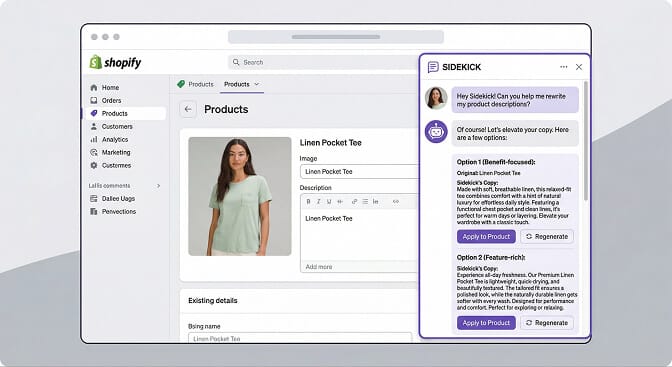
Shopify Sidekick is incredible at what it does. Since the Winter '26 Edition rollout, it can generate product descriptions, build Shopify Flow automations from plain English, create custom apps through Tinker, edit themes, and even proactively surface business insights through Sidekick Pulse.
It's free on every Shopify plan. It knows your store data inside and out. And for backend operations, it genuinely saves hours every week.
But here's where most merchants get it wrong.
Sidekick is merchant-facing. It lives in your Shopify admin. It talks to you. It helps you manage your store, write copy, analyze data, and build workflows.
It does not talk to your customers. It does not power your search bar. It does not help a shopper who types "blue running shoes size 10" find the right product.
That's a completely different problem. And it requires a completely different tool.
The Search Gap Shopify Doesn't Talk About
Shopify does have native search functionality through its Search & Discovery app. It's free. It handles basic filtering. It lets you add synonyms and boost certain products.
And for stores with fewer than 200 SKUs selling straightforward products, it works fine.
But it breaks down fast. Here's how.
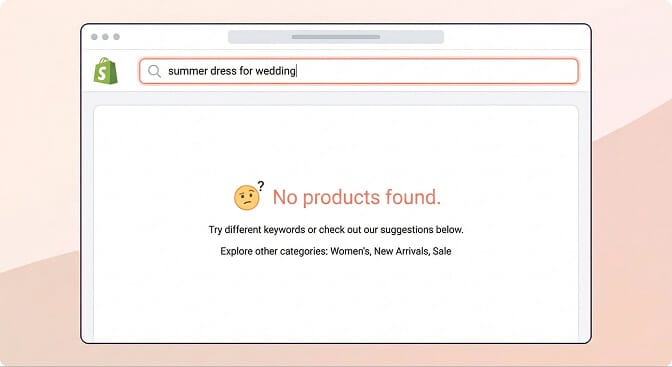
A customer searches "laptop bag" on your store. You have the product, but it's tagged as "computer sleeve." Native search returns nothing. Sale lost.
Someone types "red dress under $100" in your search bar. Shopify's default search doesn't understand natural language queries that combine attributes with price ranges. Another sale, gone.
A shopper misspells "moisturizer" as "moistuizer." No typo tolerance. No results. Bounce.
These aren't edge cases. According to Baymard Institute research, up to 70% of ecommerce search engines fail to return useful results for product-type synonyms. And stores with more than 500 SKUs feel this pain acutely because the gap between what customers search for and how products are tagged grows exponentially with catalog size.
If you've ever wondered why your Shopify store has traffic but no sales, broken search is often the silent culprit.
The biggest blind spot in ecommerce isn't traffic. It's the customers already on your site who can't find what they're looking for.
Where Third-Party AI Search Picks Up
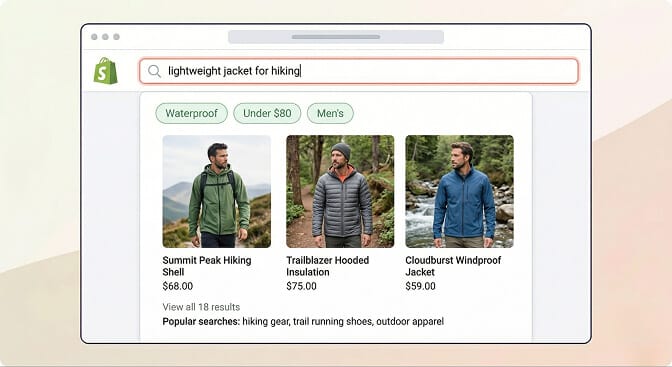
This is the part that costs you money if you don't understand it.
Third-party AI search apps like Sparq sit on the customer-facing side of your store. They replace or enhance the default search bar experience that shoppers actually interact with.
Here's what that means in practice:
Natural language understanding. When a customer types "gift for mom under $50," an AI-powered search engine understands the intent behind those words. It doesn't just match keywords. It interprets what the shopper actually wants and returns relevant results. This is how natural language search in ecommerce actually works.
Typo tolerance and synonym handling. "Sneakers" and "trainers" should return the same results. "Moistuizer" should still find your moisturizers. This sounds obvious, but Shopify's default search can't do this reliably without extensive manual synonym configuration.
Smart, adaptive filters. Instead of static filter menus that show every option whether relevant or not, AI-powered filters adapt to the current search context and inventory. If you search for "winter coats," you see filters for warmth rating, material, and length. Not screen size or megapixels. This is the difference between basic filtering and smart ecommerce filter design.
Search analytics. This is the one most merchants sleep on. When you can see exactly what customers are searching for, including searches that return zero results, you're looking at a real-time demand signal. It tells you what products to stock, what copy to fix, and where your catalog has gaps.
"But Won't Sidekick Eventually Do This?"
Stay with me here.
I hear this question a lot. And it's fair. Shopify is investing billions in AI. Sidekick keeps getting smarter. The Winter '26 Edition brought over 150 AI-powered updates.
So why wouldn't Shopify just... add better search?
Two reasons.
First, Sidekick's architecture is designed for merchant assistance, not customer-facing search. It operates within the Shopify admin interface. It processes merchant requests through conversational AI. Rebuilding it as a real-time product search engine for storefronts would essentially mean building a completely different product.
Shopify does have its Search & Discovery app for the customer side. But it's a separate tool from Sidekick, and its current capabilities are still limited compared to purpose-built AI search solutions for ecommerce. The Search & Discovery app has a maximum of 25 filters, collection pages cap out at 5,000 products before filters disappear, and there's no true natural language processing.
Second, Shopify is a platform. Not a specialist search company. Their incentive is to make the entire ecosystem work. That's why they're building Sidekick App Extensions, so third-party apps can integrate with Sidekick. It's the same reason the Shopify App Store exists. Shopify builds the foundation. Specialist apps solve specific problems deeply.
This isn't a criticism. It's just how platforms work. Google builds Android but doesn't make every app. Shopify builds the store infrastructure but relies on its app ecosystem for specialized functionality like advanced ecommerce search algorithms.
The Real Comparison: What Each Tool Actually Does
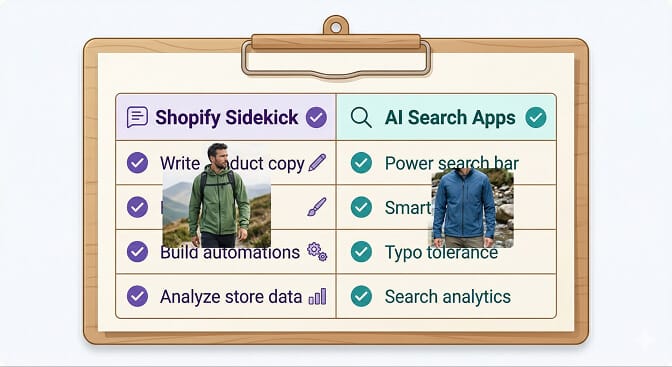
Let me make this really simple.
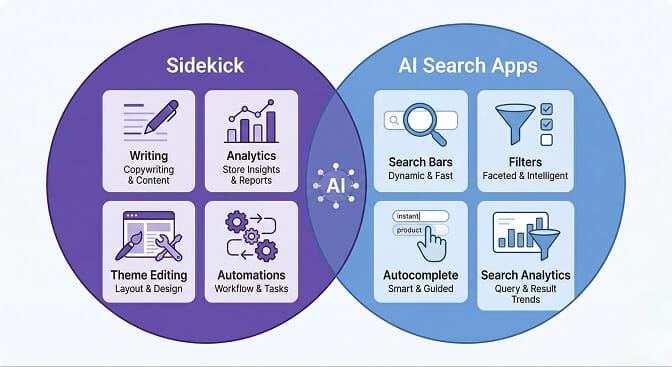
Shopify Sidekick handles the back office. Product descriptions, store analytics, theme editing, workflow automation, discount codes, app recommendations, content generation. It's your operations assistant.
Third-party AI search handles the storefront. Search results, product filtering, autocomplete suggestions, natural language queries, search analytics, zero-result tracking. It's your sales floor assistant.
They don't compete. They complement each other.
Thinking you don't need AI search because you have Sidekick is like thinking you don't need a sales team because you have an accountant. Both are essential. They just do very different jobs.
What This Actually Looks Like In Practice
Let me paint a picture of what a store looks like when both tools are working together.
You wake up and open Shopify admin. Sidekick Pulse has flagged that your best-selling collection saw a 12% drop in conversion rate over the weekend. It suggests you check your product page layout and recommends A/B testing a new image format.
Meanwhile, your AI search analytics dashboard shows that 47 customers searched for "vegan leather bag" in the last week, but you don't carry one. That's a product opportunity you'd never have spotted without tracking the right ecommerce KPIs.
A customer lands on your store from Instagram. She types "casual summer dress blue" into the search bar. Your AI search engine understands the intent, accounts for synonyms (summer dress, sundress, casual dress), filters by color, and returns eight relevant products in under 200 milliseconds. She buys one.
Sidekick didn't make that sale. But it helped you build the store. The AI search app helped the customer find the product. Together, they're a complete system.
The 5 Questions to Ask Before Choosing Your Stack
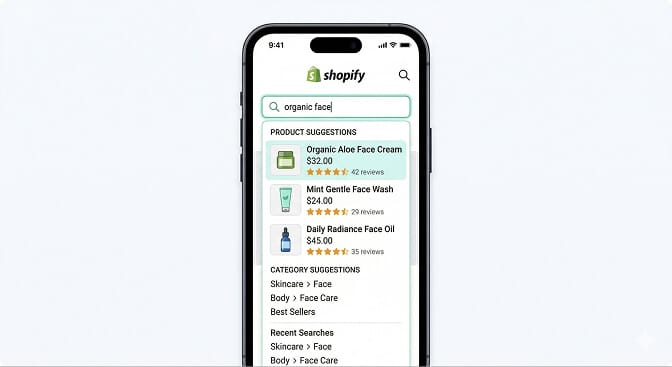
Here's what I'd ask if I were evaluating my store's AI setup today:
1. Can my customers find products using natural language? Try searching your own store. Type "gift for teenager under $30" or "comfortable work shoes." If your search bar chokes on these queries, you need better search UX.
2. Do I know what customers are searching for? If you can't see your top search terms, zero-result queries, and search-to-conversion rates, you're flying blind. Search analytics reveal demand signals that no other tool provides.
3. How many SKUs do I have? Under 100 products with simple categories? Shopify's native search might be enough for now. Over 500 SKUs? You almost certainly need a dedicated product search and filter solution.
4. Am I confusing admin AI with customer AI? Sidekick helps you. Search apps help your customers. If you've been investing in one while ignoring the other, you've got a gap.
5. How fast is my search? If results take more than 300 milliseconds to load, you're losing impatient shoppers. Speed matters more than most merchants realize, especially on mobile where search bar design directly impacts conversions.
If you're tired of customers searching and leaving empty-handed, Sparq fixes that in about 10 minutes. Free to try, and you'll see the difference in your first week's search analytics.
The Merchant Who Had Both (And What She Learned)
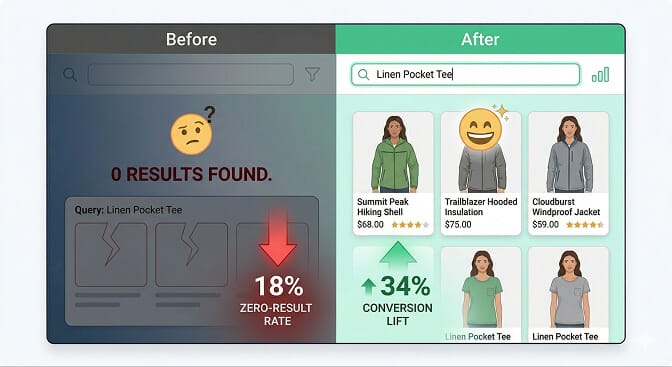
Remember the skincare brand owner from the beginning?
After she installed a dedicated AI search app alongside Sidekick, three things changed in the first month.
Her zero-result search rate dropped from 18% to under 3%. Customers searching "moisturizer for oily skin" now found her "Oil Control Hydrating Cream" because the AI understood the relationship between those terms. This is exactly how semantic search transforms ecommerce.
Her search conversion rate jumped 34%. Shoppers who use search are already high-intent buyers. When they actually find what they want, they convert at dramatically higher rates than browsers. Understanding how ecommerce site search actually works makes this pattern click.
And the search analytics showed her that dozens of customers were looking for "sunscreen for sensitive skin," a product she didn't carry yet. She added one. It became her third best-seller within six weeks.
Sidekick still writes her product descriptions. It still helps her manage discounts, edit her theme, and analyze store data. She uses it every single day.
But the AI search app is what actually connects her customers to her products.
The Bottom Line
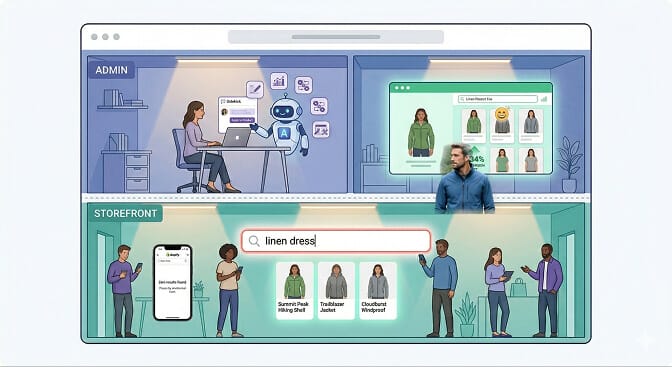
Shopify Sidekick is not your search solution. It was never meant to be.
It's your admin assistant. Your operations co-pilot. Your content generator. And it's genuinely excellent at all of those things.
But the moment a customer lands on your store and types something into the search bar, Sidekick can't help them. That's a different problem that requires a different kind of AI. One that understands shopping intent, handles messy human language, and surfaces the right products in milliseconds.
The stores that figure this out early are the ones that stop bleeding quiet revenue from failed searches.
The ones that don't? They keep wondering why their traffic is great but their conversion rate stays flat.
Want to see what your customers are actually searching for? Install Sparq and check your search analytics. It takes less than 10 minutes, and the first thing you'll see might be the product opportunity you've been missing.
Frequently Asked Questions
What is the difference between Shopify Sidekick and AI search apps?
Shopify Sidekick is a merchant-facing AI assistant that lives inside your Shopify admin. It helps with tasks like writing product descriptions, editing themes, building automations, and analyzing store data. AI search apps like Sparq are customer-facing tools that power your storefront search bar, helping shoppers find products using natural language, typo tolerance, and smart filtering. They solve fundamentally different problems.
Does Shopify Sidekick improve my store's search functionality?
No. Sidekick does not affect how customers search or discover products on your storefront. Shopify's customer-facing search is handled by the separate Search & Discovery app, which provides basic keyword matching and filtering. For AI-powered natural language search, synonym handling, and advanced search analytics, you need a dedicated third-party search app.
How do I know if my Shopify store needs a better search app?
Search your own store using natural, conversational queries like "blue dress under $50" or "gift for dad." If you get irrelevant results or no results at all, your search needs upgrading. Other signs include high bounce rates on search results pages, stores with 500+ SKUs, and no visibility into what customers are searching for. Sparq gives you instant search analytics to diagnose and fix no-results pages.
Is Shopify Sidekick free for all merchants?
Yes. Shopify Sidekick is included at no extra cost with every Shopify plan, from Basic to Shopify Plus. All features including custom app generation through Tinker, workflow automation, and Sidekick Pulse are available to all merchants. However, any third-party apps that Sidekick recommends may have their own pricing.
Will Shopify Sidekick replace third-party search apps in the future?
It's unlikely. Sidekick is built for merchant-side operations, not customer-facing product discovery. Shopify's strategy is to build core platform infrastructure while enabling specialist apps through its ecosystem. That's why they're developing Sidekick App Extensions for third-party integration rather than building every feature natively. Purpose-built AI search apps offer deeper capabilities like neural search, real-time analytics, and intent-based filtering that sit outside Sidekick's design scope.