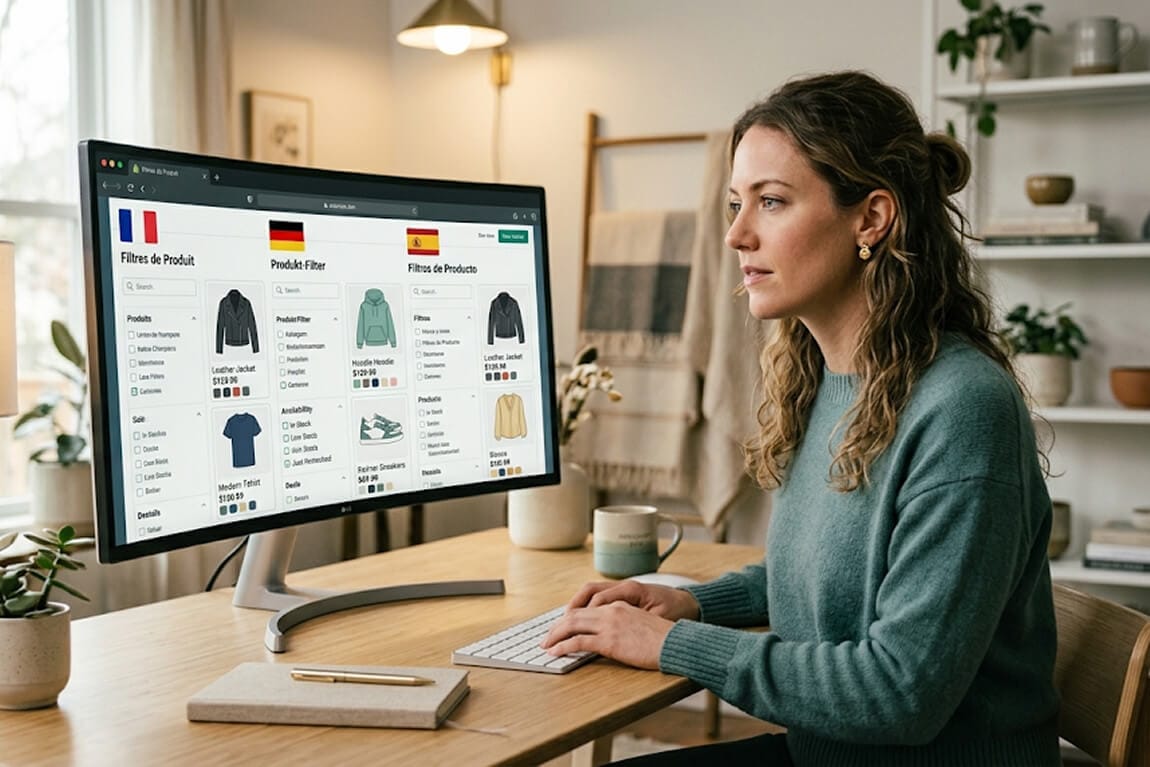
Multi-Language Semantic Search for Global Shopify Stores: One Catalog, Every Market
You translated your product pages. You localized your currency. But your search bar still only understands English. Here's why that's costing you international sales and how to fix it with one filter architecture that works across every market.
She'd done everything right.
Shopify Markets set up for five countries. Currency localization. Translated product descriptions in French, German, Spanish, Portuguese, and English. Hreflang tags in place. Even localized the email templates.
Traffic from Europe was growing. But the conversion rate from international visitors was running at roughly half of what she was seeing from English-speaking markets.
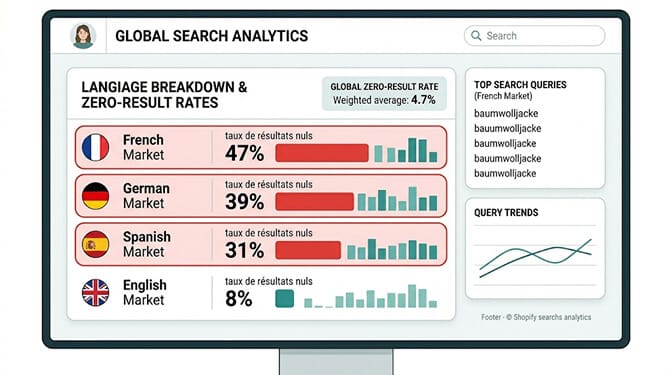
She looked at the search data. German visitors were typing queries. Getting zero results. French visitors were searching and leaving at a higher rate than any other segment.
The problem wasn't her products. It wasn't her translations. It was her search bar.
It was still thinking in English.
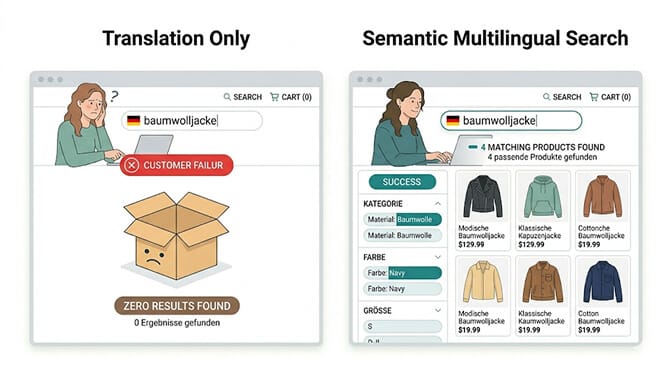
A German shopper who typed "baumwolljacke" (cotton jacket) was getting zero results because her product catalog stored the attribute as "cotton jacket" in English. The translation on the page was correct. The filter label said "Baumwolle." But the search index hadn't been localized. The filter data was English underneath a German mask.
This is the multi-language search gap that most globally expanding Shopify stores have. And it's exactly the gap that's driving the conversion differential between domestic and international traffic.
Why Translation Is Not the Same as Localization
Here's the distinction that most multilingual Shopify guides completely miss.
Translation is making your content readable in another language. Localization is making your store searchable in another language. These are different problems that require different solutions.
Translation tools, whether Shopify Markets, Langify, Weglot, or any other, handle the display layer. Your product descriptions, navigation labels, and filter names appear in the customer's language. The page looks localized.
But the underlying search index is often still English. When a customer searches or filters, the query goes against your product data in its original language. If your products are tagged "organic cotton," a Spanish customer searching "algodón orgánico" may find nothing, even if every product on the page is correctly translated.
This is why international conversion rates lag domestic ones for stores that haven't addressed the search layer specifically.
The translation layer shows customers their language. The search layer needs to understand it. These are two different problems. Most multilingual Shopify setups solve the first and completely ignore the second.
Shopify merchants who add three or more languages see an average revenue increase of 25% within 12 months, driven by both new market penetration and higher conversion rates in markets already sending traffic. But that 25% assumes the discovery experience works in those languages. If international customers can't find products through search and filters in their own language, you're leaving most of that revenue on the table.
The Four Multi-Language Search Failures Most Global Stores Have
Understanding where the gap lives determines exactly what to fix. These are the four specific failure modes, each costing you differently.
Failure 1: The Language-Locked Search Index
Your search index contains your products in the language they were created. For most Shopify stores, that's English. Every other language is a display translation layered on top.
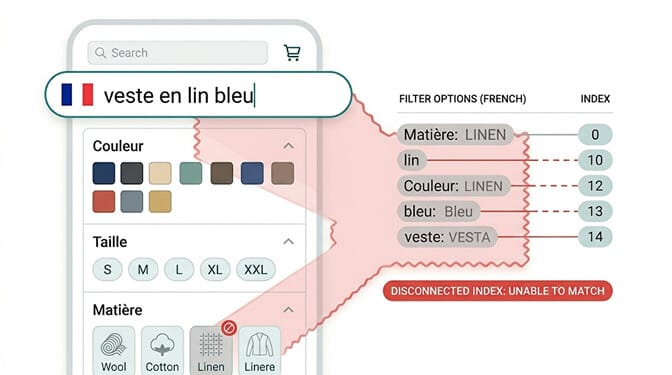
When customers search in their native language, the query goes against the English index. Queries that are close enough to English cognates sometimes succeed. "Organic," "cotton," "blue," "size M," these work in many European languages because the words are similar. But anything that diverges, any query using native vocabulary rather than borrowed English terms, fails.
The German shopper searching "blau" (blue) may find products. The German shopper searching "Baumwolle" (cotton) may not, if the product attributes are stored as "cotton" rather than indexed with the German equivalent.
The fix requires search indexing at the language level, not just the display level. Your search app needs to index your product data in each language your store supports, including your product attributes, tags, and metafields, not just your titles and descriptions. This means either maintaining translated product attributes or using a semantic search layer that understands cross-language concept matching.
Failure 2: Filter Labels That Don't Match Search Behavior
Your filters display in the customer's language. But do the filter values match what customers actually type when they search?
In French, a customer might filter by clicking "Coton" in the material filter and get results correctly. But the same customer might also type "coton" in the search bar and get nothing if the search index doesn't recognize it.
This creates a split experience: browsing through filters works, but searching doesn't. The customer who arrives knowing exactly what they want and searches directly is the highest-intent visitor you have. Losing them specifically at the search stage is an expensive failure.
The filter-to-search consistency requirement: the vocabulary used in your filter labels in each language should match the vocabulary your search index recognizes in that language. If the French filter says "Coton," the search index should return results for "coton" searches. If the Spanish filter says "Algodón," Spanish queries for "algodón" should match.
This requires either a unified multilingual synonym dictionary in your search app or a semantic search layer that understands cross-language equivalencies as concepts rather than requiring vocabulary matching. The same label-to-query parity principle shows up in our piece on omnichannel search and filter continuity.
Failure 3: Market-Specific Vocabulary That Doesn't Match Catalog Vocabulary
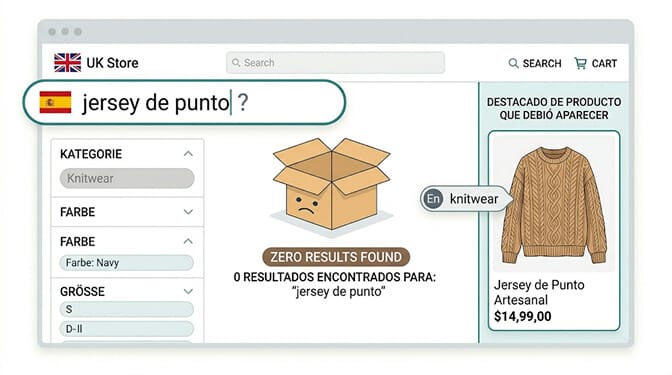
This one is more subtle. Even within a single language, vocabulary varies by region.
A Spanish shopper from Mexico and a Spanish shopper from Spain use different words for the same products. "Carro" vs "carrito" for cart. "Chaleco" vs "chaleco sin mangas" for vest. "Suéter" vs "jersey" for sweater. Your Spanish translation may reflect one regional dialect while your Spanish-speaking traffic comes from multiple regions.
The same problem exists in French (France vs Quebec vs Belgium), Portuguese (Portugal vs Brazil), and Arabic (modern standard vs regional dialects).
A semantic search system handles this through concept understanding rather than vocabulary matching. A search for "jersey de punto" and "suéter de punto" and "sweater knit" all resolve to the same product concept. The system understands that these phrases describe the same thing rather than requiring exact term matching.
A synonym dictionary alone doesn't solve this fully. You'd need to maintain hundreds of regional synonym mappings per language. Semantic understanding at the concept level is more durable and more scalable.
Failure 4: Filter Architecture That Doesn't Adapt to Market Conventions
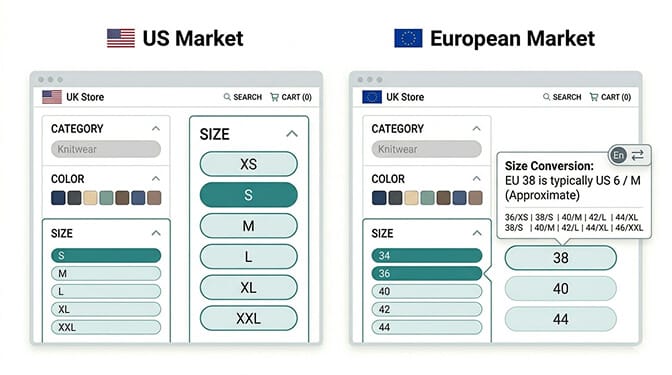
Here's the filter localization problem that goes beyond language and into convention.
Different markets use different sizing systems. US clothing sizes (XS, S, M, L, XL) versus EU numeric sizes (34, 36, 38). US shoe sizes versus UK versus EU. Temperature in Celsius versus Fahrenheit. Measurements in centimeters versus inches.
Your filter architecture may be showing US conventions to European customers who don't think in those units. A German customer who wears a size 38 dress looking at a filter showing "Small, Medium, Large" with no numeric conversion has to do mental math to shop. Many don't bother.
This is a filter localization problem distinct from a language problem. The filter labels can be in German, but if the size values are American conventions, the filter still creates friction.
The fix: your filter app needs to support market-specific filter value display, showing the same underlying product attribute through the lens of the customer's regional convention. A product tagged "size M" can display as "M" for US customers and "38" for European customers, sourced from a size conversion metafield that maps the two systems. The same convention-aware display logic powers the best ecommerce filter design examples we've seen perform across markets.
The Architecture That Makes One Catalog Work for Every Market
If you want to understand which specific queries from your international customers are currently failing, Sparq's search analytics break down search performance by language and query, showing you exactly where non-English customers are searching and not finding. The zero-result query list by market is usually the fastest path to understanding your specific language gap.
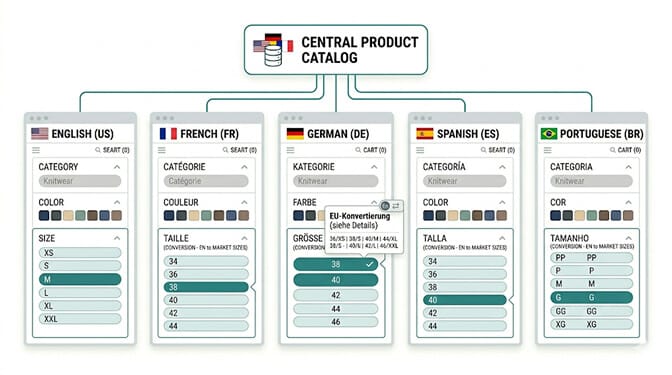
The underlying architecture that makes multilingual semantic search work across a single product catalog has four components.
Component 1: A semantic search index that understands concept rather than vocabulary. Your search should be able to match "baumwolljacke" to a product tagged "cotton jacket" because both describe the same concept, not because the words are the same. This is the core capability that separates semantic search from keyword search in a multilingual context.
Component 2: Language-aware synonym dictionaries for market-specific vocabulary. Even the best semantic models benefit from market-specific synonym configuration. "Trainers" and "sneakers" and "tennis shoes" and "zapatillas" all describe the same product category. Building synonym groups for your specific product vocabulary in each market language catches the gaps that semantic models don't automatically handle.
Component 3: Translated product attributes at the data level, not just the display level. Your product tags, metafields, and attributes should exist in each language your store serves, not just in English with a translation layer on top. This is a product data project, not a display project, and it's where most multilingual stores have the largest gap.
Component 4: Market-convention filter display. Your filter architecture should show values in the measurement conventions, sizing systems, and vocabulary patterns of each market, sourced from the same underlying product data through market-specific display logic.
What Market-Specific Filter Success Actually Looks Like
Let's make this concrete with a specific example.
A home goods store sells a cotton throw blanket. In their catalog it's tagged: "material: cotton," "size: 50x60," "color: navy," "care: machine washable."
In English: a customer searching "machine washable cotton throw" finds it. Filtering by "Cotton" and "Navy" finds it.
Without multilingual semantic search: a German customer searching "waschbare Baumwolldecke" (washable cotton blanket) finds nothing. The French customer searching "plaid coton lavable" finds nothing. The Spanish customer filtering by "Azul" may find it if the color was translated, but searching "azul marino" (navy blue) may not.
With multilingual semantic search and localized filter architecture: all three find the product. The German customer's search resolves "waschbare Baumwolldecke" to the cotton, machine-washable throw. The French customer's filter shows "Coton" and "Marine" (navy) in French. The Spanish customer's search for "azul marino" matches the navy color attribute through synonym mapping.
Same product. Same catalog. Different discovery experience for each market because the search and filter layer was built to serve each one.
This is what "one catalog, every market" actually means. Not translating the same page five times. Building a single product architecture that speaks the right language in search and filter for every customer, wherever they're shopping from.
The Takeaway
The merchant with the European conversion gap solved it over six weeks. She worked through her product attribute data, adding translated attributes in German, French, Spanish, and Portuguese for her top 100 products. She built synonym dictionaries for her core product vocabulary in each market. She configured her filter app to show EU sizing for European markets.
Three months later, her European conversion rate had risen to within 4% of her domestic rate.
She hadn't added new products. Hadn't changed her prices. Hadn't run any new campaigns to those markets.
She'd just made her store searchable for the customers who were already arriving.
That's the multi-language search opportunity that most global Shopify stores haven't fully addressed yet. The traffic is there. The products are there. The translations are there. The search layer is the missing piece that determines whether international customers find what they came for.
Ready to see what your international customers are searching for and where those queries are failing? Get started with Sparq on your Shopify store and check your search analytics by market. The gap between what your international visitors search for and what your store returns is usually much larger than you expect. If you'd rather see the full picture first, the Sparq features overview, pricing, and option to book a demo walk through everything before you install.
Frequently Asked Questions
What is multi-language semantic search for Shopify stores?
Multi-language semantic search is a search system that understands the meaning behind customer queries in multiple languages rather than matching exact keywords in a single language. For a Shopify store, it means a German customer can search "baumwolljacke" (cotton jacket) and find the same products an English customer finds when searching "cotton jacket," even if the underlying catalog was created in English. It works by understanding concepts across languages rather than requiring exact word matches, and it's the layer that most multilingual Shopify setups build the display translation for but leave the search experience without.
Why do my international Shopify visitors have lower conversion rates than domestic visitors?
Lower international conversion rates are most commonly caused by a search and filter experience that wasn't localized at the data level, only at the display level. When non-English customers search in their native language, their queries go against a search index that may only understand English product attributes and tags. This produces high zero-result rates and poor-quality results for international traffic, which drives abandonment before customers can find products. Translating your product pages makes them readable in other languages. Building a multilingual search index makes your catalog findable in those languages. Both are required for international conversion rates to match domestic ones.
How is semantic search different from simple translation for Shopify multilingual stores?
Translation handles the display layer: product descriptions, filter labels, and navigation appear in the customer's language. Semantic search handles the discovery layer: queries in any language resolve to the correct products by understanding conceptual meaning rather than exact word matching. Translation without semantic search produces a store that looks localized but doesn't function as one for customers who search. A German customer who sees filter labels in German but finds nothing when they type a German search query is experiencing translation without semantic search localization.
What filter changes are needed specifically for international markets beyond language translation?
Beyond language translation, filters need market-convention localization: showing EU numeric sizes rather than US size labels for European markets, Celsius rather than Fahrenheit for temperature-related products, centimeters rather than inches for measurement-dependent categories. These are distinct from translation, as the underlying product attribute (size M) needs to be displayed through different convention lenses (M for the US, 38 for Germany) rather than simply translated. This requires your filter app to support market-specific display logic for filter values, sourced from the same underlying product data.
Does adding multilingual semantic search require rebuilding my Shopify store?
No. The primary work is in your product data architecture rather than your store structure. The key steps are: building translated product attributes and tags at the data level (not just display translations), creating synonym dictionaries for your core product vocabulary in each target language, and configuring your search and filter app to use semantic understanding rather than keyword matching. None of these require changes to your Shopify theme or store architecture. The data work is a product management task, and the search configuration is handled at the app level.