
How Does E-commerce Search Work? The Hidden Journey Between "Add to Cart" and "Goodbye"
What actually happens in the 0.3 seconds after a customer types a query, and why most stores lose the sale before results even load.
She typed "comfy blue sweater" into the search bar.
Your store has 47 blue sweaters. Twelve of them have "cozy" or "soft" in the description. Three are bestsellers.
The search returned zero results.
She left. Bought from your competitor. Never came back.
This happens thousands of times a day across Shopify stores. Not because merchants don't have the right products. But because most store owners have no idea what actually happens in that fraction of a second between a customer pressing enter and seeing results.
I'm going to show you exactly what's happening inside that black box. Because once you see it, you can't unsee it. And you'll finally understand why "good enough" search is actually bleeding your store dry.
The 0.3 Second Journey You Never See
Here's what happens when a customer types a search query into your store:
Step 1: The query gets captured. Simple enough. The letters they typed get sent to your search engine.
Step 2: The query gets parsed. This is where things get interesting. The search engine has to figure out what those words actually mean. Is "blue sweater" one thing or two? What about "mens blue sweater size large"? The engine has to break this into searchable components.
Step 3: The query gets matched against your product data. Here's the brutal part. Your search engine takes those parsed terms and hunts through your product titles, descriptions, tags, and maybe a few other fields. It's looking for matches.
Step 4: Results get ranked. If matches exist, they need to be ordered. Which blue sweater shows first? The bestseller? The highest margin item? The one that literally says "blue sweater" in the title? Different engines rank differently.
Step 5: Results get displayed. Finally, your customer sees something. Hopefully products. Possibly a "no results found" page that makes them question why they bothered.
Sounds straightforward, right?
Here's the weird part.
Most Shopify stores are running on search technology that handles Step 2 and Step 3 like it's 2008. And that's where the money disappears.
The Matching Problem That Costs You Sales
Let me explain what "matching" actually means, because this is where most stores fail without realizing it.
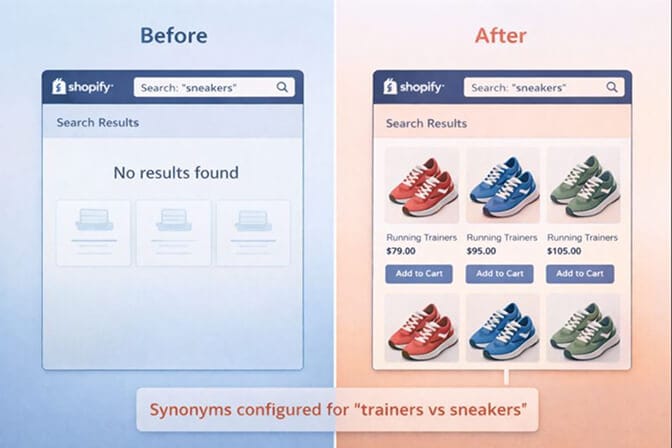
Traditional search engines use keyword matching. They look for the exact words a customer typed. If someone searches "sneakers" and your products are tagged "trainers," traditional search returns nothing.
Your products exist. They're perfect. But the search engine doesn't understand that "sneakers" and "trainers" are the same thing.
This is called the vocabulary gap, and it's responsible for more lost sales than most merchants will ever know.
Now here's where it gets worse.
Typo tolerance is another matching challenge. Research shows that 20-30% of search queries contain spelling mistakes. If someone types "addidas" instead of "Adidas," a basic search engine just shrugs and shows nothing.
Shopify's native search has some typo tolerance, but it's limited. It can handle one misplaced letter or two swapped characters. It only works on product titles and variants. And the first four letters must be correct.
So "addidas"? That might work. But "adiddas"? Gone.
The gap between what customers type and what your product data says is the single biggest source of search abandonment.
And this is the part that costs you money.
Why "Exact Match" Search Belongs in the Past
Here's a quick history lesson.
Early e-commerce search was basically a database query. Customer types words. Database looks for those exact words in product fields. Results come back. Done.
This worked fine when stores had 50 products and customers knew exactly what they wanted.
But shopping behavior has changed.
Today, 69% of shoppers go straight to the search bar when they land on a store. They search the way they talk: "comfy blue sweater for fall" or "gift for dad who likes golf."
Natural language search is how humans actually shop. But traditional search engines don't understand natural language. They just see a string of keywords.
Modern search technology uses something different: natural language processing (NLP). Instead of just matching keywords, NLP tries to understand intent.
When someone types "comfy blue sweater," an NLP-powered search engine understands:
- "Blue" is a color attribute
- "Sweater" is a product type
- "Comfy" suggests softness, coziness, relaxed fit
It can then return sweaters that are blue AND have descriptors like "soft," "cozy," "relaxed," or "comfortable" in their data, even if those exact words weren't in the search query.
This is the difference between search that works and search that frustrates.
The Shopify Search Reality Check
Let me be direct about something.
Shopify's default search is basic. It works, but it's not designed for stores with serious SKU counts or customers who search the way humans actually search.
Here's what Shopify's native search does:
- Prefix matching: It matches words that start with your search terms. Searching "shirt" will find "shirts" and "shirtdress."
- Limited typo tolerance: One wrong letter, two swapped characters. First four letters must be correct.
- Field searching: It looks at product titles, descriptions, tags, and some variant info.
Here's what it doesn't do well:
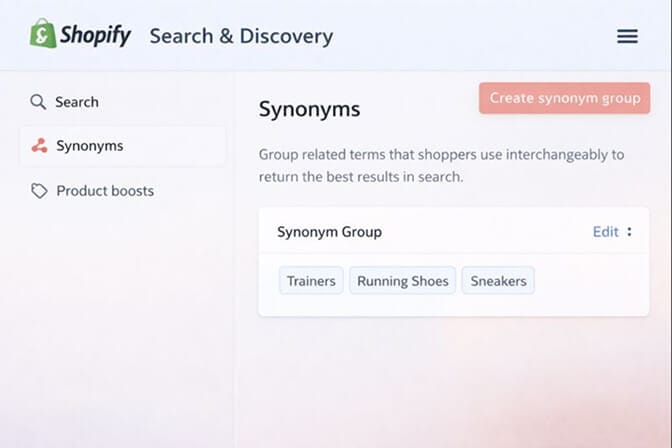
- Synonym handling: "Couch" won't find "sofa" unless you manually add synonyms (and you're limited to 1,000 total synonyms for your entire store).
- Natural language understanding: It doesn't parse intent. It just matches keywords.
- Smart ranking: Results are based on basic relevance, not conversion potential or business rules.
Shopify's free Search & Discovery app adds some helpful features like boosting specific products and creating synonym groups. But it has limits: 25 filters max, 1,000 synonyms, basic analytics.
For stores under 100 SKUs, this might be fine. For stores scaling past 500 products, the cracks start showing.
The Filter Factor Most Merchants Ignore
Search isn't just about the query box. It's about what happens after.
Filters are the second half of product discovery. When a customer searches "dress" and gets 200 results, they need to narrow down by size, color, price, style, or occasion.
Here's where many stores fail:
- Filters don't reflect how customers actually shop
- Filter values are inconsistent (some products tagged "blue," others "navy," others "ocean")
- Out-of-stock items show up, wasting customer time
- Mobile filter experiences are clunky
Good filters turn a broad search into a specific purchase. Bad filters turn a motivated buyer into a bounce statistic.
80% of shoppers will leave an e-commerce store that doesn't offer a good site search experience.
That's not a typo. Eighty percent.
What Search Analytics Actually Tell You
Here's something most merchants never check: what customers are searching for.
Your search bar is a direct line into customer intent. Every query is a customer telling you exactly what they want to buy.
When you analyze search data, you discover:
- Zero-result searches: Products customers want that you either don't stock or have mislabeled
- High-exit searches: Queries where people search, see results, and leave anyway (a relevance problem)
- Trending terms: Demand signals before they show up in your sales reports
If "sustainable" searches are spiking and you've never tagged products with sustainability attributes, you're missing sales you didn't know existed.
This is where search becomes strategy. Not just a feature.
If you want to see what your customers are actually searching for, Sparq.ai's search analytics shows you exactly which queries convert and which ones leak money. It's eye-opening.
The AI Search Difference
Let me explain what "AI-powered search" actually means, because it's become a buzzword that gets thrown around without explanation.
Traditional search is rules-based. You define synonyms manually. You set ranking rules. You hope customers search the way you predicted.
AI search learns from behavior. It notices that customers who search "running shoes" often click on "athletic trainers." So it starts showing trainers for running shoe queries, without you manually configuring anything.
Machine learning search gets smarter over time because it watches patterns:
- Which results get clicked
- Which clicks lead to purchases
- Which queries get refined (someone searches, doesn't find it, searches again with different words)
This creates a flywheel. More searches = more data = better results = more conversions = more searches.
It's not magic. It's pattern recognition at scale.
For Shopify merchants, this means the difference between maintaining a search engine (manually adding synonyms, adjusting boosts, fixing zero-result queries) and letting search optimize itself.
What Good Search Actually Looks Like
Let me paint the picture of search that works:
A customer types "gift for mom who loves gardening."
- Bad search: Returns nothing, or shows everything with "gift" in the title.
- Good search: Understands this is a gift query with gardening context. Returns gardening tools, planters, gardening gloves, and outdoor accessories. Possibly even suggests a gift guide collection.
A customer types "blk tshirt xl."
Bad search: Returns nothing because "blk" isn't in your data and "tshirt" should be "t-shirt." Good search: Understands "blk" means "black," "tshirt" means "t-shirt," and "xl" is a size filter. Returns black t-shirts in XL.
A customer searches "dress for wedding guest."
Bad search: Returns every dress, or only dresses with "wedding" in the title. Good search: Understands "wedding guest" as an occasion filter. Returns formal dresses, cocktail dresses, elegant midi dresses. Maybe even suggests filtering by dress code.
This is the difference between search that guesses and search that understands.
The Bottom Line on E-commerce Search
E-commerce search is not a checkbox feature. It's the silent salesperson working 24/7 in your store.
When it works, customers find products faster, discover items they didn't know they wanted, and convert at rates 2-3x higher than browsers.
When it fails, customers leave frustrated, assuming you don't have what they need. Even when you do.
The mechanics are straightforward: query comes in, gets parsed, gets matched against your data, results get ranked, customer sees products.
But every step in that process has failure points. Vocabulary gaps. Typo intolerance. Poor ranking logic. Missing filters. No analytics.
Fixing these isn't complicated. It just requires understanding what's actually happening under the hood.
Now you do.
If you're tired of customers searching and leaving empty-handed, Sparq.ai fixes that in about 10 minutes. AI-powered search built specifically for Shopify. Free to try, and you'll see your search analytics immediately.
Frequently Asked Questions
1. What is e-commerce site search and how does it work?
E-commerce site search is an internal search engine on your online store that connects customer queries to your product catalog. It works by parsing the search query, matching keywords against product titles, descriptions, tags, and other fields, then ranking and displaying relevant results. Modern site search uses AI and natural language processing to understand intent, not just keywords.
2. How does Shopify's built-in search compare to third-party search apps?
Shopify's native search handles basic keyword matching with limited typo tolerance and prefix search. The free Search & Discovery app adds synonym groups and product boosting, but caps at 1,000 synonyms and 25 filters. Third-party apps like Sparq.ai offer AI-powered natural language understanding, automatic synonym detection, smarter ranking, and deeper analytics, making them better suited for stores with large catalogs or complex product data.
3. Does improving site search actually increase conversion rates?
Yes. Studies show site search users convert at 2-3x higher rates than browsers, and account for up to 45% of e-commerce revenue despite being only 15% of visitors. When search is optimized to return relevant results, reduce zero-result pages, and handle typos and synonyms, conversion rates improve measurably. One study found an 80% conversion rate increase when site search was properly optimized.
4. How do I know if my e-commerce search is losing sales?
Check your search analytics for three signals: high zero-result rates (customers searching for things that return nothing), high exit rates on search results pages (customers seeing results but leaving), and search refinements (customers searching, then searching again with different terms). These indicate relevance problems. If you don't have search analytics, that's the first problem to solve.
5. Will adding a search app slow down my Shopify store?
Most modern search apps, including Sparq.ai, are built for speed and don't significantly impact page load times. They typically use asynchronous loading and optimized APIs. A well-built search app should return results in under 200 milliseconds. The bigger risk is leaving slow, basic search in place and losing customers to frustration, not to load times.







