Semantic Search for E-commerce: Why Keyword Matching Is Costing You Sales in 2026
Your search bar speaks a different language than your customers. Semantic search fixes that. Here's how it works and why your store can't afford to ignore it.
A customer typed "something warm to wear in winter" into a Shopify store's search bar last month.
The store sold coats, sweaters, scarves, and thermal underwear. Hundreds of products that perfectly matched what this customer wanted.
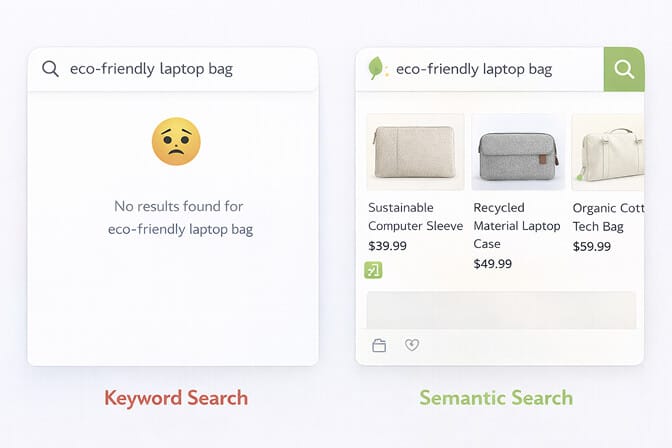
The search returned zero results.
Zero.
Not because the store didn't have warm winter clothing. But because no product in the catalog contained the exact phrase "something warm to wear in winter." The search engine was matching keywords, not understanding meaning. And to a keyword-matching engine, that query is gibberish.
The customer left. The store lost a sale. And the merchant had no idea it happened.
This is the problem semantic search solves. And in 2026, it's no longer optional.
What Is Semantic Search? (The Version That Actually Makes Sense)
Forget the technical jargon for a moment. Here's the simplest way to think about it.
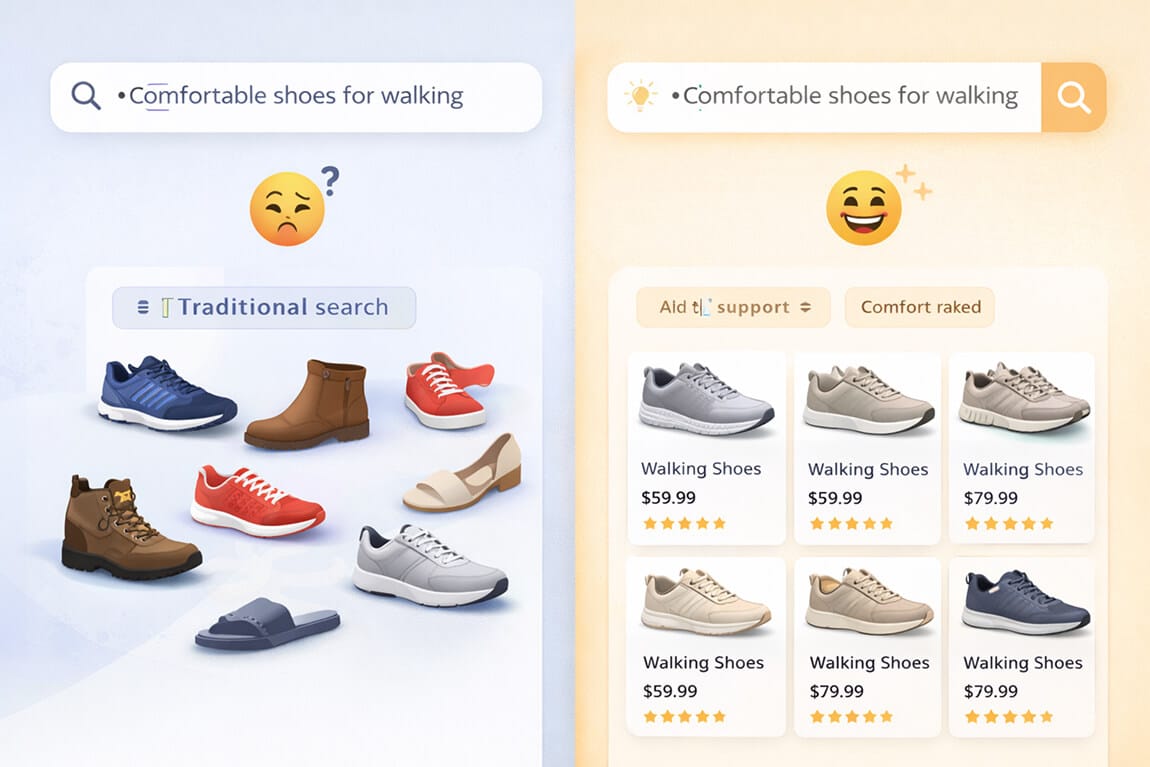
Traditional keyword search is like talking to someone who only speaks in nouns. You say "red dress for summer wedding." It hears "red" + "dress" and shows you every red dress in the catalog, including velvet holiday dresses and red t-shirt dresses. It matched the words. It missed the point.
Semantic search is like talking to someone who actually listens. You say "red dress for summer wedding" and it understands you want something formal, lightweight, seasonally appropriate, and red. It shows you cocktail dresses, midi dresses in chiffon, and garden party styles. In red.
The technical explanation: semantic search uses natural language processing (NLP) and machine learning to understand the meaning and intent behind a query, not just the individual words. It converts language into mathematical representations called vectors, then finds products that are conceptually related to what the customer actually wants.
The core difference: Keyword search asks "do these words match?" Semantic search asks "does this product match what the customer means?"
That distinction is worth real money. Studies show that customers who use site search convert at 2 to 4 times the rate of browsers. But only when the search actually works.
Why 2026 Is the Year Keyword Search Officially Dies
Stay with me here. I'm not being dramatic.
Three things have converged in 2026 that make keyword-only search genuinely obsolete for e-commerce:
Customers now search the way they talk. Thanks to voice assistants, ChatGPT, and conversational AI everywhere, shoppers have been trained to use natural language. They type "gifts for dad who likes coffee under $50" instead of "coffee mug men." Your search engine needs to understand sentences, not just strings.
Product catalogs have gotten too complex for exact matching. If you have 500+ SKUs with varying attributes, tags, and descriptions, the odds of a customer's exact words matching your exact product data are shrinking every day. Semantic search bridges that gap by understanding concepts, not just matching characters.
Competitors have already moved. Shopify added native semantic search capabilities starting in 2024. Amazon has used semantic understanding for years. The baseline expectation for e-commerce search quality has shifted. If your store is still stuck on keyword matching, your search experience feels broken compared to everywhere else your customers shop.
Here's the blunt truth: in 2026, a keyword-only search bar on your e-commerce store is like having a sales associate who only speaks one language in a multilingual world. It works sometimes. It misses a lot. And it's quietly pushing customers to stores where the search just "gets" them.
The 5 Things Semantic Search Actually Does for Your Store
Let me break this down into concrete, revenue-impacting capabilities.
1. It Understands Synonyms Without Manual Configuration
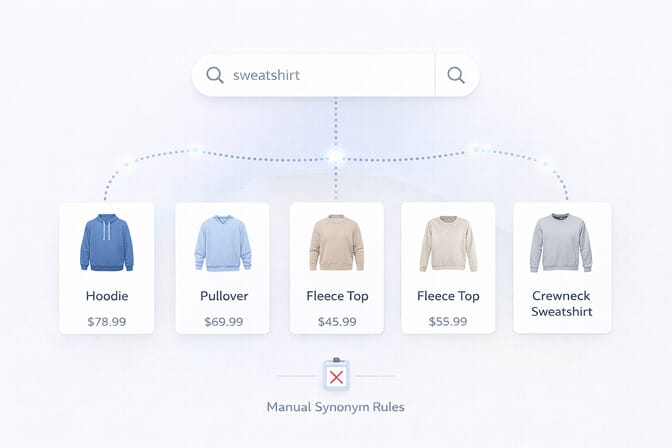
With keyword search, if your product is tagged "hoodie" and a customer searches "sweatshirt," they won't find it. Unless you've manually set up synonym rules for every possible word variation. That's hours of work, and you'll always miss some.
Semantic search handles this automatically. It knows that "hoodie," "sweatshirt," "pullover," and "fleece top" are all closely related concepts. No manual tagging required. The AI has already learned these relationships from training on massive language datasets.
What this means for your store: Every synonym gap in your current search is a missed sale. Semantic search closes those gaps without you lifting a finger.
2. It Interprets Complex, Multi-Attribute Queries
Customers don't search in neat little keyword packets. They search like humans.
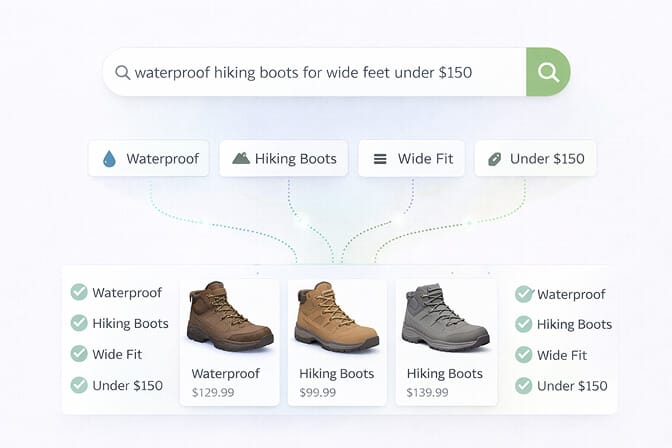
"Waterproof hiking boots for wide feet under $150."
That's a single query with four distinct attributes: waterproof, hiking boots, wide fit, and a price constraint. Keyword search chokes on this. Semantic search breaks it apart, understands each attribute, and surfaces products that match all of them.
This is especially powerful for stores with rich product catalogs. The more attributes your products have, the more your customers need semantic understanding to find the right one.
3. It Handles Typos and Misspellings Intelligently
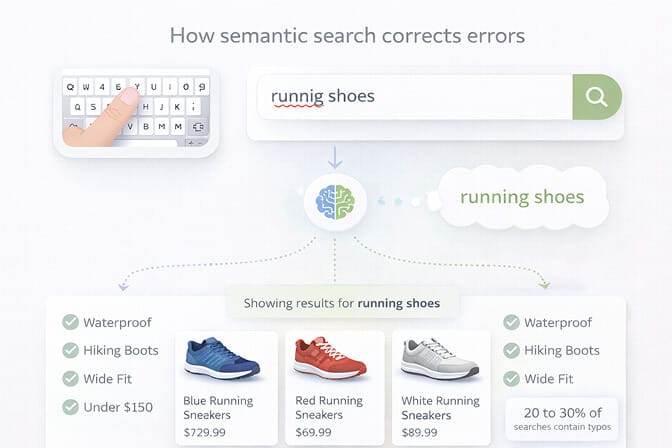
Between mobile keyboards, autocorrect mishaps, and genuine spelling confusion, a huge percentage of search queries contain errors. Research suggests that 20 to 30% of e-commerce search queries have at least one typo.
Keyword search either returns zero results for a misspelled query or matches the typo literally (returning something irrelevant). Semantic search recognizes that "cardigon" means "cardigan" and "runnig shoes" means "running shoes." It infers intent from context, even when the spelling is off.
4. It Connects Intent to Products (Not Just Words to Tags)
This is the big one. And this is the part that costs you money if you don't have it.
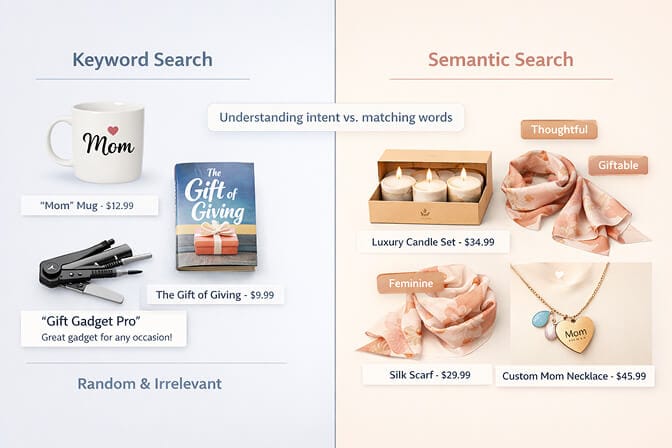
When a customer searches "gift for mom," they're not looking for a product literally named "gift for mom." They're expressing an intent: something thoughtful, moderately priced, and appealing to a female audience. Maybe a candle set. Maybe a silk scarf. Maybe a personalized jewelry piece.
Semantic search maps this intent to your catalog. It understands the concept of "gifting" and surfaces products that match the occasion, the recipient, and the price range. Keyword search sees "gift" + "mom" and returns... whatever happens to have those words in the title.
Key insight: Semantic search doesn't just find products. It understands shopping missions. And shopping missions are what drive purchases.
5. It Learns and Improves Over Time
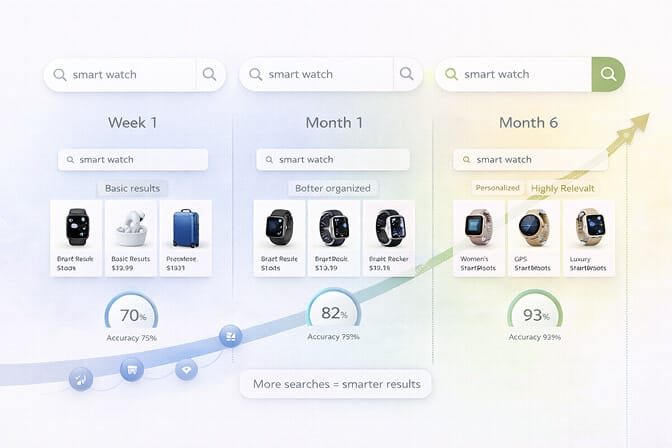
Unlike static keyword rules that you set once and forget (until they break), semantic search models improve as they process more queries and interactions. The more customers search on your store, the better the engine gets at understanding what your specific audience means.
This creates a compounding advantage. Stores that implement semantic search early build a deeper understanding of their customer language over time, which competitors starting later can't replicate overnight.
What Shopify's Native Semantic Search Gets Right (And Where It Falls Short)
Shopify rolled out semantic search capabilities starting with its Winter 2024 Edition, eventually expanding across more plans. And to their credit, it's a meaningful step forward from pure keyword matching.
But here's the honest assessment.
Shopify's built-in semantic search works at a broad level. It can handle some natural language queries and understands basic synonym relationships. For stores with small catalogs and simple product structures, it's a decent starting point.
But then something clicked for us when we started seeing the support tickets.
Merchants reported that Shopify's semantic search sometimes prioritized image data over product attributes, returning visually similar but functionally irrelevant products. Others found that search relevance actually decreased after the semantic rollout because the system made incorrect intent assumptions. And critically, there's no way to disable it and revert to keyword search if the results are poor.
The gap between "basic semantic understanding" and "semantic search that actually drives conversions" is where third-party tools earn their keep.
If you're running a store with 500+ SKUs, complex product attributes, or customers who search in varied ways, you need semantic search that you can actually tune and control. That's where AI-powered search toolsbuilt specifically for Shopify make a difference. They combine semantic understanding with features like smart filters, search analytics, autocomplete, and merchandising controls that Shopify's native search simply doesn't offer.
How to Tell If Your Current Search Is Failing
You don't need a data science degree to diagnose bad search. Here are five symptoms:
High search exit rate. If customers search, see results, and leave, your search is returning irrelevant products. Semantic search fixes relevance. Check your analytics: any search exit rate above 30% is a red flag.
Frequent zero-result queries. If your search analytics show common queries returning no results, despite having matching products in your catalog, you have a synonym or intent gap that keyword search can't bridge.
Low search-to-conversion rate. Customers who search should convert at 2 to 4 times the rate of browsers. If your search conversion is flat, the results aren't matching intent.
Support tickets about finding products. When customers email you saying "I couldn't find X on your store," that's your search bar failing at its one job.
You're manually managing synonyms and redirects. If you're spending hours adding synonym rules, search redirects, and manual product boosts, you're doing the work that semantic search does automatically.
Want to see exactly where your search is falling short? Install Sparq.ai and check your search analytics. You'll see every query your customers are using, which ones return zero results, and where you're losing revenue. It's usually eye-opening.
Implementing Semantic Search Without Breaking Your Store
Here's the practical side. If you're convinced semantic search matters (and you should be), here's how to implement it without disrupting your operations.
Step 1: Clean your product data. Semantic search is smart, but it's not magic. Clear product titles, complete descriptions, accurate attributes, and consistent tagging give the semantic engine better raw material to work with. Think of it as teaching the AI about your catalog.
Step 2: Choose the right tool. For Shopify merchants, the decision comes down to Shopify's native semantic search vs. a third-party app. If you have a simple catalog and basic search needs, native might be enough. If you need control, analytics, smart filters, and the ability to fine-tune results, tools like Sparq.ai are built for exactly this. Setup takes about 10 minutes.
Step 3: Monitor your search analytics from day one. Semantic search changes how results appear. Track your zero-result rate, search-to-conversion rate, and most common queries weekly. This data tells you whether the semantic engine is interpreting your customers correctly.
Step 4: Complement semantic search with smart filters. Semantic search gets customers to the right neighborhood of products. Smart, dynamic filters let them narrow down to the exact product. The combination of semantic understanding and intelligent filtering is where conversion rates really climb.
Step 5: Keep your content searchable. Semantic search works best when it has more content to understand. Make sure your blog posts, FAQ pages, buying guides, and collection descriptions are all indexed. A customer searching "how to choose running shoes" should find your buying guide alongside your products. This is where federated search really shines.
The Quiet Shift That Changes Everything
Here's what I want to leave you with.
Semantic search isn't a feature. It's a fundamental shift in how e-commerce works.
For years, the burden was on the customer to speak the store's language. To know the right keywords. To use the right terms. To guess how products were tagged and titled. If they got it wrong, they got nothing.
Semantic search flips that. Now the store has to understand the customer's language.
That's a better deal for everyone. Customers find what they want faster. Stores convert more visitors into buyers. And the search bar stops being a point of friction and starts being the smartest salesperson in the room.
In 2026, the stores that grow will be the ones where a customer can type "something warm to wear in winter" and find exactly what they need. Not because every product was tagged with those words. But because the search was smart enough to understand what they meant.
That's what semantic search is really about. Not technology. Understanding.
Frequently Asked Questions
What is semantic search in e-commerce?
Semantic search in e-commerce is an AI-powered search technology that understands the meaning and intent behind a customer's query, not just the individual keywords. Instead of matching exact words in product titles, it interprets concepts, synonyms, and context to return products that actually match what the shopper is looking for. For example, a search for "lightweight summer dress" returns chiffon and cotton dresses even if those exact words don't appear in the product data.
How does semantic search compare to Shopify's default keyword search?
Shopify's default keyword search matches exact words in product titles, descriptions, and tags. If a customer's query doesn't match those words precisely, they get poor or zero results. Semantic search goes further by understanding synonyms, natural language, and shopping intent. While Shopify has added some native semantic capabilities, they're limited in customization. Third-party tools like Sparq.ai offer more advanced semantic search with smart filters, analytics, and fine-tuning capabilities.
How do I add semantic search to my Shopify store?
The easiest way is to install a Shopify search app that includes semantic search capabilities. Tools like Sparq.ai can be set up in about 10 minutes with no coding required. They automatically index your products and apply semantic understanding to every search query. For best results, ensure your product data is clean and complete before enabling semantic search.
Does semantic search actually increase e-commerce conversion rates?
Yes. Shopify Plus merchants using semantic search have reported 20 to 40% improvements in conversion rates. The impact comes from better search relevance, fewer zero-result dead ends, and the ability to understand natural language queries that keyword search can't handle. When customers find what they want faster, they buy more often and abandon their searches less frequently.
Will semantic search work with a large product catalog on Shopify?
Absolutely. Semantic search actually becomes more valuable as your catalog grows. With hundreds or thousands of SKUs, the chances of a customer's exact words matching your exact product tags decreases. Semantic search bridges this gap by understanding concepts and intent rather than requiring exact keyword matches. Modern semantic search apps are built to handle large catalogs without performance issues, processing queries in milliseconds regardless of catalog size.