
Why Your Shopify Filters Are Lying to Your Customers (And How Real-Time Inventory Facets Fix It)
Static filters that show yesterday's stock and last week's prices aren't just annoying. They're actively destroying trust at the worst possible moment. Here's the dynamic facet system that fixes it.
Black Friday. 11:43pm.
Their best sale of the year was two hours in. Traffic was spiking. Email list traffic hitting. Paid ads converting. Everything was working.
Then the Shopify inbox started filling up.
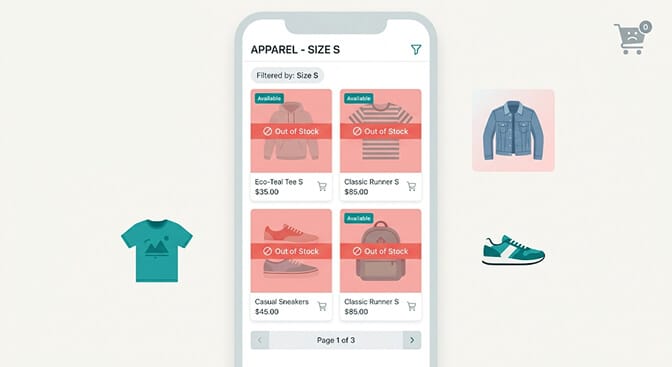
"I filtered by Size S and added three things to cart. All out of stock at checkout."
"Your price filter shows under $50 but nothing I'm finding is actually under $50."
"Why does your filter say XL is available when it clearly isn't?"
Twenty-six messages in ninety minutes. All versions of the same problem. Their filter system was running on cached data from earlier that afternoon. Inventory had moved fast. The filters hadn't kept up.
That night cost them an estimated $4,000 in abandoned carts. Not from bad products. Not from bad prices. From a filter system that told customers what the store looked like at 3pm when it was nearly midnight and everything had changed.
This is the real-time inventory filter problem. And it gets dramatically worse every time your store gets the traffic it deserves. We covered the broader shift from static to query-aware filters in our piece on dynamic facets vs static filters.
The Specific Mechanism That's Costing You
Here's the weird part that most merchants don't fully understand.
Your filter sidebar isn't looking at your live inventory every time someone applies a filter. Most filter systems, including Shopify's native filtering and many filter apps, work from a cached index. That index is a snapshot of your product data taken at some interval, sometimes every hour, sometimes longer.
On a normal Tuesday, this barely matters. Inventory moves slowly. The snapshot from an hour ago is close enough to current that customers don't notice the gap.
During a flash sale, a product launch, or any high-velocity event, that gap becomes a revenue leak you can actually measure.
The math is simple: if your most popular size sells out at 11pm and your filter cache refreshes at midnight, every customer who filters by that size between 11pm and midnight sees a lie. They select the filter, see results, add to cart, and discover at checkout that the product isn't available.
Cart abandonment. Trust erosion. Support tickets. Revenue lost.
The fix isn't complicated. But it requires understanding exactly which filter behaviors need to change and how each one produces different conversion outcomes.
Dynamic Facet Pattern 1: Inventory-State Size Filters
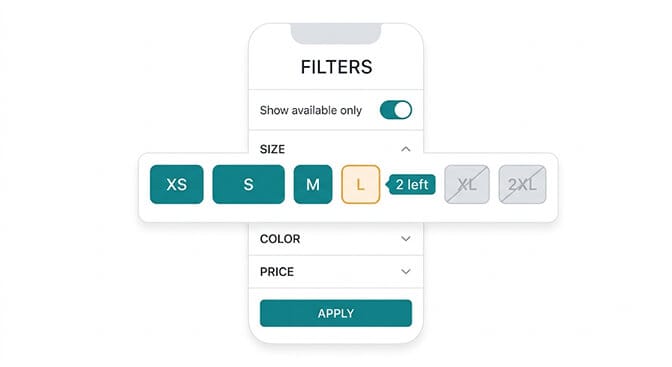
The foundation of real-time inventory filtering is the size filter. It's the most used filter on fashion and apparel stores, and it's the one that creates the most checkout-stage abandonment when it runs on stale data.
An inventory-state size filter does three specific things that a static filter doesn't.
First, it hides or disables options with zero inventory. If your XL is sold out across every product in the current collection, XL doesn't appear as a selectable option. The customer never chooses it. She never adds to cart. She never reaches checkout to find it's unavailable.
Second, it surfaces low-stock signals for options with limited availability. When you have two units of a specific size left, the filter chip shows "2 left" or "low stock." This creates legitimate urgency without fabrication. The customer makes a faster decision because she has accurate information.
Third, it updates within minutes of inventory changes, not hours. This is the technical requirement that separates an inventory-aware filter from a static one. During a sale event, "within minutes" is the difference between a filter that's useful and one that's actively misleading. The same granularity principle shows up in our review of the best ecommerce filter design examples.
The configuration question to ask your filter app: "How frequently does your inventory index update, and can that interval be shortened during high-traffic events?" If the answer is "hourly" or "we don't know," that's your problem identified.
Dynamic Facet Pattern 2: Sale-Price-Aware Price Range Filters
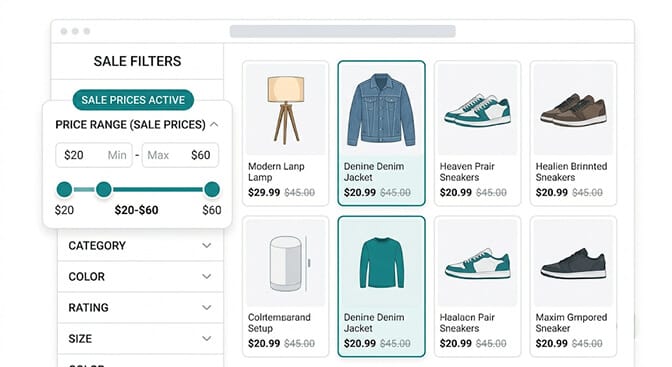
Here's the pricing filter failure that most merchants don't notice until a customer points it out.
Your product regularly sells for $89. During your sale, it's $53. Your price filter reads from the product's base price field. A customer filtering for "under $60" doesn't see that product in her results because the filter is reading $89, not $53.
She came specifically for your sale. She has a budget. She's filtering to find things within it. And your store is hiding the exact products she'd buy because the filter doesn't know the sale is happening.
The reverse failure is equally common. A customer who filtered for "under $100" during a previous visit returns during a sale. Now many products are $45. But the filter still sorts and ranges based on original prices. The experience creates a confusing mismatch between what the filter shows and what products actually cost.
A sale-price-aware price filter reads from Shopify's compare-at price and variant price fields simultaneously. During active discounts, it uses the current effective price, not the base price, for all filter logic. The price range slider reflects what customers will actually pay.
It also enables a dedicated "On Sale" filter toggle that surfaces only discounted products. During your promotional campaigns, this is the filter option that matches the expectation your email subject line created. "SALE: Up to 60% off" drives the click. An "On Sale" filter chip honors the promise when they land on your store.
Dynamic Facet Pattern 3: Variant-Level Availability Signals in Results
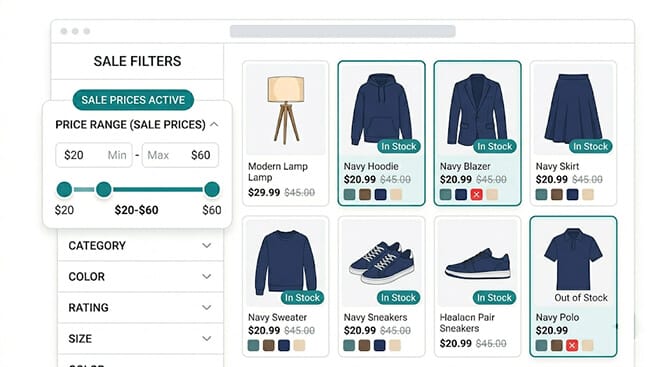
This is the filter failure that's hardest to see from the merchant's dashboard but most visible to customers in the moment.
A customer filters by Color: Navy. She gets twelve results. What she doesn't know is that three of those twelve products have their Navy variant specifically out of stock, even though other color variants of the same product are available. The filter returned the product correctly (it does have a Navy option) but the specific variant she filtered for isn't actually purchasable.
She clicks through. Selects Navy. Sees "out of stock." Goes back. Tries the next product. Repeat.
This is the variant-level availability gap, and it's distinct from the product-level availability problem. It requires the filter system to check inventory at the variant level, not just the product level.
The fix: filter results that display color or size options should indicate which specific variant combinations are currently in stock. A product card in a filtered Navy result should show the Navy swatch as active and available, not just present. If the Navy variant is out of stock, the swatch should be grayed or marked, even within the filtered result set.
This requires your filter app to maintain variant-level inventory data as part of its index, not just product-level availability. Ask specifically about this before assuming your filter app handles it.
Dynamic Facet Pattern 4: Promotion-Specific Filter Categories
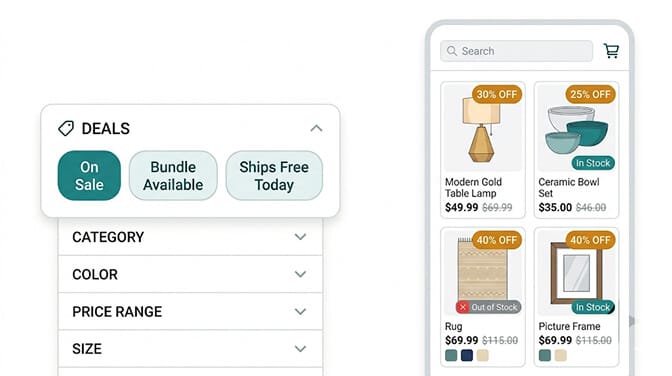
Most Shopify stores run promotions without giving customers a filter to find them.
Your email says "SALE: 40% off everything." Customers click through. They land on your collection page with eighty products, some heavily discounted, some barely touched by the promotion. There's no way to quickly surface only the deeply discounted items. Customers have to hunt.
The hunting is a conversion killer. These are your most motivated buyers. They arrived specifically for the sale. Making them work to find it cancels the motivation that brought them there.
A dynamic promotion filter category surfaces automatically when you have active discounts. "On Sale," "Flash Deal," "Bundle Available," "Free Shipping Eligible" appear as filter options when the corresponding conditions exist in your catalog. When the promotion ends, they disappear.
This requires your filter app to read from your discount data, your compare-at price fields, or your promotion metafields, depending on how your store manages promotional pricing. The implementation varies, but the outcome is the same: customers who came for deals find them immediately rather than hunting through a full catalog. Pair this with zero-party data preference collection and you can also remember which shoppers are deal-motivated across visits.
This filter category also produces useful analytics. How many customers click the "On Sale" filter during your campaigns tells you exactly how many of your site visitors are deal-motivated versus full-price shoppers. That segmentation is valuable for every future campaign you plan.
Dynamic Facet Pattern 5: Back-in-Stock Filter Discovery
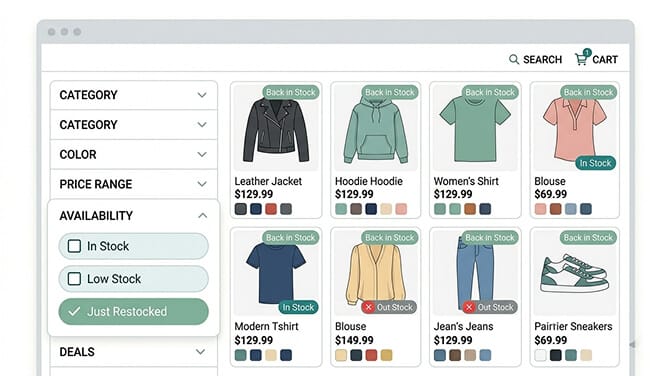
Here's the pattern that almost no Shopify merchant is running but that your most loyal customers would genuinely love.
When popular sizes and colors come back in stock after selling out, customers who've been waiting have no mechanism to discover this without checking manually. Most don't check. They wait for a back-in-stock email, which your system may or may not be set up to send. Or they move on.
A "Just Restocked" filter option surfaces products where inventory went from zero back to positive within a defined window (last 7 days, last 14 days). Customers who are regulars at your store, the ones who visit multiple times per month, use this filter to see what came back without scrolling through everything.
This is particularly high-value for stores with seasonal inventory, limited drops, or popular items that frequently sell through and are restocked. The filter turns a passive "check back later" experience into an active discovery mechanism. The same compounding logic applies to AI-driven layouts we cover in generative results pages, where freshness becomes a ranking signal in its own right.
The implementation requires a back-in-stock timestamp on your variant data, updated automatically each time inventory goes from zero to positive, and a filter app that can surface products matching that recency window.
If you want to audit how your current filter setup is actually performing during traffic events, check your Sparq search analytics and look for the sessions where customers applied filters but abandoned without purchasing. The gap between filter selection and conversion is where inventory-related friction is hiding.
The Pre-Event Configuration Checklist
Every one of these dynamic filter patterns needs to be configured and tested before your traffic events, not during them. Here's the minimum viable checklist.
One week before any sale or high-traffic event:
Test your inventory sync speed. Manually set one product variant to zero inventory and check how long it takes for that option to disappear or gray out in your filter results. If it takes more than fifteen minutes, your filter is too slow for a high-velocity event.
Verify sale prices appear in your price filter. Apply a discount to one product and check whether the filter range reflects the sale price or the original price. This single check reveals whether your filter is promotion-aware.
Set up your "On Sale" filter toggle if your filter app supports it. Test that it activates automatically when you apply a discount to a product.
The day before the event:
Set your low-stock threshold. Decide at what inventory count you want the "low stock" signal to appear (5 units? 10 units?) and configure that threshold in your filter settings.
Verify variant-level inventory signals. Apply a filter for a specific color or size and check whether the product cards in results accurately reflect which specific variant combinations are available.
During the event:
Monitor your filter-to-add-to-cart rate. If customers are selecting filter options but not adding to cart at your normal rate, inventory mismatch is likely the cause. Check your inventory sync frequency first. The same monitoring discipline applies to AI merchandising ranking signals, where stale data also quietly costs conversions.
The Takeaway
The merchant with twenty-six complaint messages fixed their filter setup three weeks after that Black Friday.
Real-time inventory sync. Sale-price-aware price ranges. Low-stock urgency signals. On-Sale toggle that activated with their discounts.
Their next major sale generated 19% more revenue on similar traffic. No new products. No better deals. Same customers, same intentions.
The filters just stopped lying to them.
That's what dynamic inventory facets actually do. Your marketing brings customers in with a specific intention to buy. Your filter system either honors that intention by showing them accurate, current information, or it burns the buying impulse with friction that shouldn't exist.
You did the hard work to get them there. The filters should do their job once they arrive. If you'd rather see what's possible before installing, the Sparq features overview, pricing, and option to book a demo walk through the full picture first.
Ready to find out where your current filter setup is creating friction? Install Sparq from the Shopify App Store and check your filter analytics. What customers are selecting and where they're dropping off tells you exactly what to fix first.
Frequently Asked Questions
What are real-time inventory filters for Shopify and why do they matter?
Real-time inventory filters are product discovery facets that update their available options based on current live stock levels rather than a cached snapshot. Instead of showing all size options regardless of availability, a real-time filter hides or disables variants that are currently out of stock, updates within minutes when inventory changes, and surfaces low-stock signals when specific options are running low. They matter because static filters that show unavailable options send customers to checkout with products they can't buy, which destroys the trust that generates repeat purchases.
How do dynamic pricing filters work during Shopify promotions?
Dynamic pricing filters read from Shopify's compare-at price and current variant price fields to reflect actual sale prices rather than base prices. During active discounts, the price range slider and filter options update to show what products currently cost, not their pre-sale prices. This means a customer filtering for "under $60" will see products that are $53 during your sale, even if they normally cost $89. A dedicated "On Sale" toggle filter can also be configured to surface only discounted products, giving deal-motivated shoppers a direct path to your promoted inventory.
How quickly should real-time inventory filters update on Shopify?
For standard store operations, an inventory index refresh every 15 to 30 minutes is generally sufficient. During high-traffic events like flash sales or product drops, that window is too long. Inventory can move significantly in fifteen minutes when traffic is high. For events where inventory velocity matters, you want a filter app that refreshes its index within 5 to 10 minutes of inventory changes. Test this specifically before major events by manually setting a variant to zero inventory and timing how long it takes for that option to become unavailable in your filter results.
Do dynamic inventory filters require developer work to set up on Shopify?
Not for most filter apps. Inventory-aware filter options are typically a configuration choice within your filter app's settings rather than a development project. The key questions to ask your filter app provider are: how frequently does the inventory index update, can you configure low-stock thresholds, and does the price filter read from your sale price or base price field. Most of these are settings changes, not code changes. Some advanced implementations like variant-level availability signals in result cards may require more configuration, but the core inventory-aware behaviors are usually app-level settings.
Is it worth setting up dynamic inventory filters if my store runs promotions infrequently?
Yes, because the inventory accuracy problem exists at all times, not just during sales. A customer who filters by a specific size on a regular Tuesday and gets results containing out-of-stock variants experiences the same trust erosion as one during a Black Friday sale. It's just less concentrated and harder to notice in aggregate. The sale-price-aware filter is most valuable during promotions, but the inventory-state filter and variant-level availability signals improve conversion year-round. The setup investment is the same regardless of how often you run promotions, and the ongoing benefit applies to every visit.







