Omnichannel Search Continuity: Why Your Shopify Filters Need to Work the Same Way on Every Channel in 2026
Most merchants build filters once and forget they have three different versions of them. Here's what that's costing you, and how to fix the cross-channel consistency problem before your next busy season.
The email came from a customer we'd never met.
"I love your store but every time I switch between my phone and my laptop the filters are in a different order and some are missing. The 'occasion' filter you have on desktop doesn't exist on mobile. Am I doing something wrong?"
She wasn't doing anything wrong.
We were.
We'd built an excellent filter sidebar for desktop. Then the mobile view got set up separately, configured by someone who wasn't aware of the full desktop setup. Then a mobile app got launched with yet another filter configuration that a developer had done independently. Three channels. Three slightly different filter systems. One customer who noticed and bothered to tell us.
For every one who wrote in, there were hundreds who just quietly had a worse experience and converted less or didn't come back.
Here's the thing about inconsistent cross-channel filters: they're invisible to you and obvious to your customers. You're looking at your analytics channels in silos. They're experiencing all of them as one brand that either knows what it's doing or doesn't.
Why This Is a 2026 Problem More Than Any Year Before It
Here's the weird part.
Two years ago, most of your customers had one primary shopping channel. They either shopped on desktop or on mobile. The occasional person bounced between the two, but true cross-channel shopping journeys were relatively rare.
In 2026, cross-channel shopping is the default behavior for your best customers. By 2027, over 60% of ecommerce transactions are expected to happen on mobile, but the research and discovery phase increasingly happens on desktop or in-app. Your customers are browsing on their phone, adding to cart on their laptop, checking in-store at your pop-up, and expecting it all to feel like the same store. The patterns echo what we covered in mobile search UX for Shopify and social commerce search.
When it doesn't, the friction is subtle. Nobody writes a support ticket that says "your filters are inconsistent across channels." They just browse for a bit, get confused, and either abandon or buy less than they intended.
Your best customers are your most cross-channel customers. They deserve the most consistent experience. They're currently getting the most inconsistent one.
That's the gap. And closing it is the highest-leverage filter improvement most multi-channel Shopify merchants can make in 2026.
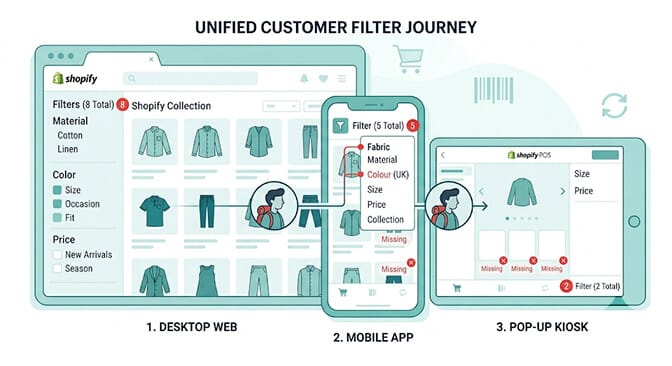
The Five Dimensions of Filter Consistency
Filter consistency isn't one thing. It's five related things that can each break independently. Let's go through each one specifically.
Dimension 1: Filter Category Completeness
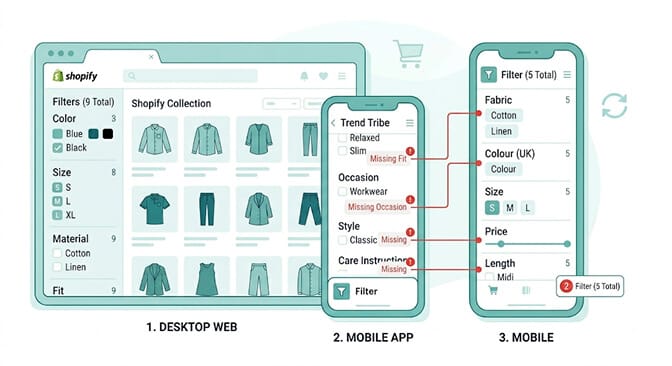
The most basic form of inconsistency: your desktop filter sidebar has more filter categories than your mobile filter panel or your app.
This happens because desktop filter sidebars are built to accommodate whatever you want to add. Mobile filter panels have real estate constraints, so whoever set them up chose the "most important" ones and dropped the rest. The app filter setup was done by a developer who made judgment calls about what mattered.
The customer who uses your "occasion: workwear" filter every week on her desktop laptop can't find the occasion filter on her phone. She doesn't know why it's missing. She just knows it isn't there. She either searches instead of filters (which is harder) or she browses unfiltered (which means she sees more irrelevant products and converts less). The underlying mechanics are the same we covered in dynamic facets vs static filters and the best ecommerce filter design examples.
The fix: audit every filter category on your most complete channel (usually desktop) and verify that every one of them exists on every other channel. This doesn't mean the layout has to be identical. Mobile filters can be organized differently. But if a category exists on one channel, it should exist on all of them.
Start with your search analytics. Which filters are used most often on desktop? Those are the ones most likely to be missed when they're absent on mobile.
Dimension 2: Filter Label Vocabulary
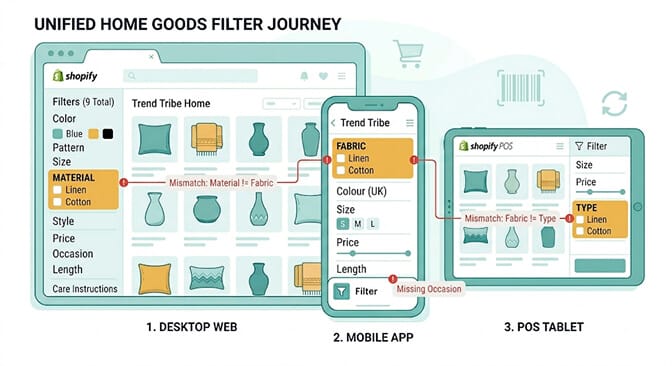
Same category. Different words. This one is surprisingly common and surprisingly damaging.
"Material" on desktop. "Fabric" on the app. "Type" in the POS. All filtering by the same underlying product attribute. But a customer who's learned to look for "fabric" on your app will look for "fabric" on your website too, and if it says "material" she might not immediately recognize they're the same thing. This is the same naming-hygiene problem we covered in our piece on how synonyms improve Shopify search conversions.
The mismatch often happens because each channel was set up by a different person at a different time. Nobody did a vocabulary consistency check across channels before launch.
The fix: pick one term for each attribute and use it everywhere. "Material" or "Fabric," not both. "Color" or "Colour," not both. "Size" or "Sizing," not both. Update every channel's filter labels to match the standard vocabulary. This is a configuration change in your filter app and your POS setup, not a development project.
Dimension 3: Filter Option Standardization
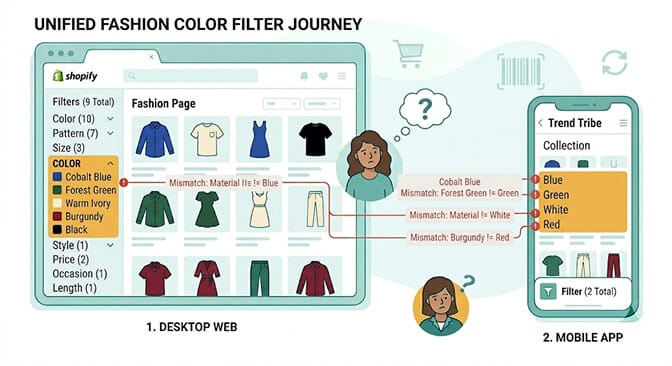
This goes one level deeper than vocabulary. It's not just the filter label that needs to match. It's the individual options within each filter.
If your desktop color filter shows "Cobalt Blue," "Forest Green," "Warm Ivory," and "Burgundy," your mobile filter needs to show those exact same options, not simplified versions like "Blue," "Green," "White," "Red."
This matters because customers develop brand familiarity with your specific vocabulary. A returning customer who knows she always wants "Warm Ivory" and searches or filters by that term will be confused if the mobile version shows "White" with no "Warm Ivory" option.
The option-level inconsistency is usually caused by how different channels handle product tag syncing. Your desktop filter app reads from your Shopify product tags. Your mobile app may have a separate product catalog sync that truncates or simplifies option values. Your POS generates options from a different field entirely.
The fix: audit your product attribute data at the source. Make sure your product tags, metafields, and variant attributes use the exact vocabulary you want to show on every channel. A product attribute that's standardized at the data layer is consistent everywhere the data is used. Our piece on search enrichment for Shopify covers the data-layer work in depth.
Dimension 4: Search Query Result Parity
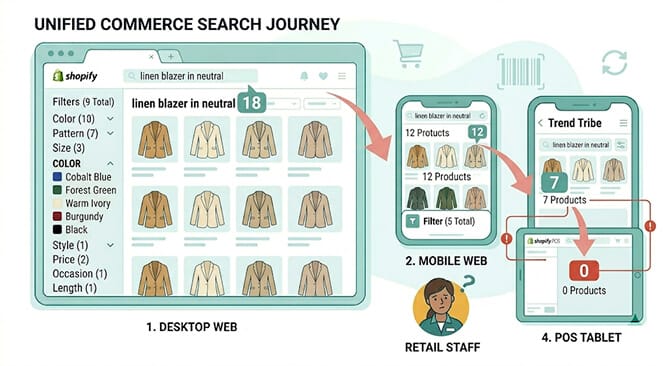
This one is subtle but it has the highest direct revenue impact.
The same search query returns different results on different channels. Not because the products are different. Because the search technology behind each channel is different, or configured differently. This is exactly the search relevance gap covered in our Shopify search relevance audit playbook.
Your web store has AI-powered natural language search. Your mobile app uses a basic keyword search provided by the app developer. Your POS uses Shopify's native product search, which doesn't do natural language at all.
Customer types "linen blazer in a warm neutral" on your website. Gets 18 relevant results. Opens your app and types the same thing. Gets 7 results because the app does keyword matching and "warm neutral" returns nothing. Tries on the POS tablet. Gets 0 results because the exact words don't appear in any product title.
Same customer. Same query. Three completely different experiences. The one she gets on your website sets an expectation that your other channels fail to meet.
The fix: standardize your search backend across channels as much as your tech stack allows. If you're running AI semantic search on your web store, apply the same synonym dictionaries and natural language configuration to your mobile experience. If your app has its own search, audit whether it can be replaced or supplemented with your preferred search tool. If your POS search is limited, compensate with better collection organization so staff can help customers find products even when search fails. Pair this with AI merchandising and your ranking layer stays consistent across surfaces too.
Want to see how search parity works across channels? The Sparq features overview shows how the same search configuration applies across different device environments.
Dimension 5: Pop-Up and Event Channel Consistency
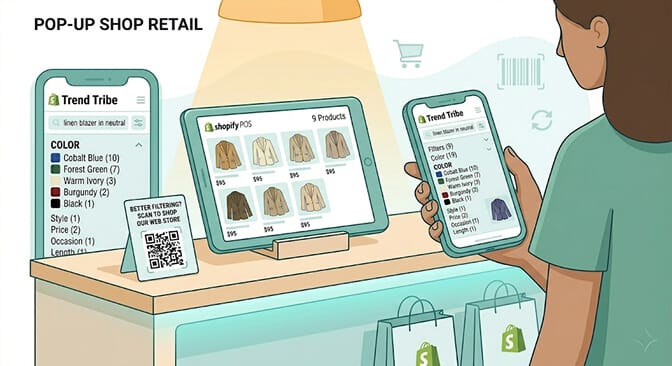
Pop-up shops get treated as separate events rather than brand touchpoints. They get set up fast, with whatever filter and search capability the POS interface allows, and nobody asks whether the experience matches what customers expect from the web store. This is the same trap covered in our livestream-to-Shopify search post, where one-off events leak revenue back to digital.
For a customer who's been shopping online for months, the pop-up is her first physical encounter with your brand. She brings her existing mental model, including her search and filter habits. If the pop-up can't honor those habits, even partially, the physical experience underdelivers against the online experience.
The specific thing that costs money: a customer at a pop-up can't find a product through the POS, pulls out her phone to search your web store, finds the product, and then... doesn't buy it at the pop-up because she needs to "think about it." The buying impulse existed. The physical moment was perfect. The inability to discover the product in the physical environment moved the decision back to digital, where impulse is weaker.
The fix for pop-up search: create a dedicated "Pop-Up Collection" before each event that includes every product being shown at the event. Generate a clean, easy-to-type URL for this collection and make it available as a QR code using a QR code maker at every counter and fitting room. When POS search fails, staff direct customers to scan the QR code, which drops them into a pre-filtered mobile browsing experience with only the products available at the event.
This isn't a perfect solution. It's a bridge. But it captures the buying impulse in the physical environment by giving customers a fast, familiar mobile discovery path that the POS itself can't provide. The canadian-street-fashion customer story shows what disciplined cross-channel discovery looks like in practice.
The Cross-Channel Consistency Audit You Can Do Right Now
This takes 20 minutes. It will show you exactly where your consistency gaps are.
Step 1: Open your web store on desktop. Screenshot your complete filter sidebar with all categories and options visible.
Step 2: Open your web store on mobile. Screenshot the filter panel in the same product category.
Step 3: Open your app (if you have one) and screenshot the filter options in the same category.
Step 4: If you have POS, check the product grid or search capability on your POS device.
Step 5: Compare all screenshots side by side. For each filter category on desktop, check: Does it exist on mobile? Does it have the same label? Do the options within it use the same vocabulary? Repeat for app and POS.
Every gap you find is a place where a returning customer's search habit breaks. Prioritize the gaps on your highest-traffic mobile channels first, since that's where the most volume is flowing.
The gaps you find in 20 minutes represent months or years of accumulated inconsistency. Fixing them is mostly a configuration task. The ROI on fixing the worst gaps is immediate. If you want to size it in revenue terms before you start, run your numbers through our ROI calculator.
What Consistency Actually Unlocks for Your Business
Here's the payoff that makes this worth the afternoon.
Returning customers are your highest-value customers. They know what they want. They know how to find it. They're not price-comparing. They're not bouncing between competitors. They came back because the last experience was good enough to repeat.
When your filter system is consistent across the channels they use, every experience they have reinforces the habit of shopping with you. They become even more efficient at finding what they want. They spend more per session because they're not wasting time reorienting to a different filter layout. They come back more often because the friction is low. The same compound-loyalty effect shows up in the filters-boosting-site-speed-and-SEO customer story.
When your filter system is inconsistent, you're spending money to bring customers back and then giving them a reason to be less confident each time they visit. The best customers, the ones worth the most to your business over time, are also the ones who will notice inconsistency first because they're using your store on the most channels.
Get the consistency right and you stop leaking loyalty out of the holes in your cross-channel experience.
If you're ready to start, install Sparq from the Shopify App Store and use the search analytics to identify which queries are behaving differently across your channels. Free to try, no-code setup, and the data will show you exactly where to focus first. If you'd rather see what's possible first, the Sparq features overview, pricing, and option to book a demo walk through the full picture.
Frequently Asked Questions
What is omnichannel search continuity for Shopify stores and why does it matter?
Omnichannel search continuity means that a customer's search and filter experience is consistent across every channel where they can browse your store: desktop web, mobile web, mobile app, and physical POS or pop-up interfaces. It matters because customers who shop across multiple channels have higher lifetime values and order values, but only realize those values if the cross-channel experience is coherent. Inconsistent filters and search quality cause returning customers to lose their discovery habits and convert less when they switch channels.
How many different filter setups does a typical Shopify store have?
Most Shopify stores running multiple channels have two to four separate filter configurations: a desktop web filter setup managed through a filter app, a mobile web layout that may be a simplified version of the desktop setup, an app filter configuration set up independently by the app developer, and a POS product grid organization that has no filter capability or a very limited one. Because these are set up independently at different times, vocabulary, category completeness, and option values often diverge without anyone noticing until customers complain.
How do I fix filter label inconsistencies across my Shopify channels?
Start at the product data source. Choose one standard vocabulary term for each attribute (Material, not Fabric; Color, not Colour) and apply it consistently in your product tags, metafields, and variant option names. Once the underlying data is standardized, update each channel's filter configuration to use the same labels. For your filter app, this is a settings change. For your app, check whether filter labels pull from product tags automatically or need to be set manually. For POS, re-organize product collections using the standard vocabulary. The configuration work is minor once the data standard is established.
Does improving filter consistency across channels affect conversion rates?
Yes, measurably. Customers who encounter a consistent filter system across channels develop stronger browsing habits specific to your store, which leads to faster product discovery, lower bounce rates on subsequent visits, and higher average order values. The specific impact is hardest to measure at the filter level, but the underlying research consistently shows that omnichannel shoppers with consistent cross-channel experiences are 16% more likely to increase order value compared to shoppers who encounter friction across channels.
Can Sparq maintain consistent filter configurations across desktop and mobile for Shopify?
Yes. Sparq's filter and search configuration applies the same synonym dictionaries, product attribute vocabulary, and natural language search logic across desktop and mobile web environments for Shopify stores. Filter categories and options that are configured in Sparq render consistently across viewport sizes, so the same categories a customer uses on desktop are available on mobile with the same labels and options. The search analytics also show query performance across devices, making it straightforward to identify where mobile search is underperforming relative to desktop.