Social Commerce Search: How to Make Your Shopify Store Feel Like the TikTok Shop Your Customers Came From
Your TikTok ad worked. Your product page didn't. Here's how the smartest Shopify stores are unifying social discovery, on-site search, and filters into one continuous shopping experience.
A Shopify merchant I work with paid $4,200 for a TikTok creator campaign last month.
The video did everything right. 1.8 million views. 47,000 visits to her store. A respectable click-through rate. Real, high-intent traffic from real shoppers who'd just watched a creator demo her product for 18 seconds.
The conversion rate from that traffic? Under 1%.
Her conversion rate from email was 4%. From organic search, around 3%. Social was lighting up her traffic dashboard and quietly bleeding her ad budget.
She showed me the analytics. The shoppers were landing on her product page. They were spending an average of 11 seconds there. Then leaving.
She blamed the product page. The product page wasn't the problem. The product page was fine.
The problem was the jarring shift between the social experience the shopper had just been in (vertical video, algorithmic feed, creator energy, instant gratification) and the storefront they landed on (static product image, boring grid, generic search bar, paragraph of brand copy).
The shoppers didn't bounce because the page was bad. They bounced because the page felt like a different planet.
This is the part most Shopify merchants miss about social commerce. Driving traffic from TikTok Shop and Instagram is no longer the hard part. The hard part is making your own store feel like the social platform the shopper just came from.
Why Social Commerce and On-Site Search Need to Converge
Stay with me here, because the math on this is wild.
Social commerce now drives more than 15% of US ecommerce traffic and a meaningful slice of high-intent purchase decisions, especially in fashion, beauty, and home goods. TikTok Shop alone has hundreds of millions of monthly active shoppers. Instagram Reels with shopping tags. YouTube Shorts. Pinterest's product feed. The social-to-purchase funnel is bigger than ever. The broader market context is in our piece on global ecommerce.
But the conversion rate gap between social traffic and search traffic on most Shopify stores keeps widening. Not because social shoppers are lower intent. Because the experience after the click is wrong.
A shopper trained on TikTok expects:
Vertical video as the primary product format, not static photos.
An algorithmic feed that surfaces the next interesting thing automatically.
Creator-driven trust signals (reviews, hauls, demos) inline.
Instant, decision-ready answers, not a wall of options.
When that shopper lands on a default Shopify storefront, none of those expectations are met. The store feels older than what they just saw. The shopper exits, goes back to TikTok, and the store loses the sale to whoever can replicate the social feel onto their own domain. The canadian-street-fashion customer story is a good look at what closing that gap looks like in production.
This is where most store owners get it wrong. They think "social commerce" means selling on social platforms. The real opportunity is the opposite: make your store feel like the social platform.
Your TikTok ad got the click. Your store has 11 seconds to feel like the place the customer expected to land.
Five Patterns That Bridge Social Discovery and On-Site Search
Here's the practical part. Five patterns Shopify merchants are using to unify the social experience with their own search and filter infrastructure. Pick two. Ship them this quarter.
Pattern 1: Vertical Video Product Galleries
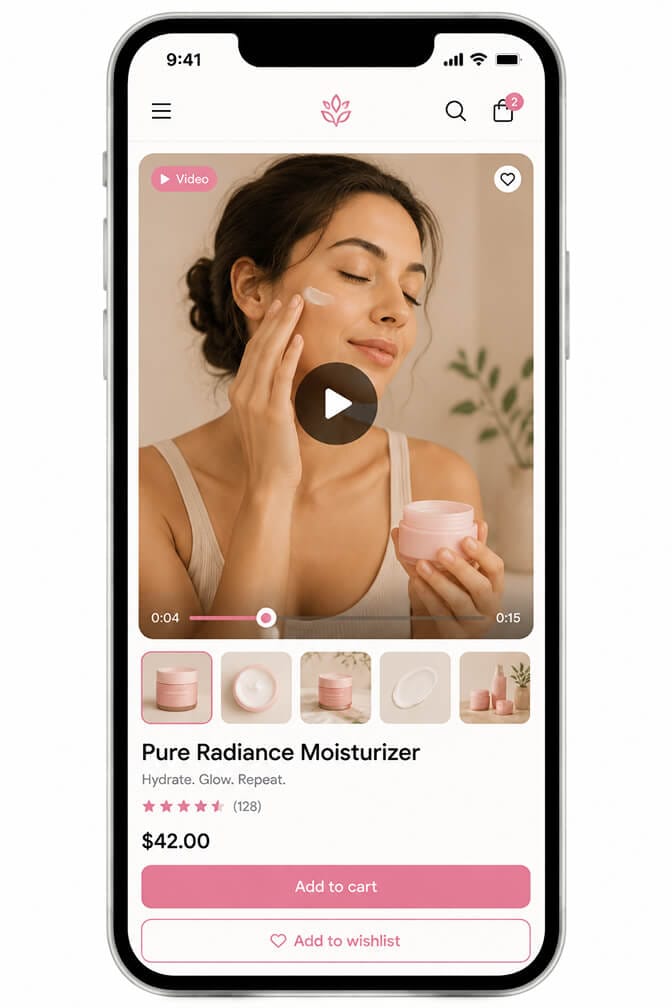
The first move is the most direct. Replace your static product image gallery with a vertical video player as the primary view, with photos as secondary.
Shoppers landing from a TikTok or Reels ad expect to see more video, not a static still. A 15 to 30 second product video on the product page closes the experience gap immediately. The shopper continues consuming video, just inside your store now.
The video doesn't need to be expensive. The same TikTok creator content that drove the ad usually has versions you can repurpose. Crop them vertical, embed them above the static gallery, and watch dwell time climb.
Pair this with a search results page that shows video thumbnails for products that have them. Suddenly your search experience feels native to the social era, and your AI semantic search starts pulling matches by visual context, not just text.
Pattern 2: Algorithmic Feed for Product Discovery
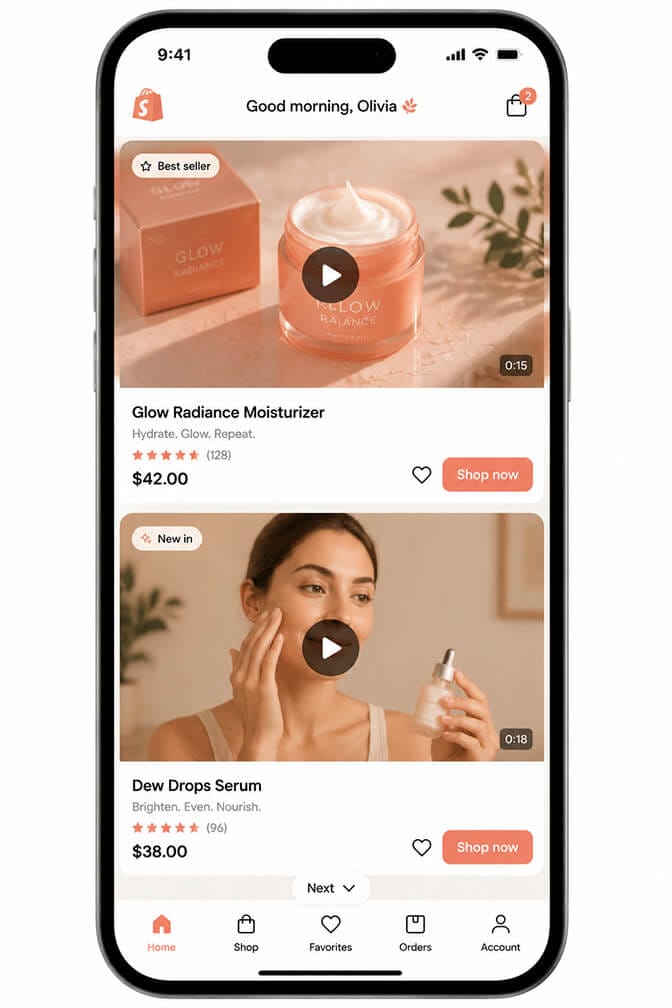
A product grid is a comparison shopping format. An algorithmic feed is a discovery format. Different shopper, different mode, different conversion math.
Some Shopify storefronts now ship an optional feed view alongside the traditional grid. The feed surfaces one product at a time, full-width, with the next product just below. The shopper scrolls through products the way they scroll through TikTok.
Behind the feed, the algorithm uses session signals (what the shopper viewed, scrolled past, lingered on) to decide what to show next. The result feels personalized without requiring identity, because it's all session-based. We covered the underlying mechanics in our piece on personalized search for Shopify.
For stores with strong visual products (fashion, home goods, beauty), this pattern produces materially longer session times and higher add-to-cart rates than a traditional grid for social-driven traffic.
Pattern 3: Shoppable Livestream Replays
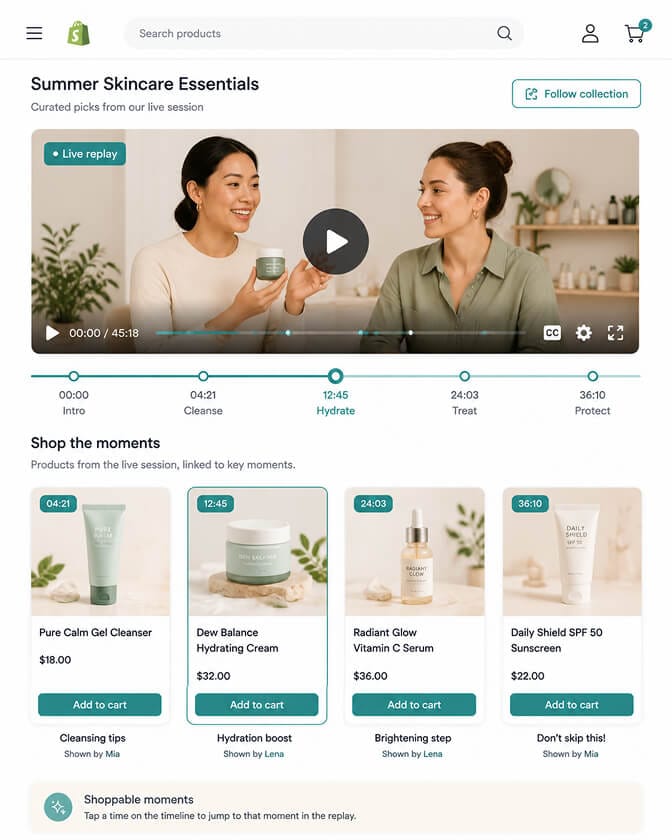
Livestream commerce keeps growing in Asia and is now scaling fast in North America and Europe. The pattern that wins on Shopify isn't necessarily running a livestream every week. It's making your livestream replays shoppable on your storefront.
A shoppable replay is a video player with timestamps tied to specific products, displayed inside a collection page or a dedicated "live archive" section. The shopper watches the replay, taps a product when it appears, and adds it to cart without leaving the page.
This pattern works especially well for stores with personalities (founders who do live drops, creators with weekly streams). The livestream archive becomes a discovery layer the shopper navigates with social familiarity.
We covered the broader video-to-conversion mechanics in our piece on ecommerce search trends for 2026. Livestream replays are a slow-burn pattern with high compounding value over months, not a quick win.
Pattern 4: AR Try-On Integrated with Filters
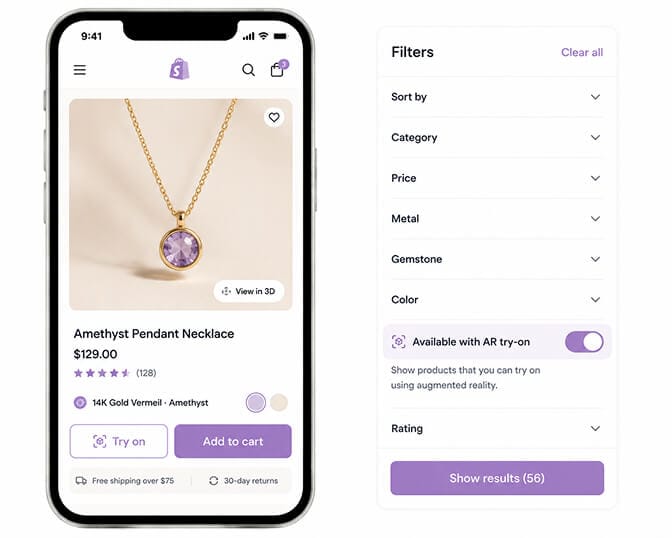
AR try-on is no longer experimental. Shopify's native AR support and third-party apps make it a 30-minute install for sunglasses, makeup, jewelry, watches, and an increasing number of furniture and apparel categories.
The pattern most stores miss is integrating AR with filtering. Add a filter called "Available with AR try-on" or surface a small AR badge on every product that supports it. Shoppers who came from a social ad demoing the AR feature can find AR-enabled products in two taps instead of scanning every product page. The same logic powers our multimodal search work, since AR is fundamentally a visual input pattern.
The conversion lift from AR is real. Stores that ship AR see materially higher conversion among product-detail-page visitors who use it. Stores that surface AR as a filter see a second lift, because they're routing the right shoppers to the right products faster. Pair it with dynamic facets so the AR filter only surfaces when it actually has matching products.
Pattern 5: Creator-Tagged Collections and Filters
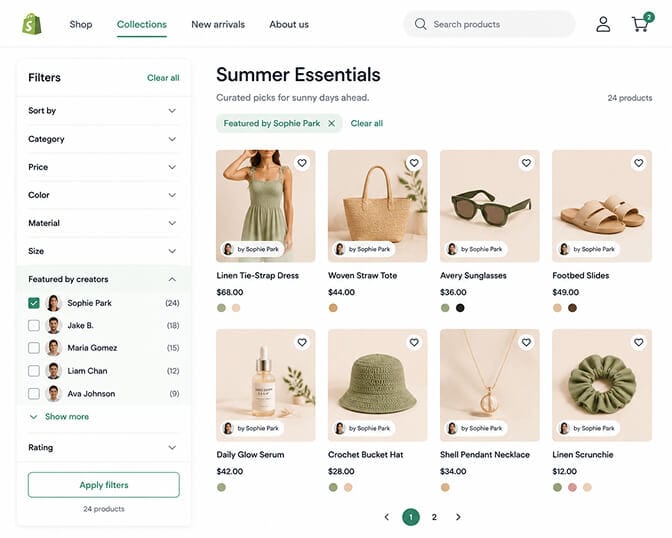
If creators drove the traffic, creators should structure the discovery.
Add a filter called "Featured by creators" with sub-options for each creator who has promoted your products. A shopper who came from a specific creator's video can filter your store down to that creator's picks in one tap. A shopper who came from a different creator can do the same.
This pattern serves three goals at once: it shortens the path from social click to relevant product, it creates social proof inside your storefront, and it gives your creator partners a clear "vanity URL" experience that performs better than a generic affiliate link. The same granularity principle shows up in our best ecommerce filter design examples.
Implementation is metafields plus a search and filter app that exposes them as facets. The mistake most stores make is dumping every creator partnership into a single "as seen on TikTok" page. Granularity matters. Each creator should be filterable individually. AI merchandising is the layer that turns those creator tags into ranking signals.
If you're watching social-driven traffic land on your store and bounce in 11 seconds, Sparq fixes most of the search and filter side of this in about 10 minutes. Free to try, no-code setup, and the analytics show you exactly which social-driven queries your store is failing to answer.
The Cross-Platform Analytics Story Most Stores Miss
Here's the part Shopify doesn't tell you. Social commerce changes how you should be reading your search analytics.
A shopper from TikTok rarely searches by product name. They search by descriptors they remember from the video: "the small green bag," "the vanilla candle from Amelia," "that ribbed tank top with the slit."
If your search analytics are still tracking text queries against product titles, you're missing the whole conversation. Social-driven shoppers query in visual descriptors and creator references, not catalog vocabulary. This is the same gap Shopify search relevance audits tend to expose first.
Two things matter here:
Track which search queries spike right after each social campaign. Those queries are your real-time signal of how shoppers describe the product after watching the video.
Make sure those queries actually return the right products. A shopper looking for "the green bag from Amelia's haul" should land on your products tagged with green and (ideally) tagged with Amelia.
Most stores have neither. Their search engine doesn't understand visual descriptors. Their products aren't creator-tagged. The shopper exits, and the merchant blames the campaign instead of the search infrastructure.
We've covered the broader search analytics work in our piece on search bar analytics. The cross-platform layer adds creator and visual descriptor tracking on top of the basics. If you want to size what this gap is costing you, plug your numbers into our ROI calculator.
Where to Start (And What to Skip)
You don't need every pattern. Pick two based on your category.
If you sell fashion or accessories: vertical video galleries plus AR try-on filters. The combination handles 70% of social-driven friction.
If you sell beauty: vertical video galleries plus creator-tagged collections. Beauty buyers care intensely about who recommended a product.
If you sell home or furniture: shoppable livestream replays plus AR try-on filters. Both let the shopper visualize before buying.
If you sell across categories or you're early stage: start with vertical video galleries plus creator-tagged filters. The lift is fast. The implementation is light. You can layer the rest in later.
Skip the patterns that don't fit your traffic mix. If your social presence is mostly Pinterest, skip the TikTok-style algorithmic feed. If you don't run livestreams, skip the replay pattern. The point is matching the on-site experience to where your shoppers actually come from. The same matching philosophy is what makes zero-click commerce results pages convert better than generic grids.
A Quiet Convergence That's Already Underway
The line between social platforms and ecommerce stores keeps blurring. TikTok Shop, Instagram Shop, YouTube Shopping, and Pinterest's commerce features have trained shoppers to expect a unified experience: video-first, algorithmic, creator-driven, instant.
The Shopify stores that match that experience on their own domain capture the social-driven traffic everyone else is paying to acquire and then losing on bounce. The stores that don't keep buying ads, watching their conversion rates plateau, and wondering why social spend isn't returning the way it used to.
Your store doesn't have to be on every social platform. It does have to feel like the platforms your shoppers spend their time on.
Want to see exactly which social-driven queries your store is failing to answer? Install Sparq from the Shopify App Store and check your search analytics. The patterns in shopper language right after each campaign are your blueprint for closing the experience gap. If you'd rather see what's possible before installing, the Sparq features overview, pricing, and option to book a demo all walk through the full picture first.
Frequently Asked Questions
What is social commerce search and how does it differ from regular ecommerce search?
Social commerce search is the practice of designing your on-site search and filter experience to match the visual, algorithmic, and creator-driven patterns shoppers experience on TikTok, Instagram, and similar platforms. It differs from regular ecommerce search by emphasizing vertical video product galleries, algorithmic discovery feeds, creator-tagged collections, and AR try-on integration alongside traditional keyword search.
How do I integrate TikTok Shop with my Shopify store search?
Connect TikTok Shop through Shopify's official integration to sync products and orders, then mirror the TikTok experience on your own store with vertical video product galleries, creator-tagged filters, and shoppable video collections. The goal is a continuous experience: shoppers click through from TikTok and feel like they're still inside a social-style interface, not a different planet.
Does adding shoppable video and livestream replays slow down my Shopify store?
No, when implemented correctly. Modern video apps for Shopify use lazy loading, adaptive bitrate streaming, and lightweight player libraries that add negligible weight to page load. Always check Core Web Vitals before and after installation, but most shoppable video apps are optimized for mobile performance because that's where social-driven traffic lands.
Are creator-tagged collections worth setting up for a small Shopify store?
Yes, even with a small store. Tagging products by the creators who featured them shortens the path from social click to relevant product, creates inline social proof, and gives creator partners a high-performing destination URL. Implementation takes minutes per creator using metafields, and the conversion lift on creator-driven traffic is usually visible within the first week.
How do AR try-on filters compare to standalone AR product pages?
Standalone AR product pages let shoppers try on individual products. AR try-on filters let shoppers narrow your entire catalog to only products that support AR, which is a much more useful starting point for shoppers who came from an AR-demoing social ad. Combining both patterns produces the largest conversion lift, especially in fashion, beauty, and accessories.