Livestream-to-Shopify Search: How to Turn Live Events Into On-Site Discovery That Keeps Selling Long After You Go Offline
Your live event converts 10 to 30 times better than your regular store. But the moment it ends, most of that momentum dies because your on-site search can't handle what viewers are looking for. Here's how to fix that.
She sent the Slack message at 11:47pm.
"We just did $22k in 90 minutes on TikTok Live. 3x our best ever session. Viewers are hitting the site now."
The next message came at 12:03am.
"Something's wrong. Search traffic is spiking but conversions are tanking. They're searching for the products I showed and getting zero results or the wrong thing."
Here's what had happened.
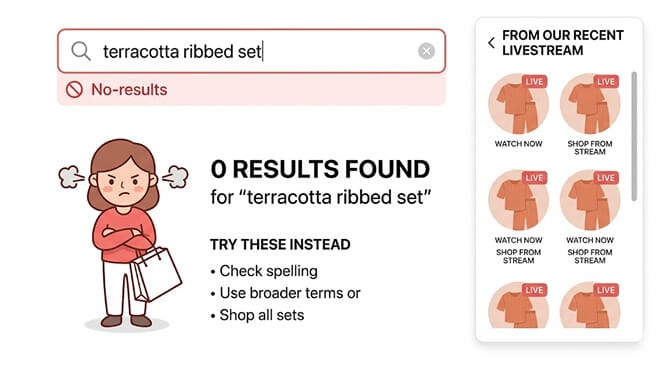
During the stream she'd shown a "terracotta ribbed knit set" and a "sage zip-up tracksuit." Viewers loved them. Hundreds clicked through to her Shopify store. But her search bar returned nothing for "terracotta" because she'd tagged the color as "rust." And when someone searched "sage zip-up" the default search returned three unrelated green products because it matched "sage" as a word without understanding what the viewer was actually looking for.
Twenty-two thousand dollars of momentum. Partially lost at the search bar.
This is the livestream-to-Shopify search gap. And almost every merchant running live events is experiencing some version of it. The broader social-to-storefront experience gap is covered in our piece on social commerce search for Shopify.
Why Livestreams Create a Unique Search Problem
Here's the weird part.
A normal Shopify store gets search traffic from people who already know what they want, more or less. They type general terms. "Blue dress." "Coffee table." "Running shoes." Your search bar has time to figure out what they mean.
Livestreams create a completely different search intent profile.
Viewers watch you describe a product in specific, vivid, human language. "The peachy-pink one." "The oversized blazer she held up at the 20-minute mark." "The bamboo cutting board set with the handles." These are not standard product title searches. They're memory-and-description searches from people who saw something real, in action, being held by a real person, and now they need to find it on your site immediately before the impulse fades.
The timing is brutal. Post-livestream traffic is among the highest-intent traffic your store will ever see. These viewers already decided they want the product. They just need to find it.
Livestream conversion rates run 10 to 30 times higher than standard ecommerce. That advantage doesn't carry over to your store automatically. You have to build the bridge.
The bridge is your search and filter setup. And for most Shopify stores running livestreams, that bridge has gaps big enough to lose significant revenue through.
The 5 Livestream Search Patterns (And How to Prepare for Each)
Livestream viewers search differently from regular shoppers. Once you understand the patterns, you can prepare your store to handle each one before the next stream starts.
Pattern 1: Color Name Mismatch
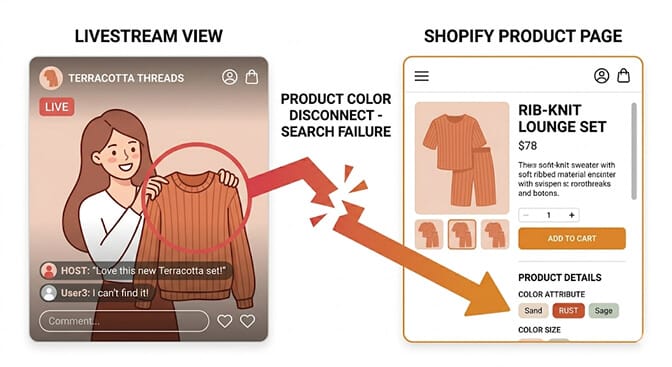
This is the single most common livestream search failure. You describe a product using natural, expressive language on camera. "This gorgeous dusty rose." "The terracotta set." "That forest green." Then viewers arrive at your store and search exactly what you said, and your search bar matches against your product tags, which say "blush pink," "rust," and "dark green."
No match. No results. Lost sale.
The fix has two components. First, add synonym groups to your search app so that "terracotta" and "rust" route to the same products, "sage" and "dusty green" resolve together, "dusty rose" and "blush" surface the same results. A smart search tool that handles synonym mapping turns your expressive livestream language into successful searches without you having to retag every product.
Second, build a habit: before each livestream, write down every color and descriptive term you plan to use on camera. After the stream, check that each term returns correct results in your search bar. The ones that don't need synonym entries.
If your current search tool doesn't support custom synonym groups, that's a fundamental limitation for any business running live events. This is a baseline capability, not an advanced feature.
Pattern 2: The Moment-in-Time Search
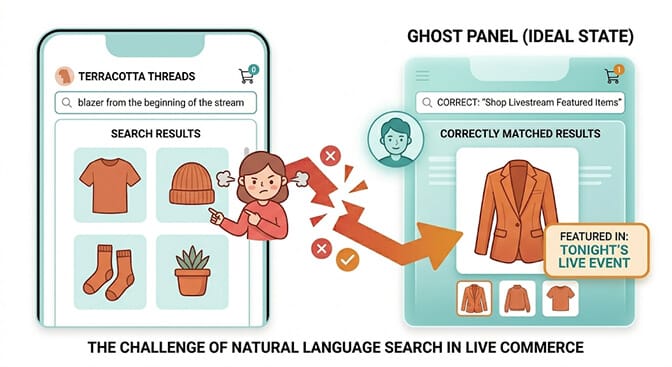
"The jacket you showed first." "The one with the gold buttons." "The set from the middle part." These searches reference when or how a product appeared in the stream, not what the product is called.
You can't train your search bar to understand "the middle of the stream." But you can eliminate the need for this type of search entirely by creating a dedicated Livestream Collection immediately before each event and linking it prominently from your homepage during and after the stream.
A collection titled "Tonight's Live Event" or "Seen on Stream" with the exact products featured, in the order they were shown, gives post-stream visitors a direct path that bypasses search entirely. This collection becomes the landing page you send viewers to in your stream bio and post-event social captions.
When the collection exists, viewers don't need to search. When it doesn't, they do. And they often fail.
Pattern 3: Natural Language Product Descriptions
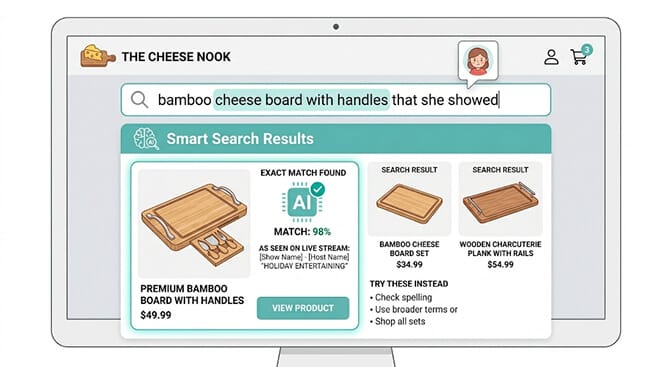
Livestream viewers absorb product descriptions in spoken, natural language. Then they type that language into your search bar.
"The bamboo cutting board set with the little handles." "The moisturizer for dry skin she mentioned." "The long line linen blazer in that neutral color." These are not keyword searches. They're conversational descriptions of something the viewer remembers from watching a human being talk about it.
Standard keyword search, including Shopify's native search, fails at these queries almost every time. It looks for exact word matches in product titles and tags. "Bamboo" might match. "Handles" probably isn't in the product title. "Little" and "the" add nothing. The combined query returns something confusing or nothing at all. This is exactly the gap our piece on multimodal search for Shopify covers in depth.
AI search that understands natural language intent rather than keyword matching is the only scalable solution to this pattern. When someone types a description rather than a product name, the search system needs to parse the intent, not the individual words.
This is exactly what Sparq was built for. If your current search app handles "blue dress" but fails at "the flowy blue thing she wore in the garden demo," you're leaving livestream revenue on the table after every single event. See how Sparq handles natural language product queries and whether your current setup is costing you.
Pattern 4: The Bundle and "Goes With" Search
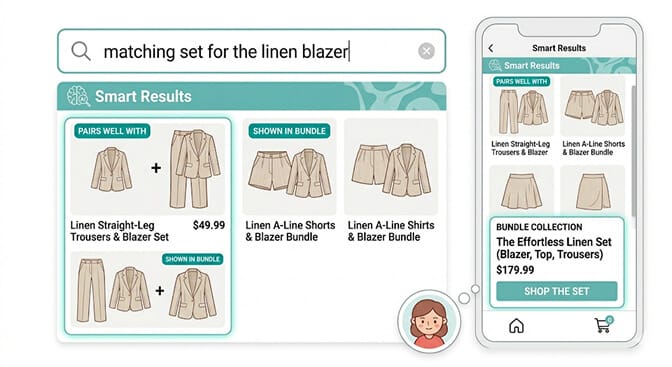
Livestream hosts often style products together. Show the blazer with the trousers. The skincare serum with the moisturizer. The candle with the holder. Viewers see the combination and want both pieces.
They search "the pants that go with the blazer" or "the whole set she was wearing." These are relational searches. They require your product architecture to reflect the relationship between products. The underlying catalog work is the same we covered in search enrichment for Shopify.
The fix: Use Shopify's product metafields to define "pairs with" relationships between products. Create bundle collection pages for items you regularly style together on stream. Add cross-sell and complementary product sections to your PDPs so that someone who finds one piece can immediately see what it goes with. AI recommendations is the layer that powers those "pairs with" surfaces automatically.
Before each livestream, identify every combination you plan to show and ensure those relationships are reflected in your store's product architecture. The stream itself is a script for the product relationships your store needs to express.
Pattern 5: The Post-Stream Long-Tail Search Wave
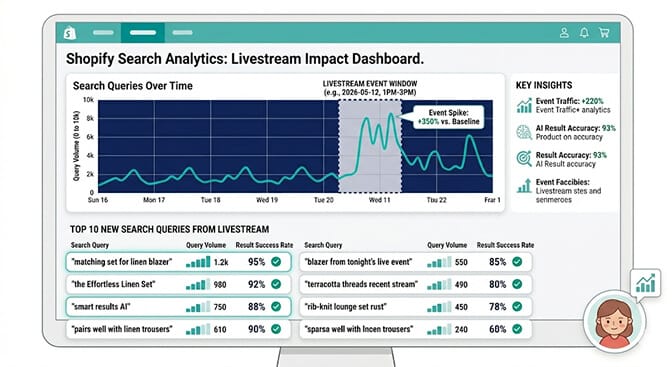
Here's the pattern that most merchants completely miss.
The immediate post-stream traffic is only part of the story. YouTube livestreams, in particular, continue to drive search traffic for weeks or months after the event because the recorded stream stays on your channel and continues to rank in Google Search.
Someone watching a recorded stream from three weeks ago searches your store with the same post-stream intent. If your search setup handled the live-event traffic correctly, it handles the evergreen traffic correctly too. If it didn't, you're failing those searches indefinitely.
The specific preparation step: use your search analytics to review what people searched during and after your last three livestreams. Look for queries that generated no results or poor results. Those are your priority synonym entries and your missing product tags.
This is the data hiding in your search analytics that most merchants never look at because they focus on what sold rather than what failed to find. The failed searches are where the money is.
The Pre-Livestream Search Readiness Checklist
Every merchant running live events should run through this before each stream. It takes about 20 minutes and it directly protects the revenue the stream is about to generate.
Two days before the stream:
Create a "Seen on Stream" or event-specific collection. Add every product you plan to feature, in the order you plan to show it. Make the collection URL clean and memorable. This becomes the link in your bio and your post-stream social captions.
The day before the stream:
Write down every descriptive term you plan to use on camera. Color names, texture descriptions, occasion descriptions, styling terms. Test each one in your search bar. Any that don't return the correct product need a synonym entry before the stream goes live. The Shopify search relevance audit playbook is a good cadence to copy for this prep.
The morning of the stream:
Verify your featured products are fully tagged with every relevant attribute. Material. Color family. Occasion. Style. Any attribute a viewer might search. Check that bundle relationships are visible on PDPs for products you'll style together. Pair this with AI merchandising so featured products surface in the right ranking moments during the post-stream traffic spike.
Immediately after the stream:
Pull your search analytics and filter for the stream date. Look at every query that returned zero results or a result mismatch. Add synonym entries for color and description mismatches. Flag product tagging gaps for the next audit.
This checklist turns each livestream into a structured data improvement cycle. Every event reveals exactly what your customers are searching for and where your current setup is failing them. The canadian-street-fashion customer story shows what this kind of disciplined catalog work looks like in production.
The Numbers That Make This Worth Your Time
The case for taking this seriously comes down to one comparison.
A standard Shopify store converts at roughly 1.5 to 2.5% of traffic. Post-livestream traffic converts at 9 to 15% on average. These are the same customers. Same products. Same store. The only difference is intent.
Post-livestream visitors have already decided they want the product. They just need to find it. Every failed search is a high-intent customer who arrived ready to buy and left empty-handed because your search bar couldn't bridge the gap between how you talked about the product on camera and how it's labeled in your store.
The top-performing livestream merchants treat their on-site search setup as part of their live event infrastructure. Not an afterthought after the stream. Not something to fix "eventually." A component that needs to be as prepared as the ring light and the inventory.
The stream creates the intent. Your store either captures it or loses it. And unlike the stream itself, which you control completely, the search failure is invisible to you. You don't see the customer type a query and leave. You just see conversion rates that don't match the energy of the event.
Your search analytics do see it. Every failed query is logged. The data is there. Most merchants never look at it. Plug your numbers into our ROI calculator to size what those failed queries are actually costing you per stream.
If you're tired of watching livestream momentum die at your search bar, Sparq fixes most of this in about 10 minutes. Free to try, no-code setup, and the analytics show you exactly which post-stream queries are failing right now.
The Real Takeaway
The merchant who sent me those Slack messages at midnight? She made two changes before her next stream.
She created a "Live Now" collection linked from her homepage nav during events. She spent 40 minutes the day before adding synonym entries for every descriptive term she planned to use on camera.
Her next stream did $28k. But more importantly, her store's conversion rate on post-stream traffic went from 3.2% to 11.4%. The same lift pattern shows up across stores that operationalize this discipline, including the predictive search customer story.
Same viewers. Same products. Same stream quality.
The only thing that changed was whether her store could understand what they were looking for.
That's the whole thing with livestream search. The event generates intent at scale. Your search either captures that intent or it doesn't. It's one of the highest-leverage optimizations available to any Shopify merchant running live events, and it costs almost nothing to get right once you understand the five patterns.
Want to see how much post-stream revenue your current setup is losing? Install Sparq from the Shopify App Store and check your post-event search data. If you'd rather see what's possible before installing, the Sparq features overview, pricing, and option to book a demo walk through the full picture first.
Frequently Asked Questions
What is the livestream-to-Shopify search problem and why does it happen?
The livestream-to-Shopify search problem occurs when viewers who watched a live event search your Shopify store using the descriptive language from the stream, such as color names, texture descriptions, and styling references, and your search bar can't match those queries to the correct products. It happens because livestream hosts use natural, expressive product descriptions on camera that often don't match the exact product titles and tags used in the store backend. The result is high-intent post-stream traffic that fails to convert because the search bar returns no results or wrong results.
How do I prepare my Shopify store's search for a livestream event?
Run through four preparation steps: create a dedicated livestream collection with your featured products before the event goes live; test every descriptive term you plan to use on camera (color names, texture words, occasion terms) in your search bar and add synonym entries for any that fail; verify bundle and "pairs with" relationships are reflected in your product architecture for items you'll style together; and review your search analytics immediately after the event to identify and fix any queries that failed. This 20-minute checklist per event directly protects the post-stream conversion rate.
How does natural language search help with post-livestream traffic specifically?
Livestream viewers absorb product descriptions as spoken, conversational language, then search your store using that same natural language rather than product titles. Standard keyword search fails at these queries because it matches individual words, not intent. AI-powered natural language search interprets the meaning behind a query like "the flowy blue thing from the garden segment" and surfaces the correct product even when none of the query words appear in the product title. For any store running regular livestream events, natural language search is a baseline capability rather than an optional upgrade.
Does setting up a dedicated livestream collection help with on-site search?
Yes, significantly. A dedicated "Seen on Stream" or event-specific collection with products in the order they were shown gives post-stream visitors a direct discovery path that bypasses search entirely. This eliminates the most common failure mode, where viewers search for a product they remember from a specific moment in the stream and get irrelevant results. The collection should be prominently linked from your homepage during and after the event and referenced in your post-stream social captions. Even with strong search setup, the collection provides a faster and more reliable path for the highest-intent visitors.
How much post-livestream revenue is the search gap actually costing my store?
The easiest way to estimate this is to compare your conversion rate on post-stream traffic to your livestream conversion rate during the event. If you're converting at 3% post-stream but 15% during the stream on the same products, the gap represents roughly 80% of potential post-stream revenue that isn't materializing. Check your search analytics for the day of and day after your last event and look at how many searches returned zero results or low-quality results. Multiply the number of failed searches by your average order value. That's a conservative estimate of the revenue the search gap is costing you per event.