
Voice + Visual Search: The Multimodal Future of Ecommerce Discovery
Your customers are about to stop typing. Here's how to make sure your Shopify store can still answer them.
A customer support ticket landed in a Shopify merchant's inbox last month with a single attached screenshot.
The screenshot showed a photo of a sweater, taken in a coffee shop, with the customer's voice query auto-transcribed underneath: "find me this sweater in green, size medium, under $80."
The store had no way to handle either the photo or the voice. The sweater wasn't in the catalog under "sweater," it was tagged "knit pullover." There was no green variant. And the customer didn't bother with the search bar.
She found it on a competitor's store in twenty seconds.
That ticket was the third one like it that month.
Here's the weird part: the merchant didn't have a voice search problem. She didn't have a visual search problem. She had a catalog problem that voice and visual search exposed mercilessly.
This is the part most merchants miss about multimodal search. Voice and visual aren't two separate trends. They're a single shift in how customers express intent. And both fail in the exact same place: when your store's data isn't ready to answer them.
What Multimodal Search Actually Is
Stay with me here, because the buzzwords get noisy.
Multimodal search is when a customer mixes input types in a single query. Voice plus photo. Photo plus typed refinement. Voice plus filter selection. The shopper isn't typing keywords anymore. They're describing, showing, asking.
Three things drive this shift:
Smartphones now capture, listen, and transmit images and audio with effectively zero friction. Lift the camera, talk, done.
AI models that interpret voice and images cheaply and instantly are now embedded in shopping assistants, social platforms, and operating systems.
Younger shoppers (Gen Z especially) treat the camera and the microphone as primary search inputs, not novelty.
According to recent industry data, more than 40% of Gen Z shoppers have used visual search in the last year. Voice commerce is forecast to cross $30 billion in transactions in the US alone by 2026. And nearly 70% of mobile shoppers say they want AI-powered shopping features.
This is no longer a trend. It's a behavior shift that's already in your traffic logs, you just can't see it because your analytics still show queries as text strings.
Why Most Shopify Stores Are Invisible to Multimodal Search
Stay with me here. This part matters.
When a customer voice-searches "soft cream cardigan for spring," they're not typing "cardigan." They're sending a full natural language phrase, often with descriptors that don't appear anywhere in your product titles.
When the same customer photographs a cardigan and asks "find this in my size," your store has to match the visual attributes (color, knit pattern, silhouette) against your catalog. Most Shopify stores have those attributes nowhere except buried in a product description.
Both queries fail for the same reason: your catalog data is thin. Title and description aren't enough.
This is where most store owners get it wrong. They go shopping for a voice search app and a visual search app. They install both. They watch them flop. Because the apps aren't the problem.
The problem is that your product attributes don't exist as structured, queryable data in the first place.
The merchants winning at multimodal search aren't the ones with the fanciest input interfaces. They're the ones whose catalog data is rich enough to answer non-keyword queries.
Five Shifts to Make Your Shopify Store Multimodal-Ready
Here's the practical part. Five concrete shifts. Each one matters whether the input is voice, visual, or hybrid.
Shift 1: Voice-Friendly Product Titles and Attributes
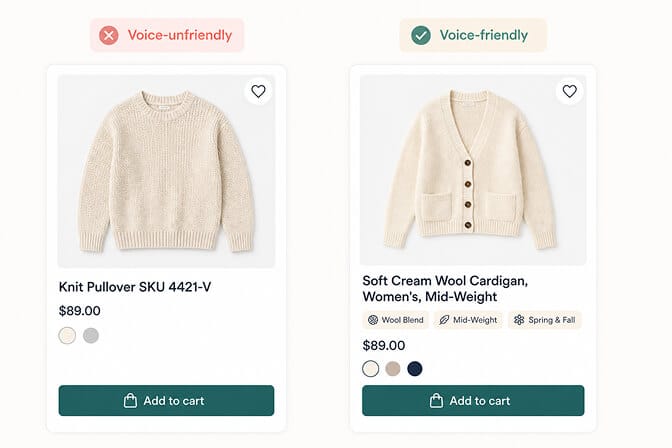
Voice queries are full sentences. "Show me a soft cream cardigan for spring."
Your product titles need to read like the queries customers actually speak. Not "KNT-PULLOVR-CRM-001." Not "Item 4421-V." A clear, descriptive, human-readable title with the attributes a voice query is most likely to include: material, color, fit, season, use case.
If your product titles look like SKUs, voice search will skip them. Every time. The same hygiene work pays dividends if you're auditing Shopify search relevance generally.
Shift 2: Natural Language Search That Handles Conversational Queries
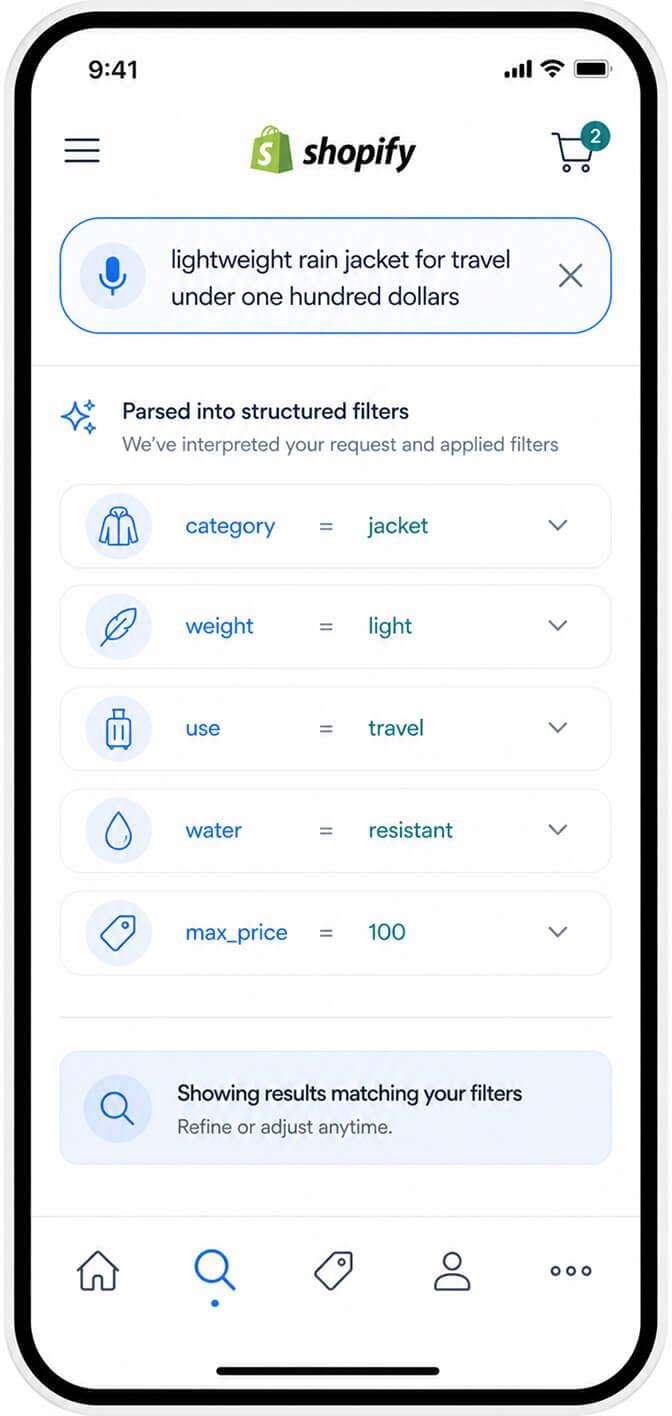
Voice queries are long. Voice queries are vague. Voice queries are full of intent that no keyword match will ever resolve.
"A lightweight rain jacket for travel under a hundred dollars" needs to become category=jacket, weight=light, use=travel, water=resistant, max_price=100. That's a parsing job, not a matching job.
Shopify's default search will return nothing. You need a search engine with AI semantic search built in. We've covered the difference in detail in our piece on the best ecommerce search engines for Shopify, and the short version is: if your search can't translate spoken sentences into structured filters, voice traffic will bounce.
Shift 3: Visual Search Entry Points (Camera Icons in the Search Bar)

If your search bar only accepts text, you've already lost the customers who'd rather show than tell.
Camera icons inside the search bar (the same way Google Lens or Pinterest does it) signal that visual search is available. The customer taps, photographs the item they're looking for, and your store responds.
Behind the icon, you need an image-matching engine that runs the photo against your catalog. Several Shopify search apps support this now, and it's no longer a heavy custom build. The same UX patterns that make this work also pop up in our deep dive on mobile search UX patterns for Shopify.
The key isn't the engine, though. It's whether your catalog has enough visual metadata for the matching to work, which leads to the next shift.
Shift 4: Image-Tagged Catalog Data (Beyond Alt Text)
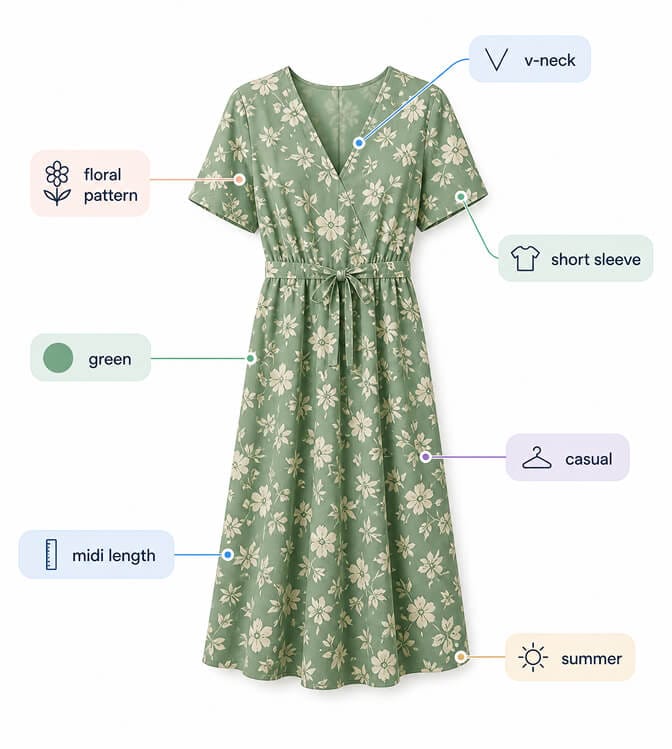
A product image to your customer is "a green floral midi dress." A product image to your search engine, if you haven't tagged it, is just bytes.
Visual search relies on either pretrained image models (which infer attributes automatically) or image metadata you provide explicitly. The best Shopify stores do both: they let AI extract visual attributes (color, pattern, silhouette, material) and then layer manual metadata for the attributes that matter most to their category.
If you sell furniture, your image data needs "wood type," "finish," "style." If you sell fashion, it needs "fit," "neckline," "sleeve length," "pattern."
This is exactly the kind of work search enrichment handles automatically, and we've written a deep dive on how search enrichment actually works if you want to see what's happening behind the scenes. AI merchandising then turns those tags into ranking signals.
Shift 5: Hybrid Voice + Photo Flows
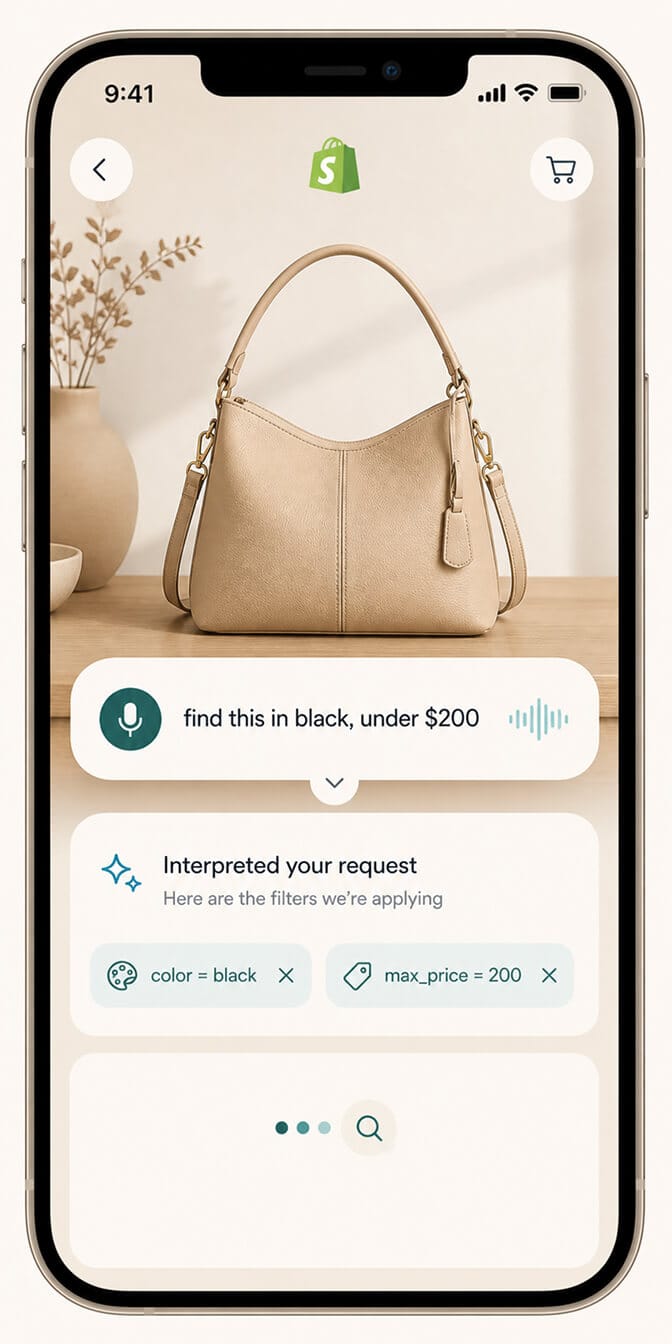
Here's where multimodal gets real. The customer photographs a product they like, then voice-refines: "find this in black, in my size, under $200."
Your store has to take a visual query, layer it with a verbal refinement, and return the right results. Most ecommerce platforms can't do this end to end yet. The ones that can are quietly winning long-tail purchase intent that competitors don't even see.
The future-proofing move here is making sure your filters, attributes, and search engine can be combined dynamically. Visual match plus structured attribute filter plus price constraint, all in one query. This is the same data architecture that powers agent-ready ecommerce search, since the underlying primitives are identical.
If your filters and your search are running in separate tools that don't talk to each other, you'll never get there.
If you're tired of customers searching (and now showing and speaking) and leaving empty-handed, Sparq fixes that in about 10 minutes. Free to try, no-code setup, and the search analytics alone show you which queries (text, voice, visual) are leaving money on the table.
The Filter Problem Hiding Underneath All of This
Here's the part Shopify doesn't tell you.
Voice and visual search are filter problems disguised as input problems.
When a voice query says "soft cream cardigan, mid-weight, under $80," your filters need to be: material, color, weight, price. When a photo query says "find this dress," the matched results need to be filterable by size, color, and price after the visual match runs.
Filters aren't decoration. They're the substrate that voice and visual queries land on. If your Shopify filters are anemic (size, color, price, and nothing else), no amount of fancy voice or visual input will save you.
Future-proofing your filters means three things:
Adding contextual attributes specific to your category (occasion, fit, room, finish, use case).
Making filters dynamic so they reflect what's actually in stock and what makes sense for the current query.
Exposing filters in URL state so they can be applied programmatically by AI agents and chained with voice or visual queries.
We've written a longer piece on what good ecommerce filter design looks like if you want concrete examples, and the filters-boosting-site-speed-and-SEO customer story shows what the lift looks like in production.
Quick Wins You Can Ship This Week
You don't need a six-month roadmap. Pick three of these for this week:
Audit your top 50 product titles. Rewrite anything that reads like a SKU into a voice-friendly natural sentence.
Add structured attribute data (material, color, fit, season, use case) to those same 50 products as Shopify metafields, not free-text descriptions.
Install an AI search and filtering app that supports natural language queries. This single move accounts for 70% of voice readiness.
Add a camera icon to your mobile search bar if your search app supports visual queries.
Pull up your Google Search Console and look at queries with question phrasing ("how do I...", "what's the best..."). Those are voice traffic in disguise. Make sure your product pages answer them.
These are an afternoon's work, and the compounding return is months long. Run the math through our ROI calculator if you want a defensible number to take to your team.
What Comes Next (And Why It's Closer Than You Think)
The next 18 months will see voice-first interfaces baked into more shopping experiences than anyone is publicly acknowledging. Operating systems are integrating shopping agents. Browsers are adding shopping copilots. Social platforms are testing voice-driven product discovery on top of camera roll integration.
The Shopify stores that update their catalog data and search infrastructure now will pick up the multimodal traffic as it arrives. The ones that don't will quietly become invisible to the search interfaces customers are starting to prefer.
Your filters and your catalog have always mattered for human conversion. Now they're table stakes for voice and visual conversion too.
Want to see what your customers are actually searching for, in voice or text? Install Sparq from the Shopify App Store and check your search analytics. The patterns you'll spot in the long, conversational queries are exactly the gaps to close first. Or, if you want a guided walkthrough first, the Sparq features overview, pricing, and the option to book a demo all give you a clearer picture before installing.
Frequently Asked Questions
What is multimodal search in ecommerce?
Multimodal search is when a customer combines input types (voice, image, text) in a single product query, like photographing a dress and voice-asking "find this in black under $80." It depends on a search engine that can interpret images, parse natural speech, and translate both into structured product queries against your catalog.
Is voice search worth optimizing for as a Shopify merchant?
Yes, especially as voice commerce is projected to surpass $30 billion in US transactions by 2026 and Gen Z shoppers increasingly use voice as a primary input. The bigger payoff is that voice search optimization (natural product titles, structured attributes, NLU-capable search) also improves conversion for typed traffic. The work compounds.
How does visual search differ from regular product search on Shopify?
Regular search matches typed keywords against product titles and tags. Visual search uses image models to compare a customer's photo against your product images and extracted visual attributes (color, pattern, shape). Visual search needs both an image-matching engine and rich visual metadata in your catalog to return useful results.
Will voice and visual search slow down my Shopify store?
A well-built multimodal search app should not noticeably affect page load. Modern AI search apps process voice and image queries on external servers and only pass lightweight results back to your storefront. Always check Core Web Vitals before and after installing any new app, but the impact is typically negligible.
How long does it take to make a Shopify store multimodal-ready?
The fastest path is one to two weeks: clean your top 50 product titles, add structured attribute metafields, install an AI-powered search and filtering app that supports natural language queries, and enable a camera icon for visual search. Full catalog cleanup is a longer project, but the 80% improvement comes from focusing on bestsellers first.