Zero-Party Data Is the New Filter Intelligence: How Privacy-First Shopify Stores Are Winning Product Discovery in 2026
The cookie is dead. Behavioral retargeting is broken. But the merchants who figured out how to just ask their customers what they want are seeing better personalization than tracking ever delivered. Here's the system.
The customer had been to the store three times in two weeks.
She'd searched "moisturizer for dry sensitive skin" on the first visit. Browsed the results. Left without buying. Came back and searched "fragrance-free face cream." Browsed again. Still no purchase. Third visit, she typed "gentle hydrating moisturizer no fragrance" and spent twelve minutes on product pages before closing the tab.
The merchant reviewed her session recordings. Three visits. Forty-seven minutes of browsing time. Zero revenue.
The frustrating part? The store had exactly what she needed. A fragrance-free, gentle moisturizer for sensitive skin, bestseller, great reviews, in her apparent budget range. But the search results kept surfacing it third or fourth in the list, behind products that keyword-matched better but weren't what she actually needed.
If the store had just asked her one question at the beginning, "tell us your skin type and any sensitivities," she would have found the right product on her first visit.
That's the zero-party data opportunity that most Shopify merchants are ignoring while they try to reconstruct broken cookie-based behavioral signals. We covered the broader privacy shift in our piece on privacy-first personalization for Shopify.
The Cookie is Gone. The Tracking is Degraded. What Replaced It?
Let's be direct about where things stand in 2026.
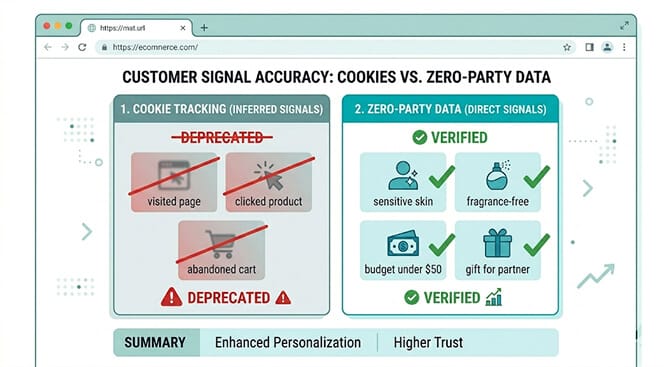
Third-party cookies are effectively dead across all major browsers. Apple's tracking restrictions have driven 75 to 85% of iOS users to opt out of cross-app tracking. Privacy regulations across the EU, UK, and increasingly US states have tightened what can be tracked without explicit consent.
The ad platforms tell you they've adapted. Your ROAS numbers tell a different story.
Here's the weird part. The answer to all of this was available the whole time. It just required treating customers like people you could have a conversation with, rather than data points to be observed without their knowledge.
Zero-party data is what customers tell you directly. Not what you inferred from watching them. What they actually said when you asked.
It's more accurate than behavioral tracking because it comes from the source. It's more durable because it doesn't depend on cookies that browsers block. It's more actionable because it captures intent rather than behavior.
And for your filter and search system specifically, it's the difference between showing a customer thirty-two moisturizers and hoping she finds the right one, versus showing her six that match exactly what she told you she needed.
Why This Connects to Your Filter Sidebar (The Part Nobody Explains)
Most articles about zero-party data treat it as a marketing asset. Collect quiz responses, put them in Klaviyo, send better emails.
That's fine. But it misses the most immediate revenue opportunity.
Zero-party data is the best possible input for your filter and search system. When a customer tells you their skin type, their budget, and their preference for fragrance-free products, that's exactly the same information they'd use your filter sidebar to express, except they'd have to do it manually, across three different filter categories, after scanning your UI to figure out what's available.
The zero-party data approach does it in one conversational exchange before they've even seen the product grid.
The connection is direct: what customers tell you in a preference quiz or onboarding flow maps directly to your filter attributes. Skin type maps to your "skin type" filter. Fragrance-free maps to your "ingredient" filter. Budget maps to your price range filter. Every quiz answer is a filter pre-selection the customer made without ever touching your sidebar. The same mapping logic is at the heart of dynamic facets vs static filters and our broader search enrichment work.
When you build this system correctly, returning customers arrive at product grids that are already filtered to their preferences. They see fewer products, more relevant ones, and convert at dramatically higher rates. Not because you tracked them. Because you asked.
The Four Collection Points That Power Your Filters
These are the specific moments where zero-party data collection produces the highest quality filter signals.
Collection Point 1: The Product Finder Quiz
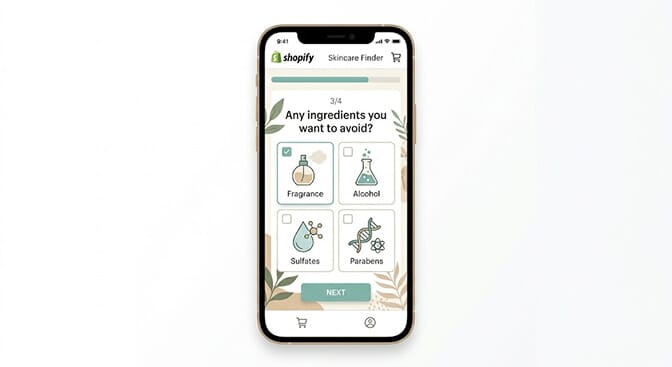
This is the most effective mechanism and the one with the clearest filter connection.
A well-built product finder quiz asks three to five questions that map directly to your most important filter attributes. For a skincare store: skin type (maps to your skin type filter), primary concern (maps to your benefit or concern filter), ingredient sensitivities (maps to your ingredient filter), budget (maps to your price filter).
The quiz outputs a filtered product grid. The customer sees fewer options that are more relevant. Conversion rates from quiz-takers run 20 to 30% higher than from customers who browse without using the quiz. The same lift pattern shows up across stores running personalized search for Shopify.
The filter architecture insight: the attributes you ask about in your quiz should be your top-level filter categories. If those questions are the most powerful signal for product matching, the corresponding filter categories should be the most prominent in your sidebar. Many merchants have their most decision-critical attributes buried in a fifth or sixth filter position because they built the sidebar without data on what actually drives conversion. Our piece on the best ecommerce filter design examples shows what the right hierarchy looks like in practice.
Your quiz response data, collected over weeks, tells you definitively what to put first.
Collection Point 2: First-Visit Preference Prompt
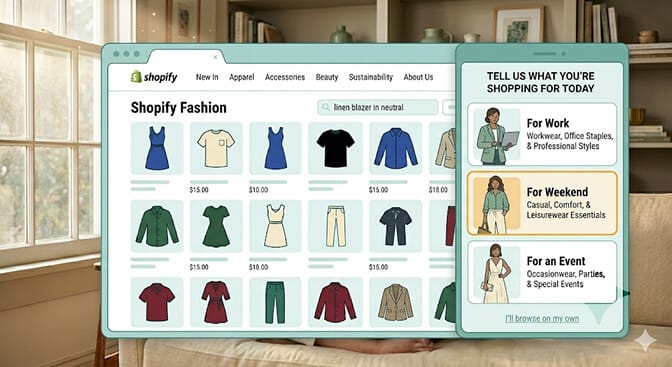
A first-visit preference prompt is lighter than a full quiz. It asks one or two questions at the moment of first arrival and uses the answers to immediately shape what the visitor sees.
"What are you shopping for today?" with three to four visual options is enough to route a visitor into the right product context without making them navigate through a full filter sidebar.
The key is immediate visible value. The prompt should visibly change the product grid within the same view. The customer selects "for an event" and the grid shifts to show dresses, heels, and accessories. She can see the system is responding to her answer. That visible response is what makes the data exchange feel worth it.
This also reduces filter abandonment. New visitors who encounter a filter sidebar for the first time often don't use it because it feels like work. A preference prompt that accomplishes the same narrowing in one click removes that friction at the point where new visitors most need guidance. The same friction principle drives our Shopify search relevance audit playbook.
Collection Point 3: In-Search Preference Refinement
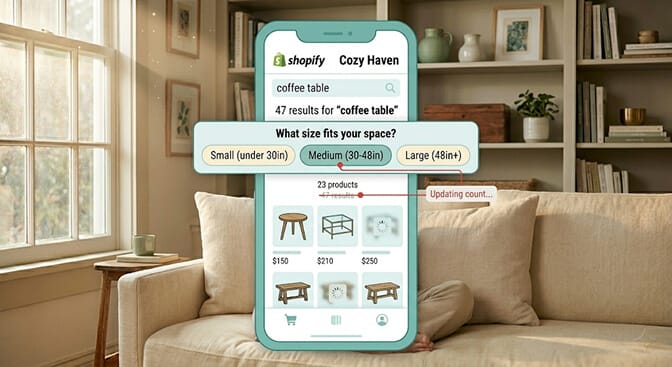
When a customer types a search query, they've told you the category but not the parameters. "Coffee table" tells you the product type. It tells you nothing about size, material, budget, or style.
A search system that prompts for one clarifying preference immediately below the results ("What size fits your space?", "What's your budget range?", "Any material preference?") collects zero-party data at the exact moment of highest purchase intent.
This is fundamentally different from a filter sidebar. A filter sidebar requires the customer to notice it, understand what's available, and actively engage. An in-search preference prompt requires one tap to answer a direct question that's directly relevant to what they just searched.
The data value is immediate (it improves this search result right now) and cumulative (aggregated across many customers, it tells you which clarifying question most improves conversion for each query category). Sparq's search analytics is built to surface exactly this kind of pattern.
The merchants with the most sophisticated search systems are starting to treat in-search preference prompts as structured data collection, not just UX features. Each prompt answer is logged, associated with the query, and fed back into the search ranking model for future sessions.
If your search app doesn't support inline preference refinement, that's a significant capability gap for any store where customers regularly search with category-level queries rather than specific product names.
Explore how AI semantic search handles intelligent search preference refinement for Shopify stores.
Collection Point 4: Post-Purchase Decision Debrief
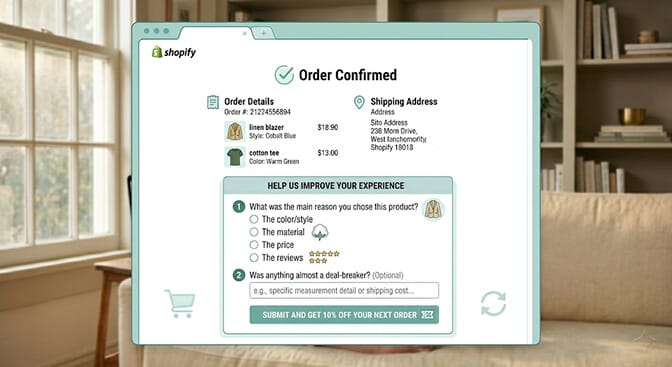
The moment after a purchase is completed is the highest-trust moment in the customer relationship. The customer is satisfied, relaxed, and more willing to share information than at any other point in the journey.
A two-question post-purchase survey on your order confirmation page is the easiest zero-party data collection you can implement. "What was the main reason you chose this product?" and "Was there anything that almost stopped you from buying?" generate the most actionable filter intelligence available.
The first question tells you which product attributes drive conversion in your specific catalog. If 60% of customers say "the material" was the main reason they bought, material needs to be your first filter category. If most say "the reviews," that tells you social proof is a conversion driver that should be surfaced in your filter-adjacent content. AI merchandising is the layer that turns those signals into ranking lift.
The second question surfaces friction points that might indicate missing filter categories. If customers regularly mention "I almost didn't buy because I couldn't find the size chart" or "I couldn't tell if it was machine washable," those are missing filter attributes you should add.
This data compounds. After three months of post-purchase collection, you have a clear, data-backed ranking of which filter attributes actually drive purchase decisions. Your filter sidebar order should reflect that ranking, and your omnichannel filter consistency work should propagate that ranking everywhere.
The Flywheel: How This Gets Better Over Time
Here's what makes this strategy genuinely superior to cookie-based tracking in the long run.
Cookies degraded over time as privacy restrictions tightened. Zero-party data compounds over time as you collect more of it.
After one month: you have enough quiz response data to confirm or challenge your assumptions about which filter categories matter most. You can reorder your filter sidebar based on actual customer decisions rather than guesses.
After three months: you have enough preference data across the customer lifecycle (pre-purchase quiz, in-search prompts, post-purchase surveys) to start identifying which preference combinations predict the highest lifetime value customers. You can use that to prioritize which products appear first when those preference signals are present. The same flywheel powers our predictive search customer story.
After six months: your filter architecture is genuinely data-driven. Every major filter decision, what categories to show, what order to show them in, what vocabulary to use, has been validated against actual customer preference signals rather than designer intuition.
The merchants who build this system now will have a six-month head start on the ones who start in late 2026. The data compounds. The architecture improves. The gap between stores with this system and stores without it grows every month.
And none of it depends on a pixel, a cookie, or a tracking mechanism that a browser update can break. If you want to size what this is worth on your specific revenue, plug your numbers into our ROI calculator.
Ready to start seeing what your customers are actually searching for before you build the preference collection system around it? Install Sparq from the Shopify App Store and check your search analytics first. Free to try, no-code setup, and the queries that keep failing to convert are usually the clearest signal of which preferences your customers have that your current filter system can't address.
The Takeaway
That skincare customer who visited three times and spent forty-seven minutes browsing without buying? The merchant implemented a simple three-question quiz the following week.
The quiz asked about skin type, primary concern, and any ingredient sensitivities. It took twelve seconds to complete.
Within four weeks, the merchant saw a 22% increase in first-session conversion for new visitors who completed the quiz. The average order value from quiz completers was 18% higher than from unassisted browsers.
The customer herself came back. This time she completed the quiz. The product grid showed her six products. The one she needed was the first result.
She bought it immediately and left a five-star review.
The store hadn't changed its products. Hadn't changed its pricing. Hadn't run any promotions. It had just started asking the right question at the right moment, and connected the answer directly to what the customer saw next.
That's the zero-party data opportunity in ecommerce discovery. Not a future trend. A current, working strategy that's better than the behavioral tracking it replaced. If you want a guided walkthrough before installing, the Sparq features overview, pricing, and option to book a demo walk through the full picture first.
Frequently Asked Questions
What is zero-party data and why does it matter for ecommerce product discovery?
Zero-party data is information a customer intentionally and proactively shares with your brand, such as quiz responses, stated preferences, budget ranges, and use-case information. It matters for ecommerce product discovery because it's more accurate than behavioral inference (it comes from the customer directly), more durable than cookie-based tracking (it doesn't degrade with browser privacy updates), and more immediately actionable for filter and search personalization. A customer who tells you their skin type and budget constraints gives you better filter data in twelve seconds than a cookie could infer in three sessions.
How does zero-party data improve Shopify filter performance specifically?
Quiz responses and preference prompts map directly to your filter attributes. When a customer tells you their skin type in a quiz, that's the same information they'd express by using your skin type filter, except delivered faster and without requiring them to navigate your filter UI. Aggregated zero-party data also tells you which filter categories drive purchase decisions in your specific catalog, so you can restructure your filter hierarchy to prioritize the attributes that actually matter to your customers rather than the ones you assumed mattered.
What are the best ways to collect zero-party data on a Shopify store?
The four most effective methods are product finder quizzes (three to five questions that map to your filter attributes and return a personalized product grid), first-visit preference prompts (one to two questions that immediately shape the product grid the visitor sees), in-search preference refinement (clarifying prompts within the search results page that collect intent signals at peak purchase interest), and post-purchase surveys (two questions on the order confirmation page that reveal which attributes drove conversion and which created friction). Each method collects data at a different stage of the customer journey and serves both immediate personalization and long-term filter architecture improvement.
Does zero-party data collection require developer work on Shopify?
Not for most collection methods. Product finder quizzes are available through quiz apps in the Shopify App Store that integrate without coding. First-visit preference prompts can be built with popup or onsite engagement apps that support form customization. Post-purchase surveys can be added to the order confirmation page through your email platform's post-purchase flow or a dedicated survey app. In-search preference refinement is a capability of advanced search apps rather than a separate implementation. The data connection between preference signals and filter pre-population is typically handled at the search app configuration level.
Is zero-party data better than first-party behavioral data for ecommerce personalization?
They serve different purposes and work best together. First-party behavioral data (clicks, page views, cart activity) tells you what customers did. Zero-party data tells you what they meant. Behavioral data is good for understanding patterns across your full customer base. Zero-party data is better for individual-level personalization and for understanding intent that behavior alone can't reveal. A customer who visits the same product page three times might be comparing it to something else, or might be uncertain about the size, or might be waiting to buy until payday. Zero-party data that captures their preference for a specific material and budget eliminates that ambiguity in a way behavioral tracking can't.