Your customers are telling you exactly what they want to buy. Your search bar just isn't listening fast enough.
Last Tuesday, I watched a session recording that made me wince.
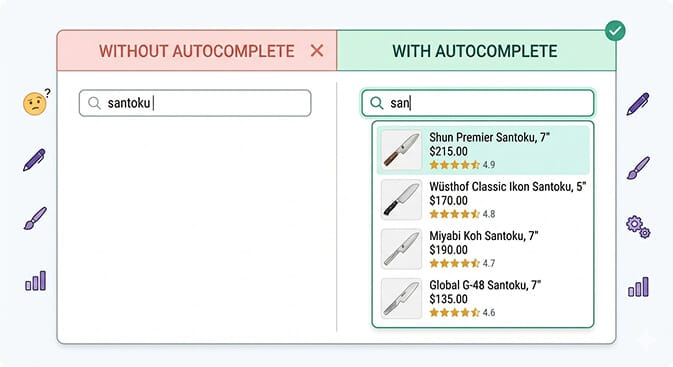
A customer landed on a Shopify store selling premium kitchen knives. She clicked the search bar. Typed "san" and waited.
Nothing happened.
She typed "sant" and still nothing. No suggestions. No help. Just a blinking cursor.
She finished typing "santoku knife," hit enter, and got three results. One was a cutting board. She bounced in nine seconds.
Here's what kills me: that store had 14 santoku knives in stock. Fourteen. And the customer never saw a single one because the search bar sat there like a brick wall, waiting for her to do all the work.
This is what happens when your ecommerce store doesn't have type-ahead search. And it's costing you more than you think.
Every Keystroke Is a Micro-Conversion
Most store owners think about conversion in big moments. The add-to-cart click. The checkout button. The payment confirmation.
But conversion starts way earlier than that.
When a customer types a single letter into your search bar, that's intent. Pure, unfiltered buying intent. They're not browsing. They're not "just looking." They came to your store with something specific in mind, and they're telling you exactly what it is, one character at a time.
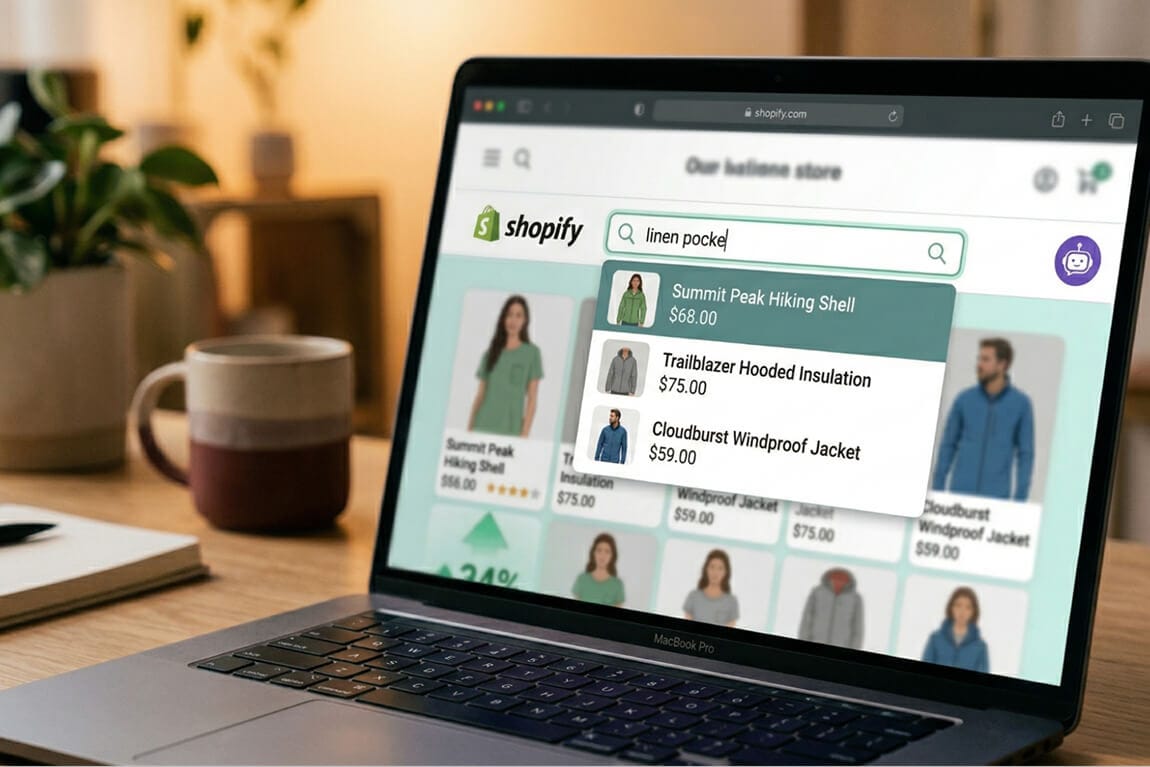
Type-ahead search (also called autocomplete search or predictive search) intercepts that intent in real time. Instead of making customers finish typing, guess at spelling, or struggle with your product naming conventions, it offers suggestions after just two or three characters.
And the data backs up why this matters.
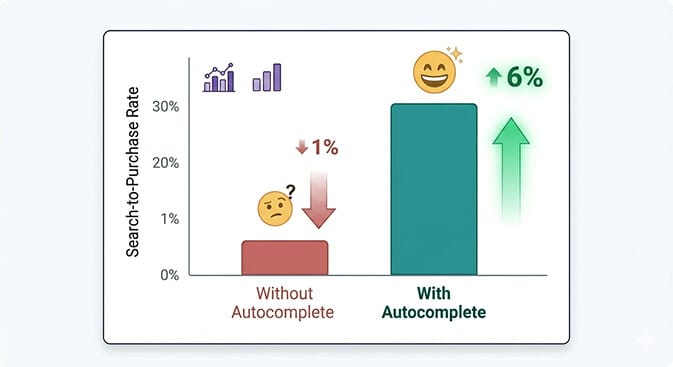
Stores with ecommerce search autocomplete see search-to-purchase conversion rates 2-4x higher than stores without it. Baymard Institute found that 68% of ecommerce sites have autocomplete implementations that fail to help users with even basic queries.
That's not a small gap. That's a canyon.
How Type-Ahead Actually Works (Without the Jargon)
Let me break this down simply, because most articles overcomplicate it.
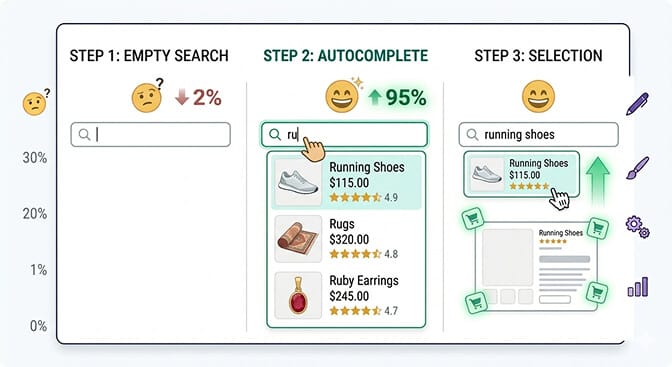
You type "ru" into a search bar. Behind the scenes, the search system scans your entire product catalog, titles, descriptions, tags, collections, and instantly surfaces the most relevant matches.
But here's where good autocomplete separates from bad.
Bad autocomplete just matches the letters. "Ru" returns "rugs" and "rubber bands" and "rules poster" in random order. No images. No ranking logic. No understanding of what a shopper actually means.
Good autocomplete understands shopping intent. "Ru" on a shoe store returns "running shoes" first, with product images, prices, and a direct link. It knows that a person typing "ru" on a sneaker site isn't looking for rugs.
That difference, between dumb string matching and intelligent query prediction, is the difference between a search bar that converts and one that frustrates.
The Five Patterns of High-Converting Autocomplete
Not all type-ahead search is created equal. After analyzing how ecommerce search works across hundreds of Shopify stores, five patterns consistently drive the highest conversion rates.
Pattern 1: Product-Aware Suggestions with Thumbnails
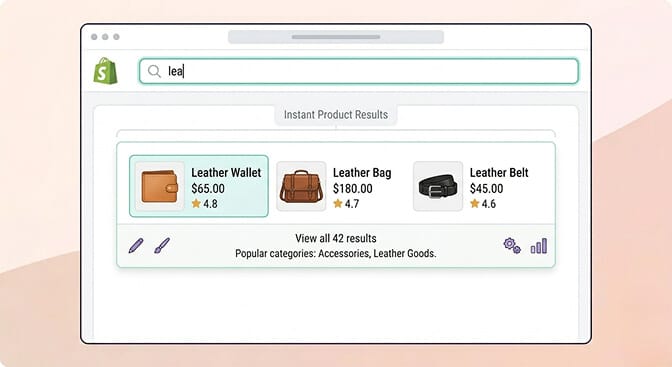
Plain text suggestions are table stakes. The stores that convert best show product images right in the dropdown.
Why? Because shoppers are visual. When someone types "lea" and sees a thumbnail of the exact leather wallet they want, they click it. No search results page needed. No extra step. They go straight from intent to product.
This one pattern alone can increase search-initiated conversions by 15-25%. It removes an entire page load from the buying journey. We've covered this in depth in our piece on using product images in Shopify search to improve conversions.
Pattern 2: Category and Collection Suggestions
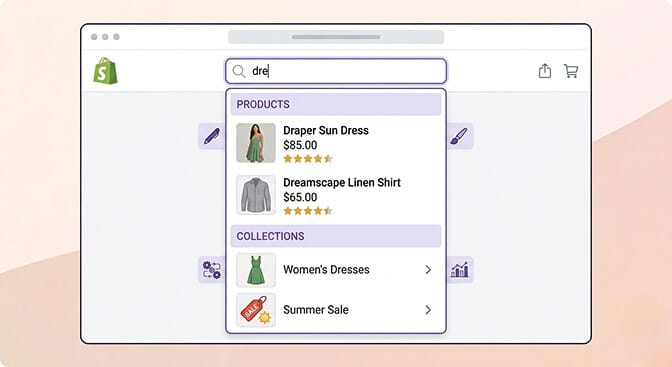
Smart autocomplete doesn't just suggest products. It suggests paths.
When someone types "dre" on a fashion store, showing "Dresses" as a collection alongside individual product matches gives the shopper a choice: go broad or go specific.
This is huge for stores with large catalogs. A customer who might not know your exact product names can still navigate by category, directly from the search bar. It's one of the best practices for search in ecommerce that too many stores ignore.
Pattern 3: Typo Tolerance and Synonym Handling
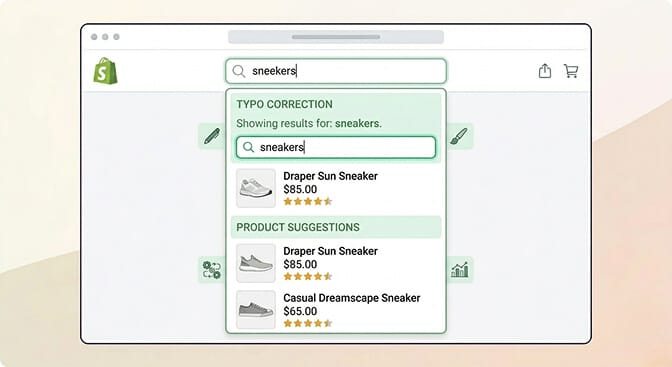
This is where most stores bleed money and don't even know it.
A customer types "sneekers" instead of "sneakers." On a store without typo tolerance, they get zero results. On a store with it, they see exactly what they wanted.
Stay with me here. This isn't a minor edge case.
Baymard's research shows that up to 27% of search queries on ecommerce sites contain typos, abbreviations, or alternative spellings. If your search bar can't handle "grey" vs "gray" or "tshirt" vs "t-shirt," you're turning away roughly a quarter of your searching customers.
Synonym handling works the same way. Someone searches "couch" but your products are listed as "sofa." Without synonym mapping, that's a zero-result search. With it, it's a sale. We wrote an entire guide on how synonyms improve ecommerce search conversions if you want to go deeper.
Pattern 4: Trending and Popular Searches
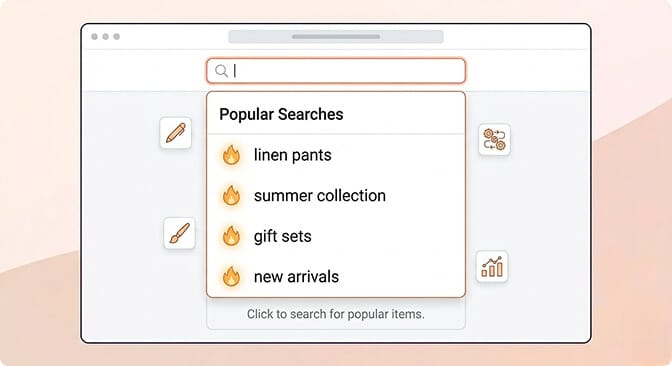
The best type-ahead experiences don't wait for the customer to type. They start helping before a single keystroke.
When a customer clicks into the search bar, showing trending searches or popular queries does two things. First, it gives undecided shoppers a starting point. Second, it surfaces your best-selling products and collections without any navigation required.
Think of it as merchandising inside your search bar. You're guiding discovery, not just responding to queries. It's the same principle behind a well-designed search bar UI.
Pattern 5: Mobile-Optimized Instant Search
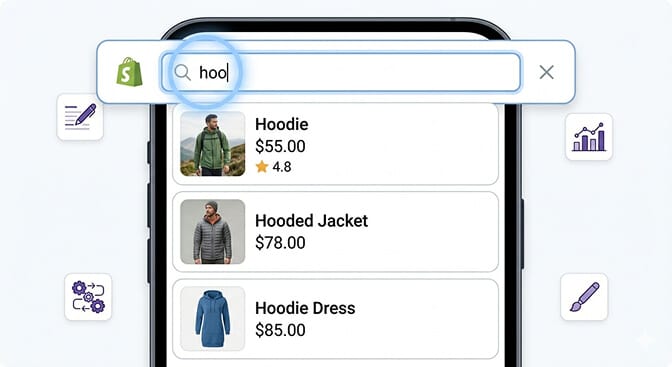
And this is the part that costs you money if you ignore it.
Over 70% of Shopify traffic is mobile. On mobile, typing is painful. Screens are small. Patience is thin.
Type-ahead search on mobile isn't a nice-to-have. It's a necessity. Every suggestion you surface saves your customer from pecking at a tiny keyboard. Every character they don't have to type is friction removed.
The best mobile autocomplete implementations use full-screen search overlays with large, touch-friendly suggestion rows. They load instantly, under 100ms, because on mobile, any lag feels broken. If you're still running your store on default settings, our piece on designing site search and product filtering for mobile is worth a read.
The Revenue Math Most Store Owners Never Do
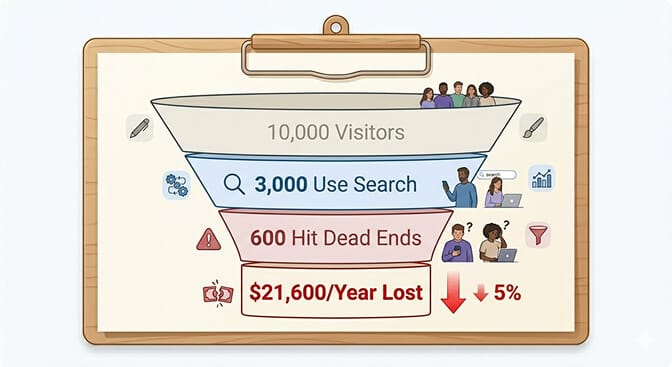
Let me make this concrete.
Say your store gets 10,000 visitors per month. Industry data shows about 30% of ecommerce visitors use site search. That's 3,000 search sessions.
Search users convert at 2-3x the rate of browsers. If your overall conversion rate is 2%, search users are converting at 4-6%.
Now, here's what type-ahead search changes.
Without autocomplete, a chunk of those 3,000 searchers hit dead ends. Typos, wrong terms, abandoned queries. Conservative estimate: 20% of search sessions fail unnecessarily. That's 600 lost search sessions per month.
At a 5% search conversion rate and a $60 average order value, those 600 failed sessions represent roughly $1,800 in lost revenue. Every month. From a search bar that just needed to be smarter.
That's $21,600 a year. From one feature.
This is why search analytics matter just as much as the autocomplete itself. If you can't see what customers are searching for, and where they're dropping off, you can't fix the leaks. If you want to see the math for your own store, try our ROI calculator.
If you're tired of customers searching and leaving empty-handed, Sparq fixes that in about 10 minutes. AI-powered search that understands what your customers actually mean, with analytics that show you exactly where you're losing money. Free to try.
What Bad Autocomplete Looks Like (So You Can Spot It)
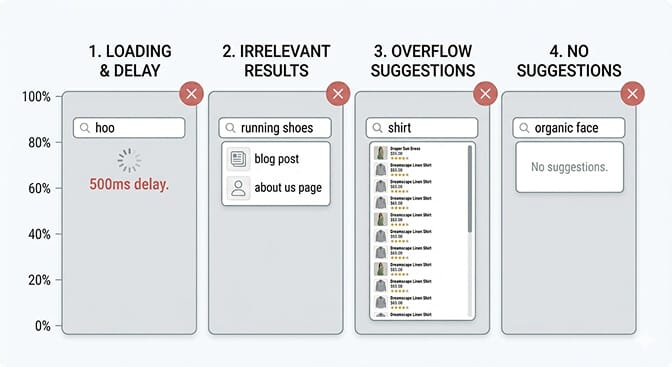
Not every autocomplete implementation helps. Some actively hurt.
Slow suggestions that appear after 500ms+ feel broken. Customers keep typing past them, or worse, they assume the store is laggy and leave.
Irrelevant suggestions that match characters but not intent erode trust. If typing "bla" on a clothing store surfaces "black olive tapenade" from a blog post, your search is indexing the wrong content.
Too many suggestions overwhelm. More than 6-8 suggestions in a dropdown creates decision paralysis. The whole point is to narrow choices, not multiply them.
No suggestions is the worst outcome. If your autocomplete can't help with a query, it should gracefully degrade, showing popular products or suggesting alternative terms, not just displaying an empty dropdown. Our guide on no results found page design ideas covers this in detail.
Why Shopify's Built-In Search Falls Short
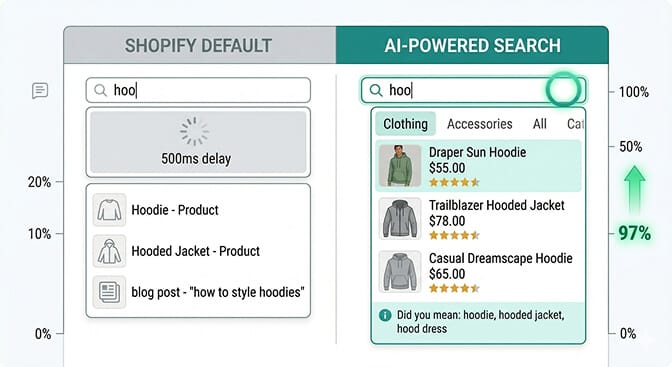
Shopify's native predictive search works. Technically.
But it's basic. It does simple prefix matching without real AI understanding. No synonym handling. No typo tolerance. Limited analytics. No customization of how suggestions are ranked or displayed.
For stores with under 50 products, it's fine. For stores scaling past a few hundred SKUs, especially stores with products that customers describe in different ways, it starts failing quietly.
And the dangerous word there is quietly. You don't get an error message when a customer types "sneakers" and your catalog says "athletic shoes." You just never see that customer again.
Making the Switch Without Breaking Things
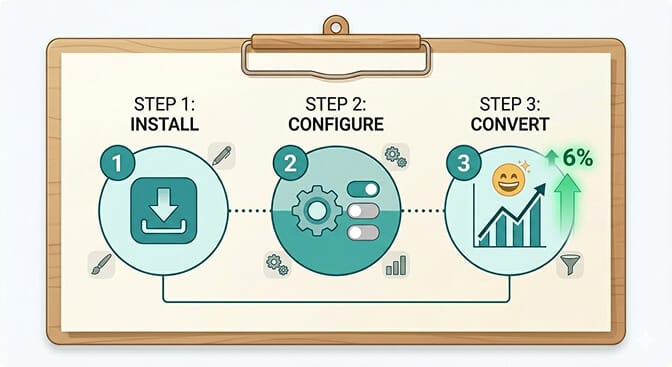
If you've read this far, you're probably wondering how hard it is to upgrade your search.
Here's the honest answer: it depends on what you choose.
Enterprise solutions like Algolia give you total control but require developer time and ongoing configuration. They're powerful, but they're built for teams with engineering resources.
Purpose-built Shopify search apps give you the same core functionality, type-ahead with AI understanding, typo tolerance, synonym handling, analytics, without the complexity. Install, configure, done. You can explore our full comparison of the best ecommerce search engines to see how they stack up.
The key things to look for in any autocomplete solution:
Speed. Suggestions must appear in under 200ms. Anything slower defeats the purpose.
Intelligence. It should understand shopping intent, not just match strings.
Visual richness. Product thumbnails in suggestions are non-negotiable.
Analytics. You need to see what people search for, what they find, and where they give up.
Mobile optimization. If it doesn't work beautifully on a phone, it doesn't work.
Want to see what your customers are actually searching for? Install Sparq and check your search analytics. It's eye-opening.
The Takeaway Nobody Talks About
Type-ahead search isn't really about technology. It's about respect.
When a customer starts typing in your search bar, they're trusting you with their intent. They're saying, "I want something specific, and I believe you have it."
The least your store can do is meet them halfway. Show them you're listening. Help them finish the thought. Guide them to what they came for.
Every character they type is a small act of faith. Autocomplete is how you honor it.
Frequently Asked Questions
What is type-ahead search in ecommerce?
Type-ahead search (also called autocomplete or predictive search) displays product suggestions in real time as a customer types into a store's search bar. Instead of waiting for the shopper to submit a full query, it surfaces relevant products, collections, and categories after just a few characters, reducing friction and speeding up product discovery.
Does autocomplete search actually increase conversions on Shopify?
Yes. Stores with well-implemented autocomplete search see search-to-purchase conversion rates 2-4x higher than those without. The improvement comes from reducing failed searches, eliminating typo-related dead ends, and shortening the path from search intent to product page. The impact is especially significant on stores with 500+ SKUs.
How does type-ahead search compare to Shopify's default predictive search?
Shopify's built-in predictive search handles basic prefix matching but lacks AI-powered features like synonym handling, typo tolerance, and intent-based ranking. For stores with large or varied catalogs, dedicated search apps offer significantly better autocomplete with product thumbnails, smart ranking, and search analytics that Shopify's native search doesn't provide.
Will adding an autocomplete search app slow down my Shopify store?
Quality search apps like Sparq are designed to return suggestions in under 200ms, which adds no perceptible load time. The suggestions load asynchronously, meaning they don't block your page from rendering. Most Shopify search apps use edge servers and caching to keep response times instant. We've covered this in detail in our post on whether Sparq affects page load time.
How do I know if my current ecommerce search autocomplete is underperforming?
Check your search analytics for three signals: high zero-result search rates (customers searching for things you stock but getting no results), low search-to-conversion rates (people searching but not buying), and high search exit rates (customers leaving your site after searching). If you don't have search analytics at all, that itself is the first problem to fix. Our guide on measuring the effectiveness of your Shopify search walks you through every metric.