
The Meeting Nobody Had: How Your Search Bar Already Knows What Products to Stock Next
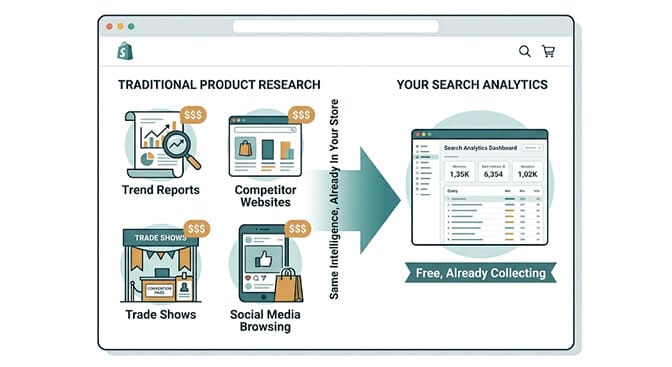
Most merchants spend money on market research, trend reports, and competitor analysis to figure out what to sell next. Your search data already has the answers. It's been collecting them every day. You just haven't read it yet.
The buyer for a home goods store had a process.
Every quarter she'd spend two weeks reviewing trend reports from industry services she paid for, browsing competitor catalogs, watching TikTok, reading trade publications, and attending one or two virtual sourcing events. The process produced a buying decision. Sometimes the decision was right. Sometimes it wasn't.
Then a colleague showed her the search analytics inside their store.
Specifically the zero-result report. The list of things customers had searched for in their store that had returned nothing.
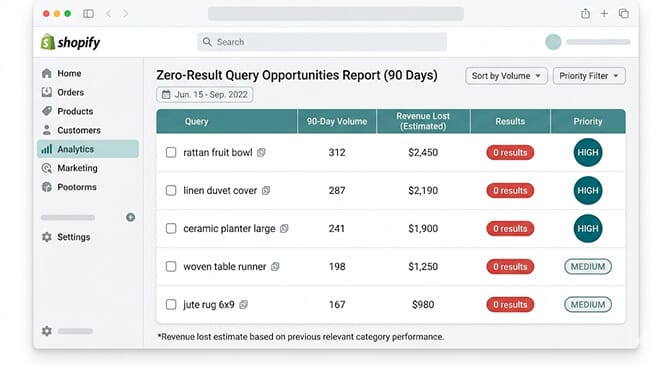
"Rattan fruit bowl" had appeared 312 times in the past quarter. They sold ceramic fruit bowls, wooden fruit bowls, and wicker storage baskets. Not rattan. Not specifically a fruit bowl in rattan.
312 customers had come to their store, typed exactly what they wanted, found nothing, and left.
She'd been paying for trend reports while her own customers were submitting product requests directly to her store's search bar.
The Data You Already Have That You're Not Using
Here's where most merchants are getting this wrong.
Product research is treated as an external activity. You go out to find demand signals. You subscribe to services. You study competitors. You look at what's trending on platforms you don't sell on. All of this to understand what your customers want.
Meanwhile, your search bar is running a continuous, real-time customer survey every single day. It's logging exactly what people came to your store looking for. It's logging what they found and what they didn't. It's logging which searches led to purchases and which led to exits.
This is not a small data set. For a store running a few hundred daily visitors, your search analytics accumulate thousands of product intent signals per week. Each one is more accurate than any trend report because it came from someone already on your store, already interested in buying, already telling you exactly what they want.
Your search analytics are not a technical report about how your search is performing. They are a transcript of every product conversation your customers tried to have with you. The question is whether you're reading it.
Most merchants aren't. Not because they don't care. Because nobody told them the transcript existed.
Reading the Transcript: Five Query Types and What Each One Means
Not all search queries carry the same type of intelligence. Here are the five categories and what each tells you about your product decisions.
Query Type 1: The Direct Catalog Gap
A zero-result query for a product type you don't carry is the clearest signal in your search data.
The customer is already in your store. They've already decided they trust you enough to buy from you. They searched for something specific. Got nothing. Left.
This is not ambiguous. They wanted rattan fruit bowls. You don't sell rattan fruit bowls. They left.
The frequency is the qualification threshold. A query appearing once might be unusual. A query appearing fifty times over ninety days is a consistent signal from a consistent segment of your audience. A query appearing three hundred times over ninety days is an urgent sourcing conversation.
Before treating every zero-result query as a catalog gap, run one check: search the term yourself in your store and try to find what they were looking for through other paths. If you sell something that genuinely matches the query but the search failed to surface it, that's a search configuration problem, not a product gap. Fix it with synonym mapping rather than sourcing.
If you genuinely don't have anything close to what the query describes, that's a product gap. The zero-result query is the sourcing brief.
Query Type 2: The Feature Request Hidden in a Failed Search
This one is trickier and more valuable.
The query returns results. Customers click through. Almost nobody buys. This pattern in your analytics looks like a search quality problem. It's actually a product specification problem.
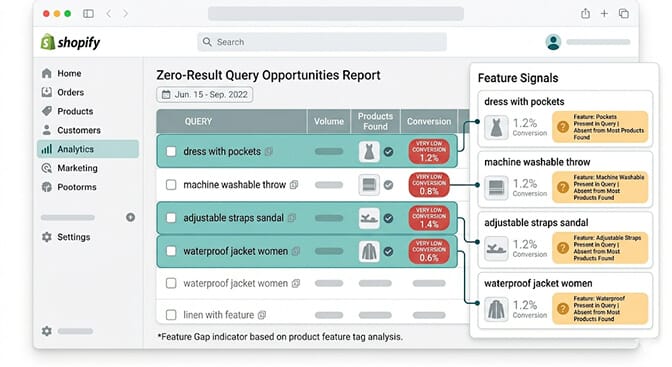
"Dress with pockets" returns results showing dresses. The dresses don't have pockets. The conversion rate is near zero because customers filtered specifically for a feature that none of the results have.
"Machine washable throw" returns decorative throws. Most can't be machine washed. Customers who care enough about care instructions to include them in their search query are not buying throws they have to dry clean.
"Waterproof jacket women" returns jackets. Many aren't genuinely waterproof, or the product data doesn't confirm they are. Customers searching specifically for waterproof are skeptical enough to not buy when the answer isn't clearly confirmed.
Each of these is telling you something specific about the feature requirements of your audience that your current inventory isn't meeting. The product exists in your catalog in the wrong version of itself.
This is the most actionable type of query intelligence for existing inventory: it tells you what specification upgrade would significantly improve conversion for products you already carry. Add pockets to your dress line. Source machine-washable versions of your popular throws. Confirm and surface waterproof ratings on your outerwear.
Query Type 3: The Vocabulary Gap That Hides an Actual Catalog Gap
This query type requires more judgment than the others but produces two different action paths.
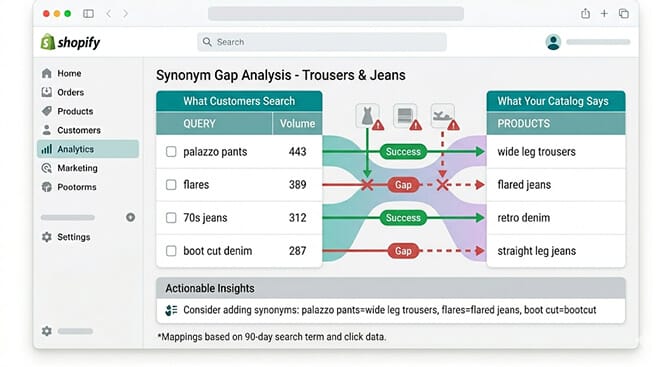
Sometimes a query that returns zero results reflects a vocabulary mismatch rather than a product gap. "Palazzo pants" returning zero results when you carry wide-leg trousers is a synonym problem. The product exists. The search doesn't know they're the same thing. The fix is in your search configuration rather than your buying decision.
But sometimes a vocabulary gap reveals an actual gap beneath the apparent synonym relationship. "Palazzo pants" and "wide-leg trousers" are related but not identical. A wide-leg trouser can be a tailored office piece. Palazzo pants usually means a flowing, dramatic silhouette. If your wide-leg trouser inventory is all tailored and structured, and the 443 "palazzo pants" queries represent customers looking specifically for the flowing version, fixing the synonym doesn't solve the problem. It just shows customers the wrong products faster.
The diagnostic test: look at the conversion rate on sessions where the vocabulary mismatch is bridged. If customers who search "palazzo pants" and get shown your wide-leg trousers through synonym mapping convert at a normal rate, it's a synonym fix. If they convert at near zero even with results surfaced, it's a product gap beneath the vocabulary gap. You have the term covered but not the concept.
Query Type 4: The Price Signal Embedded in the Query
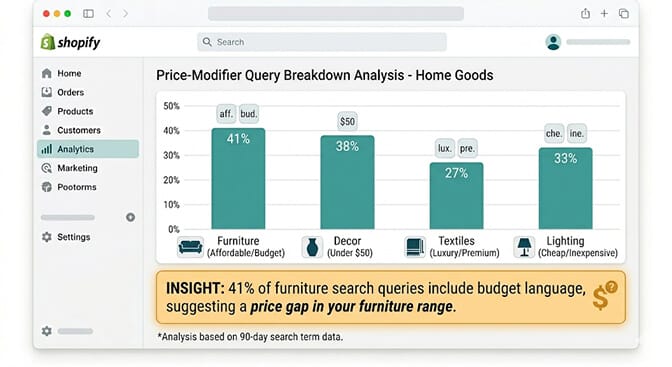
Your customers embed price expectations in their search queries, and almost nobody is reading these signals as pricing intelligence.
"Affordable area rug." "Budget-friendly coffee table." "Inexpensive throw pillow." When a significant proportion of queries in a specific product category include budget or affordability language, that category has a price expectation problem. Your entry price point is above what a meaningful segment of your audience expects to pay.
This tells you something specific: you either need an entry-level option in that category, or your value communication isn't working for the price-sensitive segment. The query data can't tell you which is the right answer. But it tells you the problem exists.
The opposite signal is equally valuable. "Premium bedding." "Luxury throw." "Investment piece furniture." High-intent aspirational language in queries within a category where you only carry mid-range products tells you there's an unmet premium demand segment in your audience. These customers want to spend more than your catalog lets them.
Both price signals together create a pricing architecture insight: if your category shows both budget queries and premium queries at significant volume, you may be positioned in the undifferentiated middle, missing both segments. Customers with strong price intent at either end aren't finding a satisfying match, which explains why that category's search-to-conversion rate may be lower than adjacent categories.
Query Type 5: The Category Creation Signal
This is the intelligence type that creates genuine competitive advantage.
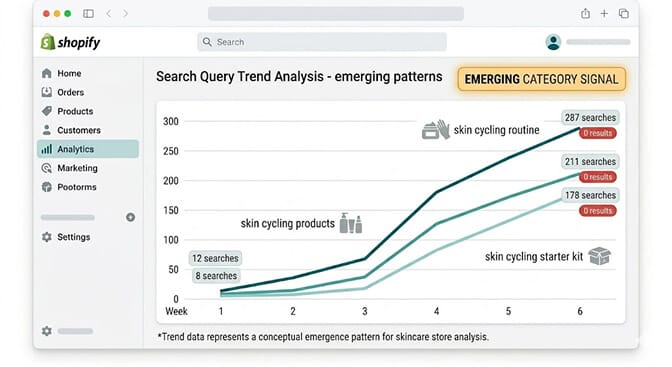
New search terms appearing in your data for the first time and then growing rapidly are category creation signals. Your audience is starting to use new vocabulary for a type of product or approach that's emerging in your category. They're bringing a trend into your store before the trend has peaked.
The specific pattern: a term appears at low volume, stays low for a couple of weeks, and then begins accelerating. When multiple related terms start accelerating together, that's a cluster signal. "Skin cycling," "skin cycling routine," and "skin cycling starter kit" all beginning to grow together in your skincare store tells you this is an emerging concept your audience is engaged with, not a one-off query.
The competitive advantage: if you're reading these signals when they're at 50 to 100 monthly searches and moving to address them, you're ahead of the demand curve by four to eight weeks. The merchant who sources product, creates a collection, and builds the relevant filter categories before the trend peaks captures the demand at its highest-intent moment.
The merchant who notices the trend when it's at 2,000 monthly searches and the category has twelve competitors is always chasing.
If you want to see which category creation signals your customers are generating in your store right now, check your search analytics in Sparq and filter for queries that appeared for the first time in the last 30 days with at least 20 searches. The ones growing fastest are your category creation signals.
The Three Questions Your Search Data Answers Better Than Any Trend Report
Here's the practical consolidation of everything above.
Question 1: What should I stock next? Your zero-result queries by frequency. The top twenty queries returning nothing that aren't vocabulary mismatches are your next sourcing conversation.
Question 2: What should I fix in what I already carry? Your high-volume, low-conversion queries. Products returning results but not converting tell you what specification upgrades or attribute gaps exist in your current range.
Question 3: What's about to be big that I should get ahead of? Your emerging query clusters. Terms that appeared recently and are growing tell you where your audience is going before the market has noticed.
External trend reports give you consensus signals. They tell you what everyone is noticing. Your search data gives you audience-specific signals. It tells you what your specific customers are doing right now, which is always more actionable than what the market broadly expects.
The rattan fruit bowl wasn't on any trend report the buyer subscribed to. But 312 of her customers wanted one.
The Takeaway
The buyer I mentioned at the start restructured her sourcing process.
She still reads one trade publication. She doesn't pay for trend reports anymore.
Every quarter, she opens her search analytics and spends two hours with the zero-result list, the low-conversion list, and the emerging query clusters. That two-hour session replaces two weeks of external research and produces more accurate buying decisions than the process it replaced, because the signal source is her actual audience rather than a generalized market estimate.
She sources from what her customers ask for. She discontinues what her customers consistently search for but never buy. She gets ahead of trends by watching what her customers are starting to ask about before the market has caught up.
The data was always there. The meeting just hadn't been scheduled.
Ready to start reading the transcript? Install Sparq on your Shopify store and check your search analytics. The data you need to make your next product decision is probably already in there.
Frequently Asked Questions
What is search query analytics as product intelligence for Shopify merchants?
Search query analytics as product intelligence is the practice of treating your store's internal search data as a primary product research tool rather than an operational metric. Your search bar collects continuous demand signals from your actual customers: what they want, what they can't find, what feature specifications they require, and what price expectations they bring to specific categories. Zero-result queries indicate catalog gaps. High-volume, low-conversion queries indicate specification or pricing mismatches. Emerging query clusters indicate rising trends in your specific audience. All of this is more accurate than external trend reports because it comes from customers already on your store.
How do I distinguish between a product gap and a vocabulary gap in my zero-result queries?
Search the zero-result term yourself in your store and try to find a matching product through other means (browsing, collections, related searches). If you can find a relevant product your search doesn't return, it's a vocabulary gap addressable with synonym mapping. If you cannot find anything genuinely similar to what the query describes, it's a product gap where sourcing is the right response. A secondary check: after fixing a vocabulary gap with synonyms, monitor the conversion rate on sessions where the bridged term surfaces results. If customers who get results through synonym mapping convert at near zero, the mismatch goes deeper than vocabulary and the product gap interpretation is likely correct.
How often should I review my search analytics for product intelligence?
A quarterly review produces the most actionable product sourcing decisions, timed to align with buying cycles. Within that review, focus on three reports: zero-result queries by 90-day volume (catalog gaps), high-volume queries with under 2% conversion (specification and pricing gaps), and new queries that appeared and grew during the quarter (emerging category signals). A shorter weekly or biweekly check for the fastest-moving signals, specifically queries that appeared recently and are growing rapidly, helps you catch category creation signals early enough to act ahead of demand peaks.
Can search analytics tell me which products to discontinue?
Yes, in two specific ways. Products that appear in search results for high-volume queries but convert at significantly below your category average indicate a mismatch between what customers searching that query want and what that product delivers. After ruling out search configuration issues, persistent underperformance on searched queries is a product discontinuation signal. Separately, products that never appear in any search path and have no organic browsing traffic despite reasonable catalog positioning are candidates for review regardless of absolute revenue, since they're not generating customer intent on their own.
How is your own search analytics data better than paid trend research for product decisions?
External trend reports tell you what the general market is noticing. Your search analytics tell you what your specific audience is doing right now. The difference is precision and immediacy. A trend report may identify rattan home goods as an emerging category for the general home goods market. Your search analytics tell you specifically that 312 people who already trust your store enough to visit it searched for a rattan fruit bowl in the past quarter. The latter is a far more actionable signal because the demand is pre-qualified, audience-specific, and attached to clear purchase intent rather than general market awareness.