
Edge-Delivered Search: Why Fast Filters Are No Longer Optional for Mobile Conversion in 2026
Mobile drives 65 to 75% of your traffic. Mobile converts at half the rate of desktop. The gap isn't your products or your prices. It's milliseconds. Here's how edge-delivered search and instant filters close it.
He showed me his analytics with the kind of controlled frustration you develop after months of staring at the same confusing number.
Mobile: 68% of traffic. 1.9% conversion rate. Desktop: 32% of traffic. 3.8% conversion rate.
"The mobile experience looks exactly like the desktop experience on our phone," he said. "Same products. Same filters. Same design. Why does it convert half as much?"
I asked him one question. "How long does your filter sidebar take to update when someone applies a filter on mobile?"
He didn't know. He'd never tested it.
We pulled it up on a mid-range Android phone on a standard 4G connection. He applied a size filter. The page waited. Then waited a bit more. Then the results updated. Total time: 2.3 seconds.
We applied a second filter. Same wait. 2.1 seconds.
On a phone. On a store he'd been running for two years. Every filter application was asking mobile shoppers to wait more than two seconds while the page made a round trip to the server and back.
He'd been losing mobile conversions to a physics problem, and he had no idea.
The Mobile Conversion Gap Is a Speed Problem
Let's be clear about what's actually happening.
Mobile now drives 65 to 75% of ecommerce traffic for most Shopify stores. Mobile conversion rates average 1.8 to 2.5%, compared to 3.5 to 4.0% for desktop. That gap represents the largest addressable revenue opportunity in most Shopify stores, and it's been sitting there for years while merchants run ads, redesign product pages, and optimize their conversion stack.
Here's the uncomfortable truth about that gap.
Most of it isn't explained by product photography, checkout friction, or trust signals. Those things matter. But the most consistent driver of the mobile-desktop conversion gap is page and interaction speed. Specifically: the speed at which filter applications, search queries, and content updates happen on a standard mobile connection.
53% of mobile users abandon a site that takes longer than 3 seconds to load. Every 100ms of latency correlates with a 7% decrease in conversion rate. Shopify has documented that stores with sub-1-second load times convert at nearly double the rate of stores loading in 3 or more seconds.
Filter and search interactions are where these latency costs are most concentrated. Every time a mobile shopper applies a filter or types a search query, they're making an implicit patience bet. They're deciding whether the result is worth the wait. On mobile, with variable network conditions and slower processors, that bet fails more often than on desktop. (See our deep dive on ecommerce filter design that converts for the UX side of this equation.)
The mobile conversion gap is not a UX problem or a trust problem or a product problem. For a significant percentage of stores, it's a physics problem. Requests are traveling too far before returning results.
What Edge-Delivered Search Actually Means
"Edge computing" sounds like something your infrastructure team worries about. For a Shopify merchant, it has a very specific, very practical meaning.
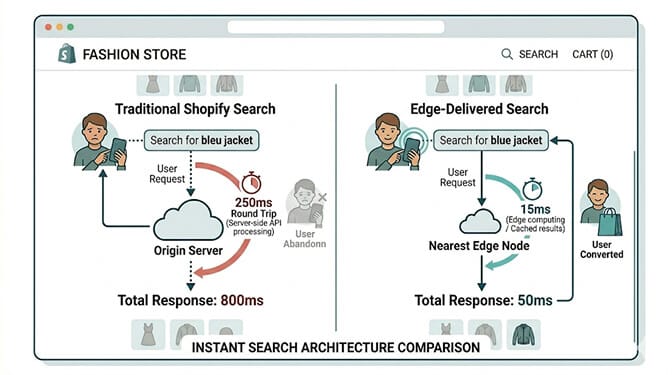
Traditional server architecture: when a customer on your Shopify store in Sydney applies a size filter, that request travels to Shopify's origin servers (in North America or Europe), the server processes the filter query, and the results travel back to Sydney. That round trip is 150 to 300ms of pure network travel time before any processing happens.
Edge architecture: the same filter query is processed at an edge server in Sydney or close to it, 10 to 30ms away. The results return in a fraction of the time.
For a filter application or search query, this difference matters enormously. A 200ms filter response feels instant. A 800ms to 1.5-second filter response feels like the app is thinking. A 2-second filter response on mobile feels broken.
Shopify itself runs on a distributed infrastructure with edge caching for static assets. But dynamic interactions like search queries and filter applications often still require origin server processing, which is where the latency problem lives specifically for international traffic and high-volume filter interactions. (For a primer on how modern search query processing actually works under the hood, see how an ecommerce search algorithm works.)
Search and filter apps built on edge infrastructure process queries at the network edge rather than making round trips to the origin for every interaction. The difference is most visible for mobile users on standard connections, users in geographic markets far from Shopify's primary data centers (Southeast Asia, South America, Africa, Eastern Europe), and users applying multiple sequential filters.
The Four Speed Metrics That Determine Filter Conversion
Not all speed metrics are created equal. These four specifically determine whether your filter and search experience converts mobile traffic or kills it.
Metric 1: Time to First Filter Result (TTFR)
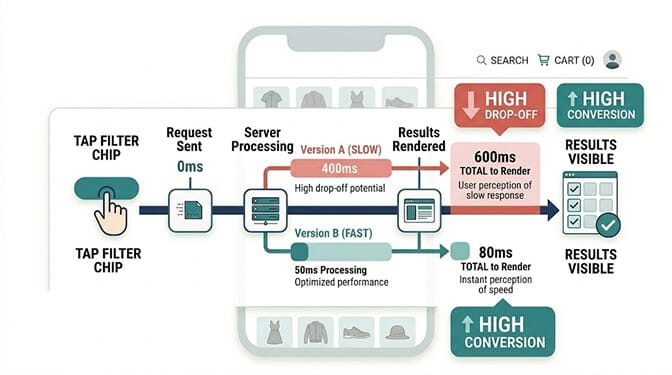
This is the metric that matters most for filter conversion: how long from the moment a customer taps a filter chip to the moment updated results appear on screen.
The acceptable threshold on mobile: under 200ms. This is the point at which the interaction feels responsive rather than delayed. Human perception research consistently shows that response times under 200ms feel instantaneous. Response times of 200ms to 1 second are perceptible but acceptable. Response times over 1 second break the perception of a direct interaction.
For filter applications, anything over 500ms on mobile produces measurable abandonment increases. The customer taps the filter, waits, and during that wait, the buying impulse competes with the distraction impulse. On mobile, distractions win more often.
The test: on a standard 4G connection (not your office wifi, not your personal LTE), apply each of your most common filter combinations and time the response from tap to visible results update. If any combination exceeds 500ms, you have an identifiable conversion problem.
Metric 2: Search Autocomplete Response Time
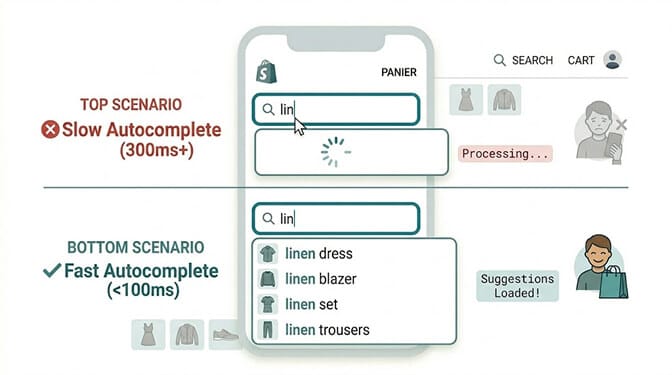
The autocomplete experience on your search bar is where speed perception is most acute.
When a customer types into your search bar, autocomplete suggestions should appear within 100ms of each keystroke. This is the threshold at which typing and suggestion appearance feel synchronized, like the suggestions are following your fingers. At 200ms, there's a perceptible lag. At 300ms or more, suggestions feel disconnected from the typing, and customers often type the full word and hit search rather than selecting an autocomplete option.
Autocomplete that feels disconnected from typing reduces suggestion selection rates. Customers who don't use your autocomplete suggestions reach less relevant search results because they're typing full queries rather than selecting pre-validated options. Lower-relevance results mean lower conversion.
The mechanism: fast autocomplete requires a search index that's either cached locally (in the browser), available at the edge, or fast enough to respond in under 100ms including network travel time. For most locations and most connections, this requires edge-delivered search infrastructure. (For a deeper look at autocomplete UX patterns, see our guide to ecommerce search autocomplete.)
Metric 3: Sequential Filter Application Compounding
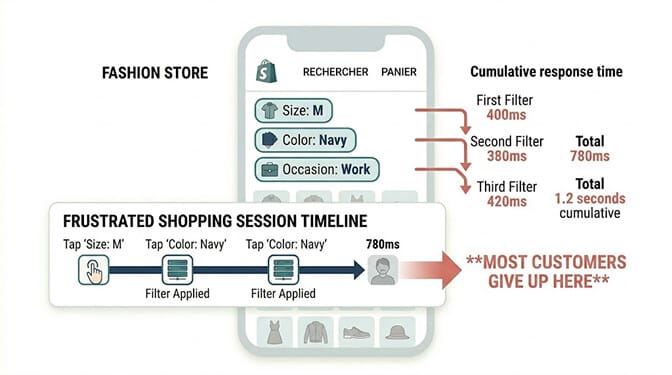
Here's the latency problem that most speed optimization conversations miss.
A single filter application at 400ms is annoying. Three sequential filter applications at 400ms each is 1.2 seconds of cumulative waiting, which for a mobile shopper who wanted to apply a combination of size, color, and occasion filters means 1.2 seconds of staring at a page while it processes before showing relevant results.
This is the sequential filter application problem. Each filter application is a separate round trip to the server. The latency compounds.
Customers who know exactly what they want and try to apply three or four filters to find it are your highest-intent visitors. They're the ones who should convert at the highest rate. But if each filter application adds 300 to 500ms of wait time, they're also the ones who experience the most cumulative delay.
Edge-delivered filter systems process each filter application from the nearest edge node, dramatically reducing the per-application latency. At 50ms per application rather than 400ms, three sequential filters take 150ms total rather than 1.2 seconds. The difference is the gap between "instant" and "waiting."
Metric 4: Mobile Network Variability
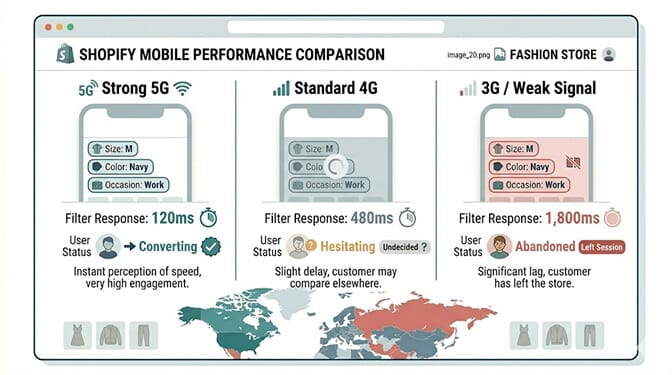
Desktop users are typically on a stable, high-bandwidth connection. Mobile users are not.
Your mobile traffic comes from customers on 5G, 4G, 3G, and everything in between. It comes from customers in strong signal areas and weak signal areas. It comes from customers whose connection quality changes mid-session as they move.
A filter system that performs acceptably on 4G may perform unacceptably on 3G or weak 4G. International traffic (which increasingly represents a meaningful share of most Shopify stores) often uses mobile connections with significantly higher latency than domestic traffic.
The practical implication: your filter speed performance on your personal device in your office is not representative of the performance your median mobile customer experiences. Testing on a fast connection gives you the best case. Your customers experience the median case, which is meaningfully slower.
Edge-delivered search reduces the sensitivity to network variability because the edge server processing the query is much closer to the customer. On a slow connection, the difference between a 5,000km round trip and a 50km round trip is the difference between a 2-second wait and a 100ms wait.
If you want to understand where your mobile search and filter performance is losing customers right now, install Sparq from the Shopify App Store and check your search analytics in Sparq filtered by device type. The gap between mobile and desktop search conversion rates in your analytics is a direct measure of speed-driven mobile conversion loss. (For the metrics that matter most, see the search ROI KPIs every Shopify store should track.)
What "Instant" Actually Means for Mobile Shoppers
Stay with me here, because this is the psychological piece that makes the speed conversation more than a technical argument.
Mobile shopping happens in shorter sessions with more distractions and less tolerance for friction than desktop shopping. The mobile context is fundamentally different.
On desktop, a customer at a computer with a task in mind can tolerate a half-second filter delay. She's in a focused browsing state. The wait is annoying but not fatal.
On mobile, the same customer may be shopping between meetings, on public transit, waiting in a queue, or in a dozen other situations where her attention is divided and her patience is limited. A half-second filter delay competes with a notification from any of the other apps on her phone. A 1-second delay is a meaningful invitation to check Instagram instead.
This is why the speed threshold for mobile filter interactions is lower than for desktop, even controlling for connection speed. The mobile context produces more competition for attention during every moment of wait time.
"Instant" for mobile filter purposes means under 100ms. That's the threshold at which the interaction feels like a direct extension of the tap rather than a request being processed. Under 200ms feels fast. Under 500ms feels acceptable. Over 500ms loses a measurable percentage of the mobile shoppers who were ready to buy.
The Practical Shopify Merchant Path to Edge-Delivered Search
Here's what this means practically for your store.
Shopify's native search does not deliver edge-computed results. It processes queries through its standard infrastructure, which is well-optimized for static asset delivery but not for real-time search and filter interactions. (For a side-by-side breakdown of native vs third-party search, see our best ecommerce search engines for Shopify comparison.)
The difference between merchants running fast filter interactions and slow ones in 2026 is typically their search and filter app. Specifically, whether that app processes queries at the edge or routes them to an origin server. If you're shopping for one, our roundup of the best paid and free Shopify search apps is a useful starting point — and Sparq is available on the Shopify App Store with a free trial if you want to test edge-delivered filter speed on your own catalog before committing.
What to evaluate when assessing search and filter app speed:
Ask specifically: does your search infrastructure use edge computing or CDN-level query processing? A vague answer about "fast servers" is not the same as edge-delivered search. The specific question is whether the search query is processed geographically close to the user or whether it makes a round trip to a central origin.
Test on multiple devices and connections. Open your store's filter interface on a mid-range Android phone on a mobile data connection (not wifi) and time filter applications. Do the same on a laptop. The gap between these two tests is your mobile filter speed problem in concrete form.
Test from multiple geographies if your traffic is international. A store that feels fast in the US may feel slow in Southeast Asia or South America if the search infrastructure isn't globally distributed.
The migration path: Most Shopify stores can move to edge-delivered search without any development work by changing their search and filter app. The configuration migrates. The speed benefit is immediate.
The Takeaway
The merchant with the 1.9% mobile conversion rate retested his filter speed after moving to edge-delivered search.
Average filter application response time on mobile: 80ms. Down from 2.3 seconds.
Mobile conversion rate three months later: 2.7%.
He hadn't changed his products. Hadn't changed his prices. Hadn't redesigned his mobile experience. He'd removed the 2.3-second physics tax that had been applied to every filter interaction every mobile customer made.
The customers were already there, ready to buy. The filters had been asking them to wait.
The mobile-desktop conversion gap is real. For most stores it has multiple causes. But for stores where filter and search applications take multiple seconds on a mobile connection, speed is the largest single fixable cause. And it's fixable without a rebuild, without a redesign, and without any code changes.
It's a search infrastructure decision.
Ready to see how your mobile search performance compares and where the speed loss is costing you? Install Sparq on your Shopify store and run the mobile filter speed test on a 4G connection. The number you see is what your median mobile customer experiences every time they try to find something in your catalog. Prefer a walkthrough first? Book a demo or check our pricing for your catalog size.
Frequently Asked Questions
What is edge-delivered search for Shopify stores?
Edge-delivered search processes search queries and filter applications at network edge servers physically close to the user rather than routing every request to a central origin server. For a customer in Sydney, edge-delivered search processes their filter query from an edge node in Sydney rather than making a round trip to a server in North America or Europe. This reduces the network travel time from 150 to 300ms to under 30ms, which produces dramatically faster filter responses on mobile devices and mobile networks where latency is most impactful on conversion.
How much does filter speed actually affect mobile conversion rates?
Significantly. Research consistently shows that every 100ms of latency correlates with a 7% decrease in conversion rate. Stores with sub-1-second load times convert at nearly double the rate of stores loading in 3 or more seconds. For filter interactions specifically, response times under 200ms produce the highest engagement and conversion rates. Filter applications over 500ms on mobile produce measurable abandonment increases, and sequential filter applications that compound latency (each filter adding 300 to 500ms of wait) disproportionately affect the highest-intent shoppers who want to apply multiple filters to find exactly what they need.
How do I test my current Shopify filter speed on mobile?
Test on a mid-range Android or iPhone on a mobile data connection (not your office wifi or personal high-speed LTE). Apply each of your most common filter combinations and time from the moment you tap the filter chip to the moment updated results appear on screen. Do this for a single filter and for sequential two-filter and three-filter combinations. Any single filter application over 500ms on standard 4G is a conversion problem. If you have international traffic, repeat the test using a VPN to simulate connections from your highest-traffic international markets, as latency from distant geographies is typically higher and the gap between edge and origin server performance is larger.
Does switching to edge-delivered search require developer work on Shopify?
Not typically. Switching search and filter apps on Shopify is generally a configuration-level change rather than a development project. The new app is installed, configured to match your filter categories and product attributes, and the old app is disabled. The speed benefit is immediate because it comes from the infrastructure the new app runs on, not from changes to your theme or product data. Most quality Shopify search apps can be installed and configured within a few hours without developer involvement.
Why does the mobile-desktop conversion gap persist if mobile is such a large share of traffic?
The mobile-desktop conversion gap persists because it has multiple causes that overlap in complex ways: checkout friction, trust signal placement, screen real estate constraints, and speed. Merchants often address the visible causes (checkout friction, trust signals) without testing the invisible one (filter and search response time on actual mobile connections). Speed problems on mobile are particularly hard to notice because developers and merchants typically test on fast connections and high-end devices. The median customer's 4G connection on a mid-range phone on a commute produces a very different speed experience than the merchant sees when testing, and that gap is where the conversion loss lives.







