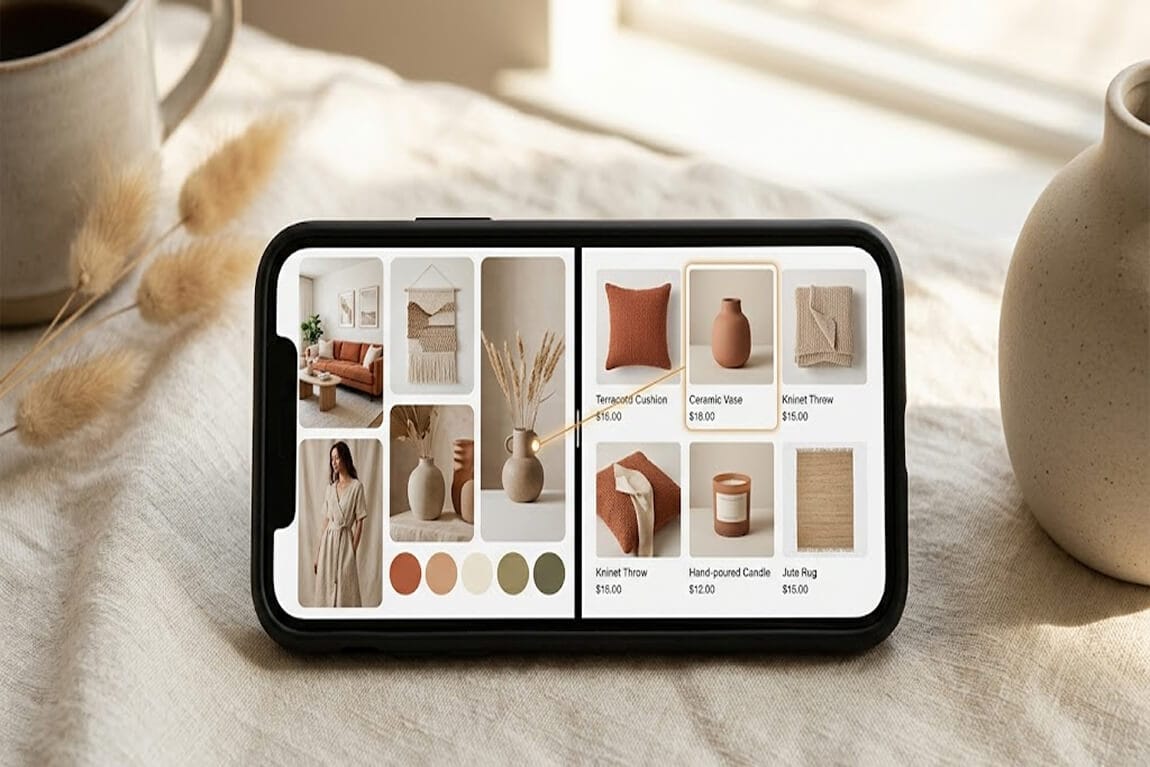
Cross-Platform Visual Search Sync: From Pinterest to Your Shopify Store in One Click
Pinterest sends 600 million visual searches a month and you're catching them with a text input. Here's the fix that finally lets a customer go from "saved this Pin" to "bought it on your store" without a single typed word.
She'd been on the store for nineteen seconds.
I watched the session replay twice. A young woman lands from a Pinterest tap, clearly on a mood-board mission. She types "beige slouchy bag" into the search bar. The store returns 137 results, none of which match the very specific Pin she'd just been staring at. She scrolls, gives up, and closes the tab.
Here's the weird part. The exact bag she wanted was in that catalog. Two rows down, third column. The store had it. Her words didn't.
That single screenshot in her phone's camera roll was worth more than any keyword she could have typed. And the search bar she landed on couldn't see it.
This is the real conversion gap between Pinterest and your Shopify store. It's not traffic. It's translation. Stay with me.
The traffic is already there. The bridge is broken.
Pinterest is now a 619 million monthly active user discovery platform. Its visual search tool processes somewhere between 600 million and over a billion visual searches every month, with mobile usage growing roughly 27 to 50 percent year over year. About 85 percent of weekly Pinterest users have bought something after seeing it on the platform, and average order value from Pinterest traffic sits at around $50 to $75 (roughly double Instagram or Facebook).
Pinterest ranks fourth for social referral traffic to Shopify stores. That referral arrives with the highest purchase intent of any social channel.
Then it hits your search bar, and you ask it to suddenly become a vocabulary test.
About 96 percent of top Pinterest searches are unbranded. People search Pinterest visually because they don't have the right words. Then they land on your store and you hand them the same dictionary that just failed them on Pinterest. And this is the part that costs you money.
What every store needs is a sync layer that accepts the image directly, no typing required. That's what cross-platform visual search sync actually is.
What "visual search sync" actually means (no buzzwords)
Strip the jargon. Visual search sync is your store's ability to ingest an image (URL, screenshot, drag-and-drop, browser extension capture) from any external source and instantly return the closest matches in your catalog.
The shopper doesn't have to describe the bag. They just hand the store the picture. The store does the matching.
For Shopify merchants, three things have changed in the last 18 months that make this actually viable. Image embedding models are cheap enough to run at search-bar speed. Mobile browsers now let users paste images directly into form fields. And Pinterest-style discovery is so dominant that your shoppers already arrive holding the screenshot.
If you want the deeper read on why search is moving past text entirely, our piece on how visual search agents are already shopping your store covers the bigger shift behind this.
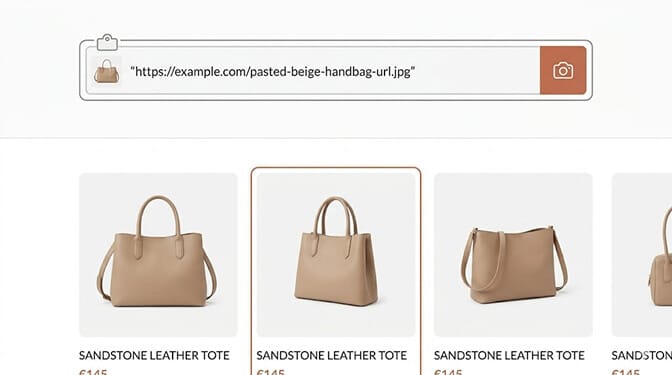
Pattern 1: The image URL paste into the search bar
The simplest implementation lives inside the existing search bar. A shopper copies an image URL (from a Pin, an Instagram screenshot link, anywhere) and pastes it into your search input. Your search recognizes the URL is an image, fetches it, embeds it, and runs a visual similarity match against your catalog.
The merchant gets: a brand new entry point that captures shoppers who were never going to type the right words. The shopper gets: the answer to "where do I find this thing I saved?" in one paste.
Keep the visual cue minimal. A small camera icon inside the search bar is enough. The shoppers who need this already know how to paste.
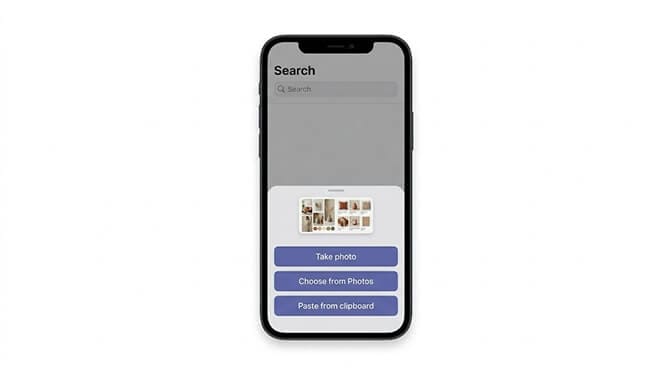
Pattern 2: The camera roll upload on mobile
This is where mobile actually earns its keep. The shopper taps the camera icon next to the search bar and gets a native sheet: take a photo, choose from photos, paste from clipboard.
Ninety percent of the time, they tap "Choose from Photos" and grab the screenshot of the Pin they took twenty minutes ago. That screenshot is the highest intent visual artifact your store will ever receive. It's not a vague desire. It's a literal picture of the thing they want to buy.
This is where most store owners get it wrong. They build visual search as a desktop-first feature, then wonder why nobody uses it. The mobile camera roll is where the conversion lives. Build there first.
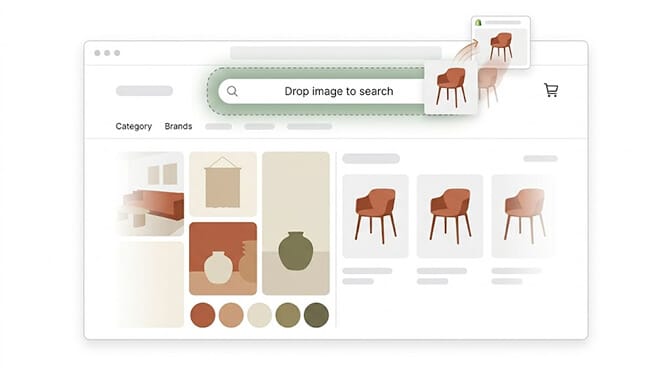
Pattern 3: The drag-and-drop on desktop
For desktop shoppers (and there are still a lot of them in furniture, fashion, and considered purchases) drag-and-drop is the unsung pattern.
The shopper opens a Pin in one tab, your store in another, drags the image from one to the other, and drops it on the search bar. The search bar lights up, accepts the drop, and runs the visual match.
It feels small. It's not. Considered-purchase categories (furniture, lighting, luxury accessories) live on desktop, and these shoppers research across many tabs. Meeting them at the drop zone is meeting them where they already are.
Pattern 4: Multi-object detection in a single image
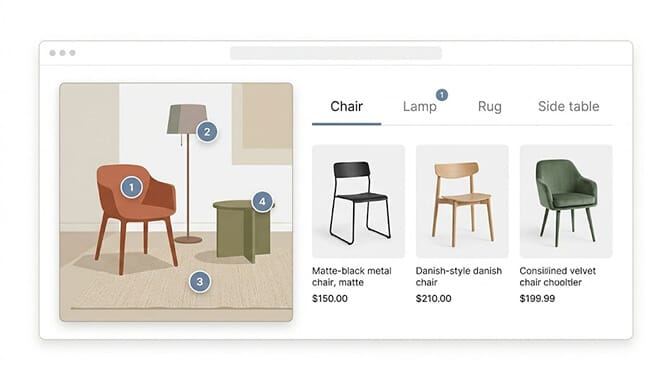
This one is doing real work in furniture, decor, and outfit-driven fashion. A shopper drops in a single Pin showing a fully styled room (or a fully styled outfit). Your search recognizes the multiple objects in the image and offers matches for each one as separate tabs.
The room Pin becomes a chair query, a lamp query, a rug query, and a side table query all at once. One image. Four shopping intents.
For DTC home and furniture brands, this is the highest-ticket visual search pattern by a wide margin. Average order value rises sharply when shoppers add coordinated items from a single look.
Pattern 5: The "Shop This Pin" browser extension
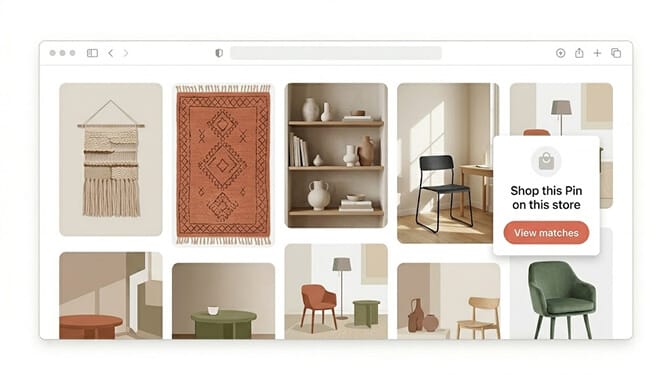
This is the stealth move. A small extension or bookmarklet that lives in the shopper's browser and adds a "Shop this Pin on your store" overlay to any Pinterest image they hover over.
When the shopper finds something they love on a Pin, they click your overlay, and they're dropped directly into a search results page on your store with the visual match already executed.
The merchants experimenting with this aren't doing it as a public app yet. They're using a custom extension for their VIP customers, their interior design partners, and their wholesale buyers. Stay with me here. This becomes a loyalty program disguised as a discovery tool.
If you want to see how multi-source visual search fits alongside voice and natural language inputs, our breakdown of multimodal search for Shopify goes into the architecture.
Pattern 6: Visual search analytics that tells you what to stock
Here's the part almost nobody is using yet, and it's the highest leverage of all six.
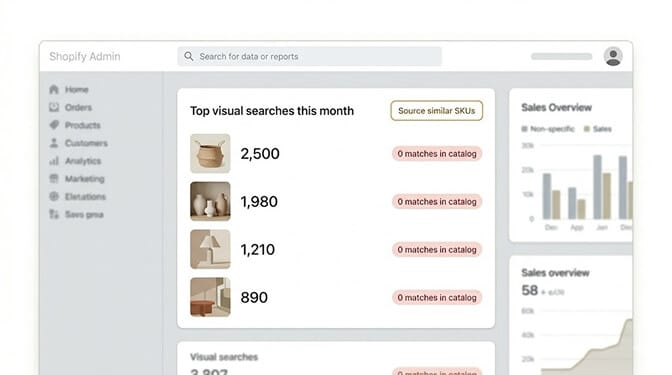
Every visual search your store receives is a data point about what shoppers wanted that you didn't have. Once you start tracking what visual searches return zero or low-quality matches, you have a real-time signal for what to source next, what to ask your designers for, and what color or silhouette is suddenly trending in your category.
Your search bar quietly becomes your buyer's most honest brief. No focus groups. No surveys. Just the actual pictures your real customers brought through the door.
Most Shopify merchants are flying blind on this. They look at sales data, which only tells them what they sold of what they already had. Visual search analytics tells them what they could have sold and didn't. Our piece on using search analytics to decide what to stock next shows the same idea applied to text search.
If you want to test visual search sync on your store without writing any code, Sparq installs in about ten minutes on Shopify and includes visual search inputs alongside its AI text search. The setup is one click, the analytics start populating the same day, and the free trial lets you see what your shoppers are actually trying to find before you commit to anything.
The honest limits (because you should know them)
Visual search isn't magic. A few real boundaries:
It works best on visually distinctive categories: fashion, home decor, furniture, accessories, footwear. It works less well on commodity categories with low visual differentiation (basic electronics, generic supplements, undifferentiated home goods).
It needs clean product imagery on your end. If your product photos are inconsistent (mixed backgrounds, off-color lighting, model shots only) your visual search results will inherit that mess. Standardized product photography is the unsexy prerequisite nobody wants to hear.
And it does not replace text search. Most shoppers still type. Visual search is the upgrade for the shoppers who arrive holding a picture, which is the highest intent group you have. Treat it as additive, not as a replacement.
What I wish more Shopify merchants understood
The shopper who arrived from a Pin already did the hardest part of your funnel. She found a thing she loved. She remembered your store enough to land on it. She showed up holding the visual answer.
All your store had to do was meet her in the language she was already speaking.
When a shopper has a screenshot and your store has a text input, the screenshot wins. Either you accept the image, or you lose the sale to whoever does.
The Pinterest-to-Shopify gap isn't a marketing problem. It's a search-bar problem. Close it, and you don't just convert better. You finally make the discovery layer your customer was already living in.
You don't have to rebuild your store. You just have to teach your search bar to see.
The next time a shopper lands on your site holding a Pin, give her somewhere to drop it.
Frequently Asked Questions
What is cross-platform visual search sync?
Cross-platform visual search sync is your store's ability to accept an image from any external source (a Pinterest Pin, an Instagram screenshot, a saved image from your camera roll, a drag-and-drop from another tab) and return the closest matching products in your catalog instantly. Instead of asking a shopper to describe what they want in words, your store reads the image directly and runs a visual similarity match against your products.
How does visual search sync compare to Shopify's default search?
Shopify's default search is text-based and matches on exact keywords from product titles and tags. Visual search sync uses image embeddings to match on visual similarity, so a shopper can paste a Pin or upload a screenshot without typing anything. The difference matters most for Pinterest and Instagram traffic, where 96 percent of top searches are unbranded and shoppers usually don't have the right vocabulary to describe what they saw.
How do I add visual search from Pinterest to my Shopify store?
You don't need to build the integration yourself. With an AI-powered search and filtering app like Sparq, you can enable a camera icon in your search bar that accepts image uploads, pasted image URLs, and drag-and-drop input. Setup takes about ten minutes, no developer required, and your existing product catalog is indexed automatically so visual matches work from day one.
Does visual search sync actually increase conversion for Shopify stores?
Yes, especially for visually-driven categories like fashion, furniture, home decor, and accessories. Pinterest traffic in particular has roughly double the average order value of other social platforms, so capturing those shoppers with visual input rather than forcing them through a text search materially lifts conversion. The bigger win is often the analytics: visual search data tells you what shoppers wanted that you didn't have, so you can source the right inventory next.
Will adding visual search slow down my Shopify store or break my theme?
A modern AI search app that supports visual input runs the image processing on its own servers, not on your storefront, so it does not slow your page load. Theme compatibility is also handled at the app level, not by your developer, which means visual search input usually works with any standard Shopify theme out of the box. Always run a quick install on a development theme first if you're on a heavily customized build, but for most stores it's a non-event.







