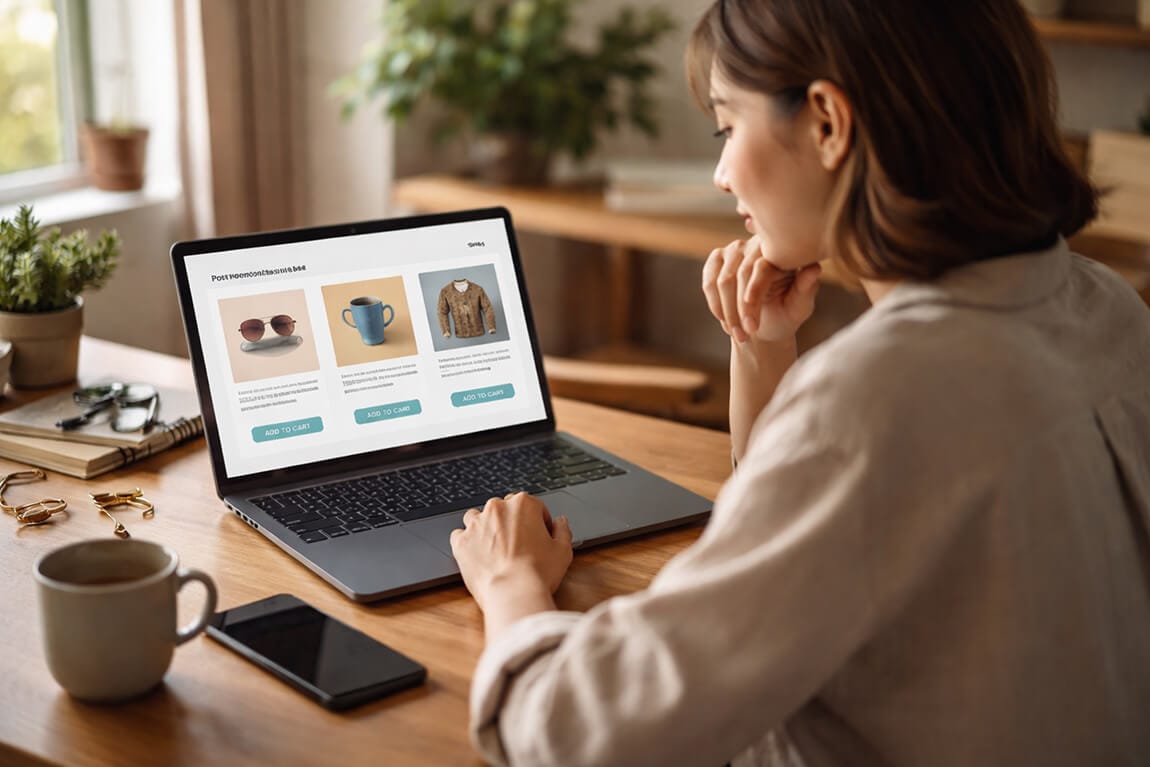
Post-Purchase Discovery Engine: Smart Filters That Drive Repeat Buys and Subscriptions
Your customers already bought once. Here is how to use search and filters to make them come back, without spending a dollar more on ads.
The customer bought a $60 bag of specialty dog food. Great.
Then she vanished.
I was staring at a cohort report for a pet brand, and the pattern made my stomach drop. Thousands of one-time buyers. People who clearly loved the product enough to buy it once, then never came back. Not because they were unhappy. Because nobody ever showed them what to buy next.
Here's the part that costs you money. That store was spending a fortune acquiring customers, then treating the moment right after purchase like a dead end. Order confirmation, shipping email, silence.
This is where most store owners get it wrong. They think discovery ends at checkout. It doesn't. The smartest repeat revenue you'll ever earn comes from helping people discover their next purchase, right after they've fallen in love with their first.
Let me show you how smart filters and search turn one-time buyers into subscribers.
Why the post-purchase moment is your best discovery window
Think about the psychology for a second.
A customer who just bought from you is at peak trust. They've handed over their card. They're excited about what's coming. That window, right after purchase, is the warmest a shopper will ever be. And most stores waste it completely.
The old playbook says discovery happens before the sale. Browse, search, filter, buy. But for repeat-purchase and subscription brands, the richest discovery happens after. You now know something you didn't before: what they actually bought.
A first purchase is the single best piece of data you will ever get about what a customer wants next. Most stores throw it in the trash.
That one data point (what they chose) lets you filter your entire catalog down to the handful of things they're genuinely likely to want again. That's not guessing. That's discovery powered by intent you already have.
Here is where most stores bleed money
The default Shopify experience treats every visit like a first visit.
Someone who bought dog food last month lands back on your site and sees... the same generic homepage as a total stranger. Same search box. Same unfiltered grid. No memory. No path to "buy it again" or "here's the matching thing."
And this is the part that costs you money. A returning customer has the highest conversion rate of anyone on your site. When you show them a blank, undifferentiated experience, you're forcing your warmest buyer to do all the work of finding their next purchase.
Most of them won't. They'll bounce, and you'll pay to re-acquire them through an ad later. Insane, when you think about it.
If you want to see how often this is happening on your own store, the fix starts with understanding what returning visitors actually search for, which is exactly what good search analytics reveal. (For the metrics that actually matter, see the search ROI KPIs every Shopify store should track.)
Now let's get into the actual patterns that fix this.
Pattern 1: The "Buy It Again" Smart Filter
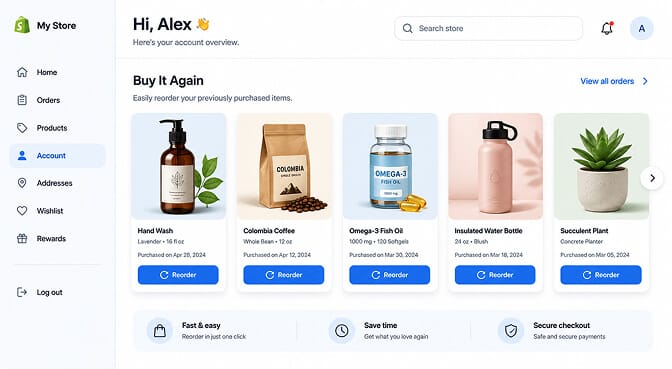
This is the simplest, highest-return pattern, and shockingly few stores do it well.
A dedicated filter or section that surfaces a customer's previously purchased items the moment they return. For consumables (food, supplements, beauty, coffee), this single feature can carry a huge chunk of repeat revenue.
Why it works: you're removing every step between "I need more of that" and "done." No searching, no re-finding, no friction. The product they already trust is one tap away.
The smart version goes further. It filters by replenishment timing, surfacing the items they're statistically due to reorder, not just everything they've ever bought.
Pattern 2: Replenishment Filters Tied to Purchase Date
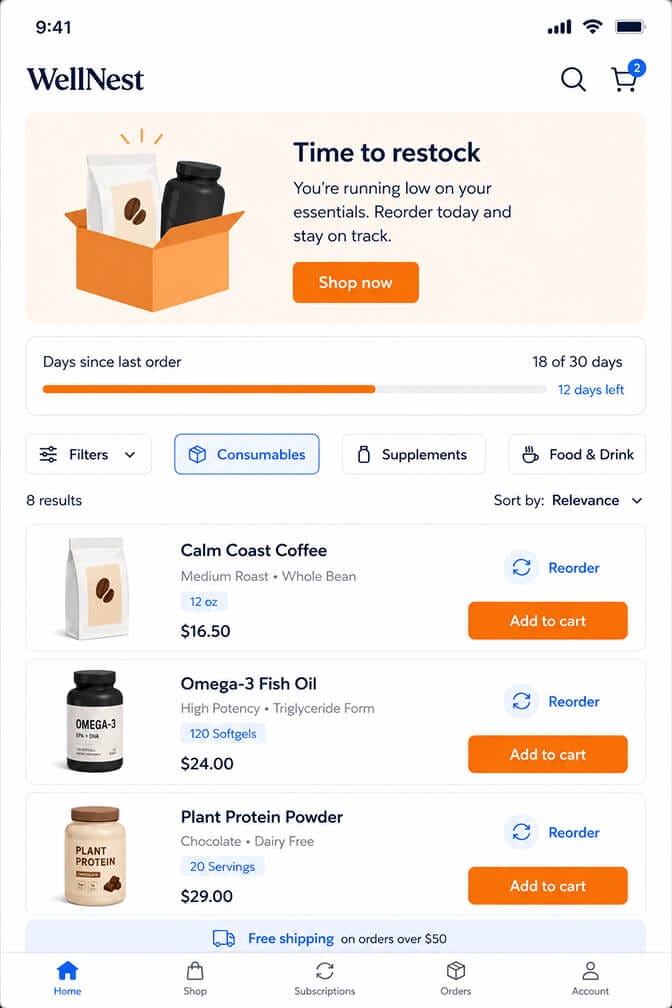
Timing is everything for consumables.
If someone buys a 30-day supply of something, the perfect moment to show it again is around day 25. A replenishment filter sorts and surfaces products based on when a customer last bought them.
Why it works: it matches your merchandising to real-life consumption. You're not nagging people to buy random things. You're reminding them about the thing that's about to run out.
This is where filtering quietly becomes retention. The catalog reorganizes itself around each customer's actual rhythm, which is the whole point of intelligent discovery. (For more on this side of search, see our deep dive on ecommerce filter design that converts.)
Pattern 3: "Complete the Set" Cross-Sell Filters
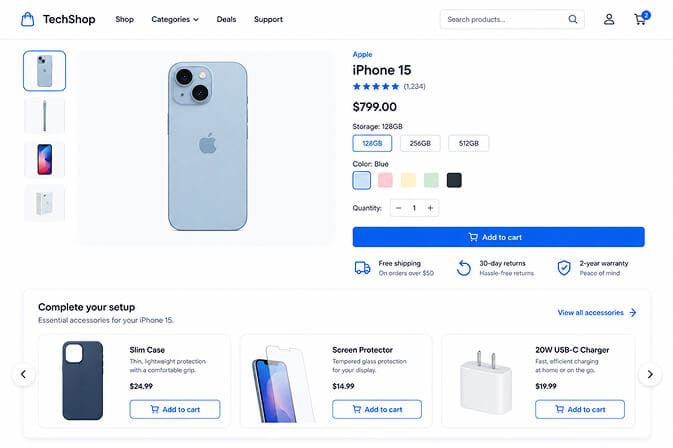
Someone bought the camera. Now filter for everything that makes the camera better.
A complete-the-set filter takes the customer's purchase and surfaces genuinely complementary products: the lens, the case, the memory card. Not random bestsellers. Things that specifically pair with what they own.
Why it works: relevance. A generic "you may also like" row gets ignored because it's noise. A filter that understands this product pairs with these products feels like helpful advice, not a sales pitch.
The intelligence matters here. Crude cross-sells suggest a second camera to someone who just bought one. Smart discovery understands the relationship between items.
Pattern 4: Subscription-Ready Filters
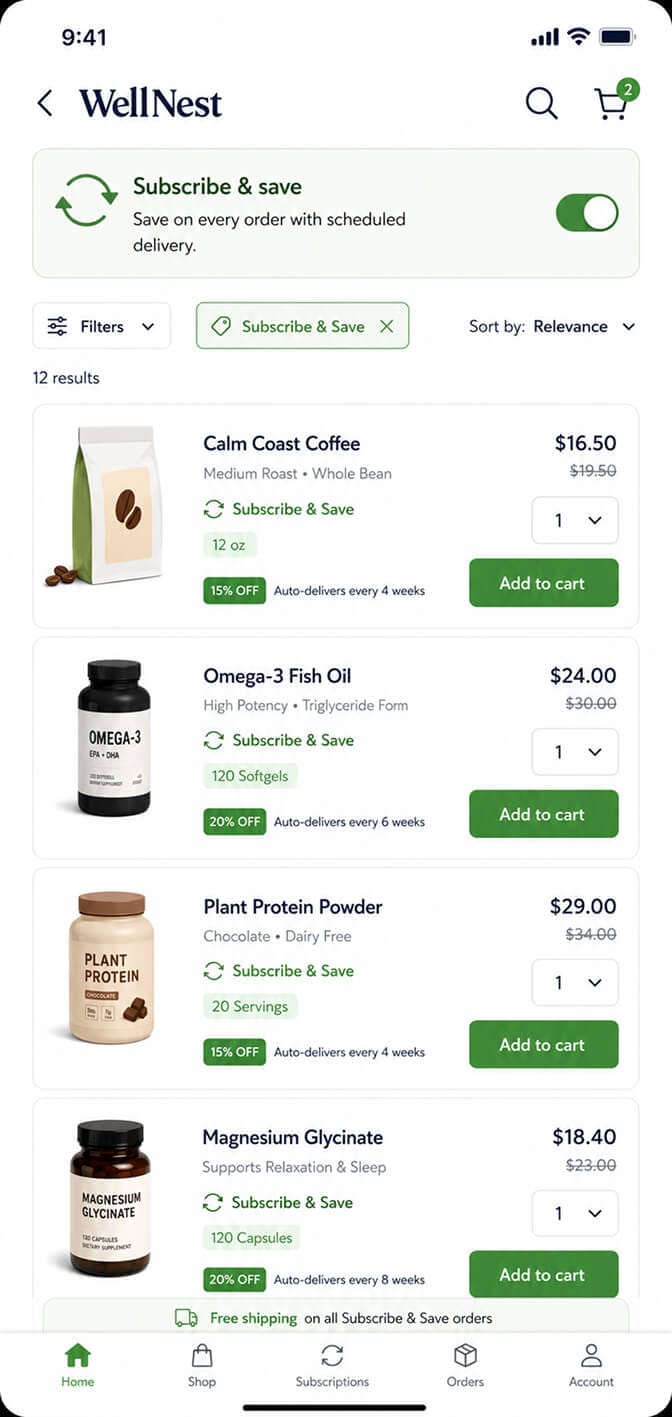
Some products are bought once. Others are bought forever. Your filters should know the difference.
A subscription-ready filter lets customers narrow the catalog to only the items available for recurring delivery, often paired with a "subscribe and save" incentive surfaced right in the results.
Why it works: it removes the mental math. Instead of making customers wonder "can I subscribe to this?", you show them exactly which products turn into a standing order, with the savings attached.
For a brand built on consumables, this is the difference between chasing reorders manually and building predictable recurring revenue.
If you're tired of watching loyal customers re-buy manually (or worse, drift to a competitor because reordering was annoying), this is fixable in about ten minutes. Sparq.ai brings AI-powered search and smart filters to your Shopify store so returning customers find their next purchase instantly, with analytics that show you exactly what they're hunting for. You can explore how Sparq handles smart product filtering without touching a line of code.
Pattern 5: "Goes With What You Bought" Personalized Search
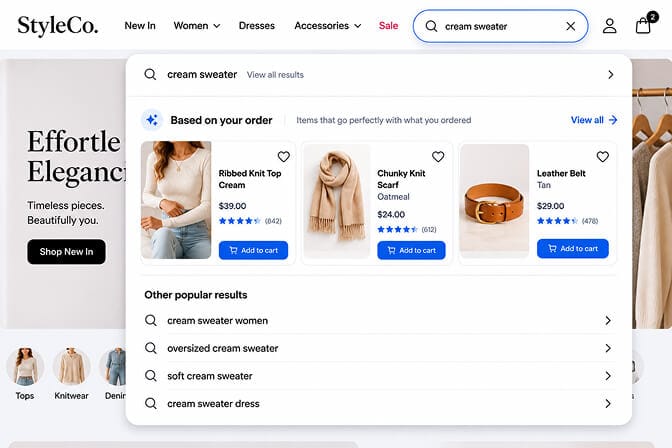
Search isn't just for new visitors hunting a product. It's for returning customers exploring around what they own.
A personalized search experience reads a returning shopper's purchase history and biases results toward what genuinely complements it. Search "black" after someone bought a navy blazer, and the results lean toward coordinating pieces, not the entire black catalog.
Why it works: the same query means different things to different people. Personalized, intent-aware search treats your returning customer like a regular at a shop who remembers them, instead of a stranger every single time.
This is where AI search earns its keep. It's not about matching keywords. It's about understanding the human behind the query. (For a primer on what makes that possible, see how an ecommerce search algorithm works.)
Pattern 6: Replenishment-Sorted Category Pages

Sorting is an underrated form of discovery.
For a returning customer, the default "featured" sort is wasted space. A replenishment-sorted page pushes the items they personally are most likely to need to the very top of the grid.
Why it works: you're respecting their time. The first thing they see is the thing they're most likely to want, which shortens the path from landing to buying.
Same catalog, same products, completely different experience based on who's looking. That's intelligent merchandising doing quiet work in the background.
Pattern 7: Post-Purchase Search Analytics (The Money Map)
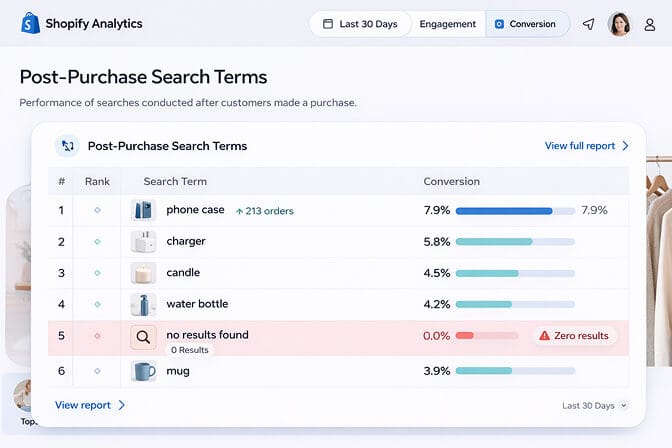
This one isn't a customer-facing filter. It's the thing that tells you which filters to build.
Post-purchase search analytics show you what returning customers type after they've bought. The patterns are gold. You'll see people searching for refills, for matching items, for the next size up, for things you might not even stock yet.
Why it works: it turns guessing into knowing. Those zero-result searches from returning customers are a literal shopping list of what to stock and which filters to surface next.
Your returning customers are telling you exactly what they want next, every single day, in your search bar. The only question is whether you're listening.
This is the part most merchants never look at, and it's the most valuable view in the building.
How to actually roll this out without a dev team
You don't need all seven patterns on day one. Start where the money is.
If you sell consumables: begin with Buy It Again and replenishment filters. That's your fastest repeat revenue.
If you sell considered products with accessories: start with complete-the-set and goes-with-what-you-bought patterns.
If you want recurring revenue: lead with subscription-ready filters.
The common thread is that every one of these runs on understanding intent and inventory together, which is exactly what a proper Shopify search and discovery engine is built to do. If you're weighing your options, our take on the best ecommerce search engines for Shopify is worth a read before you commit to anything.
What I keep coming back to
That pet brand with the disappearing customers?
They turned on Buy It Again and replenishment filters first. Within a couple of months, the share of revenue coming from returning customers climbed noticeably, and the one-and-done cohort started shrinking. Same products. Same customers. They just stopped treating the post-purchase moment like a dead end.
That's the whole idea. Discovery doesn't end when someone buys. For the best brands, that's when the most valuable discovery begins.
You already paid to earn that first purchase. The second, third, and tenth are sitting right there, waiting for you to make them easy to find.
The cheapest customer to sell to is the one who already trusts you. Build the filters that help them come back.
If you want returning customers to instantly find what to buy next, and you want the analytics that show you the revenue you're currently leaving on the table, Sparq.ai sets up on your Shopify store in about ten minutes, no developer required. See what your customers are really searching for and start turning one-time buyers into regulars. Prefer a walkthrough first? Book a demo or check pricing for your catalog size.
Frequently Asked Questions
What is a post-purchase discovery engine?
A post-purchase discovery engine is a set of smart search and filtering tools that help existing customers find their next purchase after they have already bought from you. Instead of treating returning shoppers like first-time visitors, it surfaces reorders, replenishments, and complementary products based on what they already own. For repeat-purchase and subscription brands, it is one of the most effective ways to grow revenue without more ad spend.
How do smart filters compare to standard Shopify product recommendations?
Standard recommendations usually show generic bestsellers or broad "you may also like" rows that ignore what a specific customer actually bought. Smart filters use purchase history, replenishment timing, and product relationships to surface genuinely relevant items, like reorders and matching accessories. The result is far higher relevance, which is what actually drives repeat conversion.
How do I add replenishment or buy-it-again filters to my store?
You can add them with a dedicated Shopify search and discovery app rather than custom development. A tool like Sparq.ai connects to your store, reads your catalog and order data, and lets you surface buy-it-again and replenishment filters in about ten minutes with no developer needed. From there you tune which patterns appear based on what your search analytics reveal.
Does a discovery engine actually increase repeat purchases and subscriptions?
Yes, because it removes friction from the warmest moment in the customer relationship, which is right after a purchase. By making reorders, replenishments, and subscription options easy to find, you convert more of your existing customers instead of paying to acquire new ones. Returning customers already have the highest conversion rate, so improving their discovery experience compounds quickly. You can see the impact directly in your search and conversion analytics.
Will smart filters work with my existing Shopify theme?
Yes, a purpose-built Shopify discovery engine like Sparq.ai is designed to work with standard Shopify themes without custom development. It layers onto your existing store and inventory, so you keep your design while upgrading the search and filtering experience underneath. Setup takes about ten minutes and does not require touching your theme code.







