How to Replace Shopify's Default Search (And Why It's Costing You More Than You Think)
Your search bar isn't broken. It's just not built to sell.
The email came in at 2:47 AM.
"I searched for 'navy dress' on your site and got a blog post about color theory. I wanted to buy a dress. Never mind."
That was the moment one of our users realized something uncomfortable: their Shopify store's search wasn't helping customers find products.
It was actively pushing them away.
This is the story no one tells you when you launch your first Shopify store. You spend weeks perfecting your product photos, agonizing over your About page, and tweaking your homepage hero banner for the fifteenth time.
But the search bar? That little input field in your header?
You probably never touched it.
Here's the thing: 30-40% of your visitors will use that search bar. And when they do, they're not browsing. They're hunting. They know what they want. They're 2-3x more likely to buy than someone clicking around your collections.
And Shopify's default search is quietly letting them down.
The Part Shopify Doesn't Advertise
Let me be clear: Shopify is an incredible platform. I'm not here to trash it.
But their built-in search was designed to be functional, not exceptional. It handles basic queries. It returns results. It technically works.
But "technically works" doesn't close sales.
Here's what Shopify's default search struggles with:
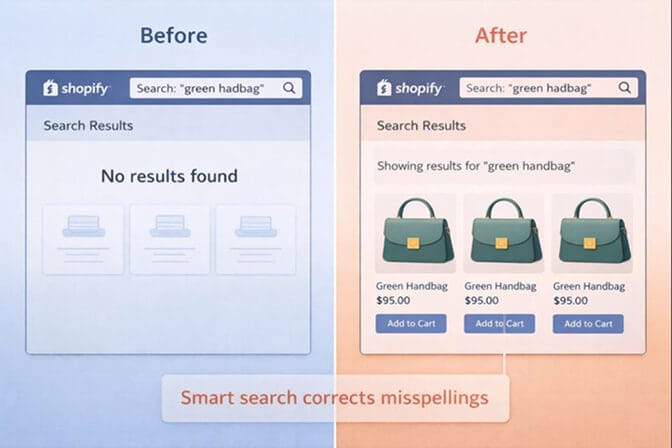
Typos destroy results. Customer types "womens sneeker" instead of "women's sneaker"? Shopify shrugs. No results found.
Synonyms are invisible. Someone searches "couch" but you've tagged everything as "sofa"? They'll never find it.
No understanding of intent. A search for "gift for mom under $50" returns nothing useful. Because Shopify's search doesn't understand shopping language. It only matches exact keywords.
Zero analytics. What are customers searching for? What searches return nothing? Where are people giving up? The default search won't tell you.
This isn't a bug. It's a limitation.
And here's where it gets expensive.
The Math That Made Me Change Everything
A store we work with (let's call them StyleHouse) had solid traffic. Around 45,000 monthly visitors. Decent conversion rate. Nothing alarming in their analytics.
But when we dug into their search behavior, the numbers were brutal.
12,000 searches per month. That's about 27% of visitors using search.
Exit rate after search: 68%. More than two-thirds of people who searched left without clicking anything.
Top "no results" query: "tshirt" spelled without the hyphen. They had 200+ t-shirts. Search found zero.
Let's do the math.
If 12,000 people searched, and 68% left immediately, that's 8,160 potential customers gone. If even 10% of those would have converted at their average order value of $67...
That's $54,672 per month evaporating into the ether.
Because of a search bar.
The Fix: Replacing Default Search (It's Easier Than You Think)
Here's the good news: you don't have to live with Shopify's limitations.
You can replace the default search engine with something smarter. Something that understands typos, learns synonyms, interprets shopping intent, and actually shows you what customers are looking for.
The process takes about 10-15 minutes.
No coding. No developer required. No theme surgery.
Let me walk you through it.
Step 1: Choose a Search App That Matches Your Needs
The Shopify App Store has dozens of search apps. Some are overkill for small stores. Some are underpowered for large catalogs.
Here's how to think about it:
If you have fewer than 500 products and just want better typo handling and basic filters, Shopify's own Search & Discovery app (free) can help. It's a step up from pure default, though it has limitations like a 25-filter maximum that frustrates growing stores.
If you have 500-5,000 products and want AI-powered search that understands natural language, you'll want something purpose-built. Look for apps that offer synonym handling, search analytics, and relevance tuning.
If you're scaling past 5,000 SKUs, you need enterprise-grade features: real-time indexing, advanced merchandising rules, and the ability to boost or bury products based on inventory or margin.
The right tool depends on where you are and where you're going.
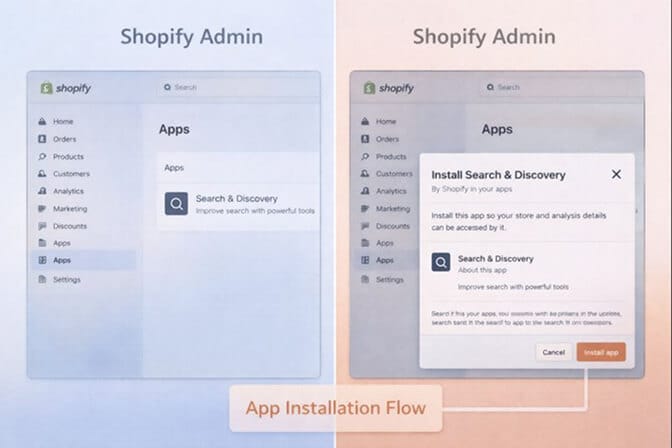
Step 2: Install and Connect
Most modern search apps install directly from the App Store. One click. Automatic theme integration.
When you install, the app will:
- Sync your product catalog
- Index your inventory (usually takes a few minutes)
- Replace the default search behavior with its own engine
You don't need to touch your theme files. The search bar stays where it is. Only what happens after someone types changes.
Step 3: Configure Your Basics
Once installed, you'll want to:
Set up synonym groups. Think about how customers actually talk. "Sneakers" = "trainers" = "tennis shoes." "Couch" = "sofa" = "loveseat." Most apps let you create these mappings in minutes.
Review typo tolerance settings. Good apps handle this automatically, but you can tune how aggressive the matching is.
Choose what appears in results. Products only? Or include pages and blog posts too? For most stores, prioritizing products makes sense.
Step 4: Check Your Search Analytics
This is the part that changes everything.
Within a week of switching, you'll start seeing data you never had before:
- Top searches: What are customers actually looking for?
- No-results searches: Where are they hitting dead ends?
- Click-through rates: Which results are people actually clicking?
This data is gold. It tells you what products to feature, what terminology to add to your descriptions, and where your catalog has gaps.
One of our users discovered their customers were constantly searching for "bundle" but they'd never created any bundles. They added three bundle products the next week. Those bundles now account for 14% of their revenue.
That insight came from search analytics.
The Objections (And Why They're Mostly Wrong)
I hear the same concerns from merchants every time this topic comes up.
"Won't another app slow down my site?"
Modern search apps run on external servers. Your search queries go to their infrastructure, get processed in milliseconds, and return results. Done right, this is actually faster than native Shopify search, which runs on the same servers handling everything else.
Good apps like Sparq.ai are built specifically for speed. If results take longer than 200ms, something's wrong.
"I only have 300 products. Do I really need this?"
The question isn't how many products you have. It's how many customers are searching and leaving.
Even with 300 SKUs, if your search can't handle typos or synonyms, you're losing sales. The smaller your catalog, the more critical each search is because there's less chance of accidentally stumbling onto something good.
"Isn't this expensive?"
Many search apps have free tiers for smaller stores. And even paid plans often start under $20/month.
Compare that to the cost of lost customers. If better search converts even five extra orders per month at a $50 AOV, you've paid for the app ten times over.
What Good Search Actually Looks Like
Let me paint the picture.
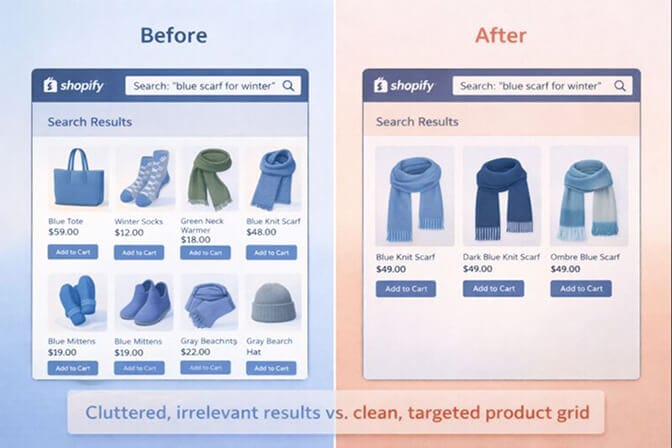
A customer lands on your site looking for a gift. They type: "blue scarf for winter"
With default Shopify search: They might get results for "blue" items that happen to include scarves. Or nothing, if you've tagged products differently.
With smart search: The engine understands "winter" implies warmth. It knows "scarf" might also be "wrap" or "shawl" in your catalog. It surfaces blue-toned wool and cashmere scarves, sorted by relevance, with filters for price and material appearing automatically.
The customer finds what they want in three seconds. They buy.
That's the difference.
The Bigger Picture: Search Is Discovery
Here's something that shifted my thinking.
Search isn't just a feature. It's your store's most honest feedback mechanism.
Every search query is a customer telling you exactly what they want. Every "no results" page is a customer telling you what you're missing.
When you ignore search, you're ignoring a direct line to customer intent.
When you upgrade search, you're not just fixing a tool. You're building a feedback loop that makes your entire store smarter over time.
If you're tired of customers searching and leaving empty-handed, Sparq.ai fixes that in about 10 minutes. It understands natural language, handles typos, and shows you exactly what customers are searching for. Free to try.
The 10-Minute Upgrade
Let's make this concrete.
- Right now: Go to your Shopify admin. Look at your search bar. Type in a product you sell, but misspell it slightly. What happens?
- This week: Pick a search app that fits your store size. Install it. Spend 10 minutes configuring synonyms for your top product categories.
- In 7 days: Check your search analytics. Look at what customers are searching for. Look at the no-results queries. Ask yourself: what's this data telling me?
The merchants who do this consistently outperform the ones who don't. Not because they have better products or bigger budgets.
Because they know what their customers want.
And that starts with a search bar that actually works.
One Last Thing
That 2:47 AM email I mentioned at the beginning?
The merchant who received it made one change: they replaced their default search with an AI-powered alternative. Setup took 12 minutes.
Within two weeks, their search exit rate dropped from 68% to 31%. Searches for "navy dress" now returned navy dresses, even when customers typed "navy dres" or "dark blue dress."
They didn't run ads. They didn't redesign their site. They didn't hire anyone.
They just stopped letting their search bar work against them.
Your move.
Ready to see what your customers are actually searching for? Install Sparq.ai and check your search analytics. It takes less time than reading this article. And what you find might surprise you.
Frequently Asked Questions
1. How do I replace the default search on Shopify?
Install a third-party search app from the Shopify App Store. These apps automatically integrate with your theme and replace the default search behavior without requiring any code changes. Most take under 15 minutes to set up and configure.
2. What is the best Shopify search app for small stores?
For stores with fewer than 500 products, Shopify's free Search & Discovery app offers basic improvements. For stores wanting AI-powered search with analytics, Sparq.ai, Searchanise, and Doofinder offer affordable plans starting under $20/month with features like typo tolerance and synonym handling.
3. Will a search app slow down my Shopify store?
No. Modern search apps run on external servers optimized specifically for speed. Queries are processed in under 200ms, often faster than native Shopify search. Well-built apps like Sparq.ai use CDN infrastructure to ensure results appear instantly.
4. Does upgrading Shopify search actually increase conversions?
Yes. Studies consistently show that search users convert 2-3x higher than browsers, but only when search works well. Stores that fix high exit rates on search results pages typically see 15-30% improvements in conversion from search traffic within weeks.
5. Can Shopify search apps handle typos and synonyms?
Most quality search apps include typo tolerance (matching "sneeker" to "sneaker") and let you create synonym groups (linking "couch" to "sofa"). This eliminates the most common frustrations customers experience with default Shopify search.