
Why Is My Shopify Store Not Showing? The Two Visibility Problems Killing Your Sales (And How to Fix Both)
Your store exists. Your products are live. So why does it feel like you're invisible?
I remember the exact moment it hit me.
A merchant had messaged us at Sparq.ai about her store. Sales had flatlined for three weeks. Traffic was trickling in, but conversions were nearly zero. She'd checked everything - product prices, shipping costs, checkout flow.
Then she said something that made my stomach drop:
"I just realized... when I search for my own products on my store, half of them don't even show up."
That's when I understood something most Shopify merchants miss entirely.
There's not one visibility problem. There are two.
And if you're only fixing one, you're leaving money on the table every single day.
The Two Invisibility Crises Every Shopify Store Faces
Here's the thing most SEO guides won't tell you:
When merchants ask "why is my Shopify store not showing," they're usually thinking about Google. And yes, that matters. If Google can't find your store, new customers can't find you either.
But there's a second invisibility crisis happening right under your nose.
Customers who are already on your site can't find your products.
They type "blue summer dress" into your search bar. Nothing. They search for "wireless headphones." Zero results. They try "gift for mom" and your site basically shrugs.
So they leave.
No purchase. No conversion. No second chance.
And this is the part that costs you money: 69% of online shoppers go straight to the search bar when they land on a store.
If your search doesn't work - or worse, if it actively hides products - you're bleeding revenue from people who already wanted to buy from you.
Let me show you how to fix both problems.
Part One: Why Your Store Isn't Showing on Google
Let's tackle the external visibility problem first. If you've been live for more than a week and you still can't find your store when you Google your brand name, something's broken.
Here's where to look:
You're Still on a Trial Account
Google doesn't index Shopify trial stores. Period. It's a spam prevention measure.
If you haven't picked a plan yet, your store is literally invisible to search engines. This is the fastest fix you'll ever make - just choose a plan and your indexing clock starts.
You Have a Password on Your Store
This one catches more merchants than you'd think.
Go to Online Store → Preferences in your Shopify admin. Look for the password section. If it's enabled, Google's crawlers can't access your site at all. They hit your password page, shrug, and move on.
Remove the password. Wait a few days. Check again.
Google Hasn't Indexed Your Site Yet
New stores take time to appear in search results. Google needs to discover your site, crawl it, understand it, and decide where to rank you.
This can take anywhere from a few days to a few weeks.
Here's how to speed things up:
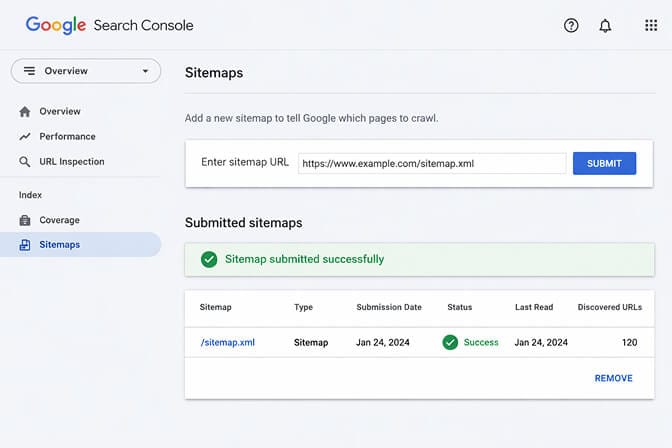
- Go to Google Search Console
- Verify your domain
- Submit your sitemap (Shopify automatically creates one at yourdomain.com/sitemap.xml)
- Use the URL Inspection tool to request indexing for your homepage
Don't just submit once and forget. Check back in a week to see what's being indexed and what isn't.
You Have a Noindex Tag Somewhere
This is the sneaky one.
A noindex tag tells Google "don't show this page in search results." Sometimes theme developers leave these in accidentally. Sometimes apps add them. Sometimes you did it yourself months ago and forgot.
Check your theme's theme.liquid file for any <meta name="robots" content="noindex"> tags. Also look in Online Store → Preferences for any checkboxes about search engine visibility.
One misplaced tag can tank your entire site's visibility.
Your Content Is Too Thin
Here's a truth that hurts:
Google needs something to rank. If your product pages have three-word descriptions, no blog content, and generic meta titles, you're giving search engines nothing to work with.
Each product page should have:
- A unique, descriptive title (not just "Blue Dress" but "Blue Linen Summer Dress - Relaxed Fit")
- At least 100-150 words of genuine description
- Optimized image alt text
- A meta description that makes people want to click
Think of Google as a librarian. If you hand them a book with blank pages, they're not going to recommend it to anyone.
Part Two: Why Products Aren't Showing in Your Own Search Bar
Okay. Google can find you now. But here's where most guides stop - and where most merchants continue losing money.
Because external visibility is only half the battle.
Internal visibility - whether customers can find products once they're on your site - is where conversions actually happen.
And Shopify's default search is... let's be honest... basic.
Here's why your products might be invisible to shoppers who are already browsing your store:
Your Products Aren't Set to "Active"
This seems obvious, but check anyway. Products in "Draft" status won't appear in search results - internal or external.
Go to Products in your admin. Filter by Draft. If you see products there that should be live, change their status.
Sales Channel Settings Are Wrong
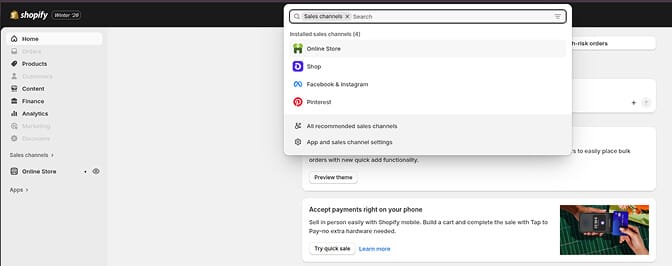
Every product needs to be enabled for the "Online Store" sales channel. If a product is only set to show on Facebook or Instagram, it won't appear in your website's search.
Click on any product → scroll to Sales channels and apps → make sure "Online Store" is checked.
The seo.hidden Metafield Is Set
Here's one that trips up merchants all the time.
Shopify has a metafield called seo.hidden. When set to "1", it hides products from search - both Google and your site's search bar.
Sometimes apps set this. Sometimes developers do it for testing and forget to undo it.
Go to any missing product → scroll to Metafields → look for anything related to "seo" or "hidden." If there's a value of "1", change it to "0".
Shopify's Default Search Just... Doesn't Understand
Stay with me here.
Shopify's native search bar is essentially a keyword matcher. It looks for exact text matches in product titles, descriptions, tags, and vendors.
That's it.
It doesn't understand that "sneakers" and "tennis shoes" are the same thing. It doesn't know that "blue" and "navy" are related. It can't handle typos. It doesn't learn from customer behavior.
So when someone searches "comfy sweater for fall" and you have a product called "Cozy Knit Pullover - Autumn Collection," Shopify's search returns nothing.
The customer thinks you don't have what they want. You do. They'll never know.
This is the hidden revenue leak that kills stores.
Your Search Index Is Out of Sync
Sometimes Shopify's search index gets corrupted or falls behind. Products exist. They're active. All settings are correct. But search still can't find them.
If you've checked everything else, contact Shopify support and ask them to rebuild your search index. It's a backend fix they can do on their end.
The Real Fix: Make Search Actually Work
Here's what I wish someone had told me years ago:
Fixing individual settings and indexing issues is important. But it's like patching holes in a leaky boat.
At some point, you need a better boat.
Shopify's default search wasn't built for serious stores. It was built for simplicity. And that's fine when you have 20 products and simple names.
But when you're scaling? When you have 500+ SKUs? When customers search in dozens of different ways for the same product?
You need search that actually understands what people want.
That's why we built Sparq.ai.
Our AI-powered search understands natural language. It handles synonyms automatically. It tolerates typos. It learns from what customers actually search for on your store - and shows you that data.
If customers are searching for "gift under $50" and finding nothing, you'll know. If they're using product names you didn't anticipate, you'll see it. If certain searches lead to exits instead of purchases, it's right there in your search analytics dashboard.
You can try it free and see your own search data within 10 minutes. No developer needed.
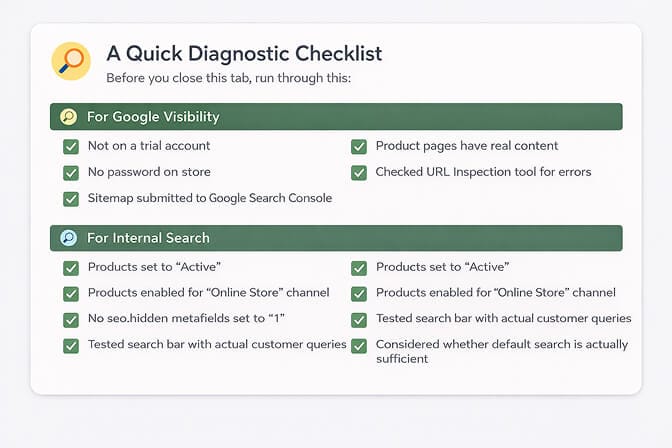
A Quick Diagnostic Checklist
Before you close this tab, run through this:
For Google Visibility:
- Not on a trial account
- No password on store
- Sitemap submitted to Google Search Console
- No noindex tags in theme
- Product pages have real content
- Checked URL Inspection tool for errors
For Internal Search:
- Products set to "Active"
- Products enabled for "Online Store" channel
- No seo.hidden metafields set to "1"
- Tested search bar with actual customer queries
- Considered whether default search is actually sufficient
What One Merchant Learned
I'll leave you with this.
That merchant who messaged us about her invisible products? We dug into her search analytics after she installed Sparq. Turns out her customers were searching for "handmade soap" - but her products were all titled "Artisan Body Bar."
Same product. Different words. Zero matches on default search.
Once she could see what customers were actually looking for, she updated her product titles, added synonyms to her search settings, and let the AI handle the rest.
Her search-to-purchase conversion rate went up 31% in two weeks.
Not because she changed her products. Not because she ran more ads.
Because customers could finally find what they came to buy.
That's the thing about visibility. It's not just about being seen. It's about being found by the right people, at the right moment, when they're ready to buy.
Fix both problems. Watch what happens.
Frequently Asked Questions
1. Why is my Shopify store not showing up on Google at all?
The most common reasons are being on a trial account (Google doesn't index trials), having a password enabled on your store, or not having submitted your sitemap to Google Search Console. If your store is new, Google may simply need more time - typically a few days to a few weeks to index new sites.
2. How long does it take for a new Shopify store to appear in Google search results?
New stores typically appear in Google within 4 days to 4 weeks, depending on how proactively you've submitted your sitemap and whether your content is unique and substantial. Submitting your sitemap through Google Search Console and building backlinks can speed up the process significantly.
3. Why are my products not showing in my Shopify search bar even though they're active?
Common causes include: products not assigned to the "Online Store" sales channel, the seo.hidden metafield being set to "1", or Shopify's search index being out of sync. Additionally, Shopify's default search only matches exact keywords - so if customers use different words than your product titles, they won't find matches.
4. Is Shopify's default search good enough for stores with 500+ products?
For most growing stores, no. Shopify's native search uses basic keyword matching without synonym recognition, typo tolerance, or natural language understanding. Stores with large catalogs often see significant improvements by switching to an AI-powered search solution that understands shopping intent.
5. Will installing a search app slow down my Shopify store?
Modern, well-built search apps like Sparq are optimized for speed and typically don't impact page load times noticeably. In fact, a better search experience often improves overall site engagement metrics because customers find products faster and browse longer instead of bouncing.







