
Shopify Advanced Search: How to Add Filters, Facets and Results That Don't Embarrass You
Shopify shipped more search power in the last two years than most merchants realise. It also shipped a wall of limits nobody warns you about. Here's both.
A merchant we work with opened her Shopify analytics one morning and found the same query sitting at the top of her zero-results report. Forty-one times that month.
The query was "belt bag".
She sells belt bags. Hundreds of them. She just calls them slings.
That's the whole problem with Shopify advanced search in one line. Nothing was broken. No app had crashed. Her catalogue was clean, her theme was fast, her product photos were beautiful. Her search simply did not know that two words meant the same thing, and forty-one people walked out because of it.
Here's the part that stings. Fixing it took about ninety seconds inside a free app she already had installed.
So before you go shopping for a search app, you should know exactly what Shopify already gives you, where it stops cold, and which of those walls you can actually climb.
What Shopify search actually reads before it ranks anything
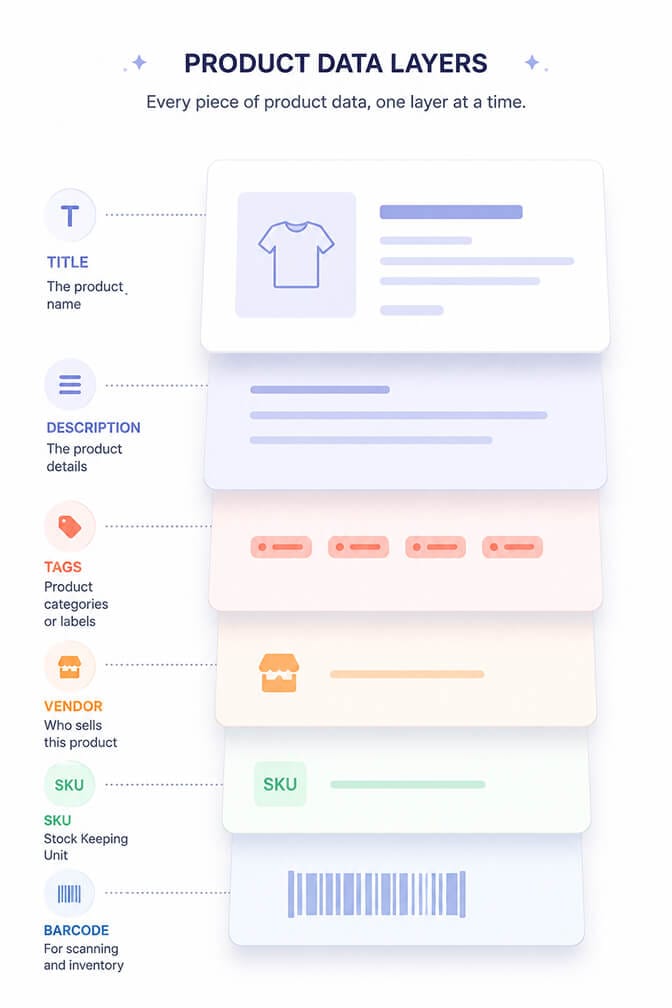
Storefront search indexes a specific set of product fields and ignores everything else. Products are searchable on title, body, product type, tag, vendor, variant title, variant SKU and variant barcode.
Ranking then runs on four signals: how often your term appears, which field it appeared in, how long that field is, and popularity signals from recent sales and customer behaviour.
Titles outrank descriptions. Short fields outrank long ones.
This is why the "write your titles the way customers talk" advice keeps showing up. It isn't a style preference. It's the single highest-weighted field in the ranking model.
One more thing that trips people up. Common words like "and", "the", "a" and "for" are stopwords. They are never indexed at all. Search for one on its own and you get nothing back.
Layer one: the native behaviours you already have and probably never tested
Before any app, your store is already doing more than you think.
Stemming. Singular and plural collapse into each other. Someone searching "puppies" finds "puppy".
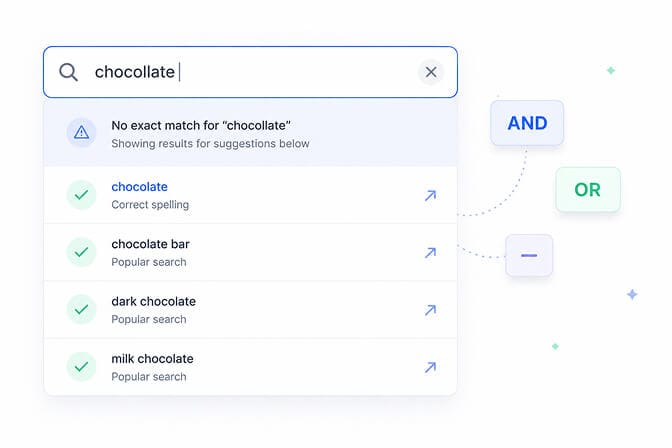
Typo tolerance. Results come back for terms that differ by one letter, or that have two letters swapped. The catch is that the first four letters have to be typed correctly, and it only applies to product title, product type, variant title and vendor. It does not apply to tags. So a tag-only match for "chocolate" will never rescue someone who typed "chocollate".
Prefix matching. Type "artich" and you get "artichoke". But partial matching only fires on the last term of a query, everything before it must match exactly, and prefix search caps out at 50 expansions. On a broad prefix in a large catalogue, relevant products silently fall off the end.
Operators. AND is the default between terms. OR widens. A leading minus sign excludes. Quotes force an exact phrase. A field prefix like title: narrows to one field.
And this is the part that costs you money.
The moment a shopper uses search syntax, Shopify switches off typo tolerance, predictive search and semantic understanding. Product boosts stop applying too. Power-user queries get the dumbest version of your search.
Stay with me, because that trade-off comes back later.
Layer two: filters and facets, where most stores actually bleed
Filters live in the free Search & Discovery app, and this is where the real gains sit for anyone past a few hundred SKUs.
You get six standard filters out of the box: Availability, Category, Price, Product type, Tags and Vendor. Then you build custom ones from product options, metafields and metaobjects.
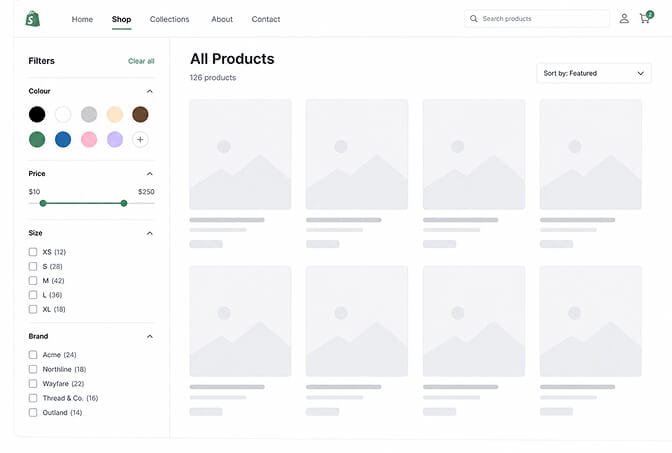
Metafield filters are the ones worth your time. Single line text, lists, decimals, integers, true/false and metaobject references all work as filter sources. That covers material, fit, wattage, caffeine level, sleeve length, whatever your category actually cares about.
Three settings people skip:
Value grouping. Onyx, Ebony and Midnight collapse into one "Black" option. On standard product attributes you can let Shopify group automatically around its taxonomy base value, or do it by hand. A group holds up to 200 values, and a store can have up to 1,000 groups.
Filter logic. Across two different filters, conditions are AND. Within one filter, values are OR by default. For product tag, metafield list and metaobject list filters you can flip that to AND, so "New" plus "Sale" returns only products carrying both.
Empty values. Hide them, push them to the bottom, or leave them in default order. Hiding sold-out options is usually the right call, because nothing kills trust faster than a filter that returns an empty grid.
If you want the visual side of this done properly, our breakdown of faceted search examples that convert walks through the layouts worth copying.
Layer three: synonyms and boosts, the ninety-second fixes
This is the belt bag fix.
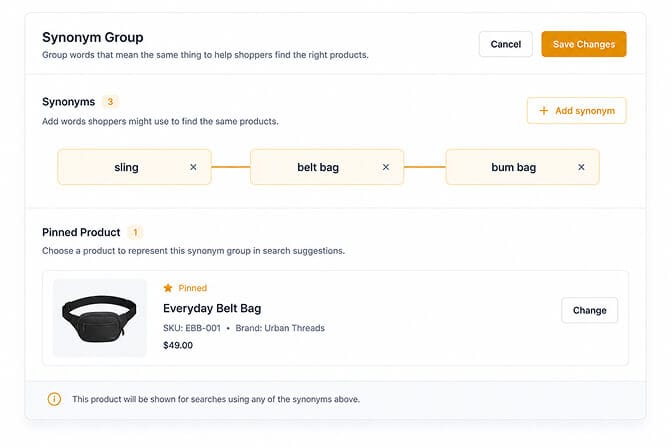
Synonym groups tell Shopify that different words mean the same thing. Each synonym can be one word or up to five. You get a maximum of 20 synonyms per group and 1,000 across the whole store, and every synonym has to be unique, it cannot appear in two groups.
Two gotchas. Synonyms are ignored on SKU and barcode matches. And a multi-word synonym behaves as a phrase search, so word order matters more than you'd expect.
Product boosts are the other lever. Assign up to 10 search terms to a product and it climbs for those queries. Boost sparingly though, because boosting a large set pushes genuinely relevant products down. Sold-out items get sent to the back regardless.
Shopify's own guidance is that you should reach for a synonym before a boost when you're trying to connect customer vocabulary to your catalogue. That's good advice. Boosts are merchandising. Synonyms are translation.
Start with your zero-results report. Every line on it is a customer telling you which word you got wrong. Our post on synonyms and search conversions covers how to prioritise that list.
Layer four: semantic understanding, and the plan tier nobody mentions
Here's the weird part.
Shopify now runs semantic understanding inside native storefront search. It reads related words, concepts and categories, and it uses product descriptions plus image data including colours and text inside the image itself.
Shopify's own example: a shopper types "christmas party shoes". You stock nothing with those words on it. Semantic search connects christmas to red and green, connects party shoes to pumps, and surfaces your red pumps anyway.
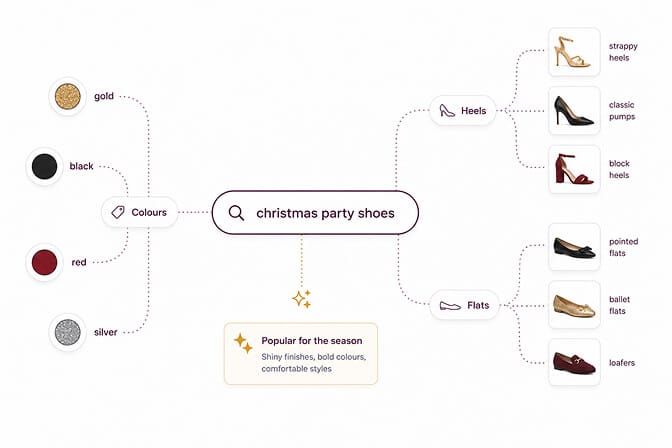
You don't switch it on. It's either there or it isn't.
And whether it's there depends on things most articles about Shopify advanced search never mention:
- Your store has fewer than 200,000 products
- You're on the Grow, Advanced or Plus plan
- It does not apply to predictive search, only the full results page
- It isn't supported on the Japanese locale
Read that second bullet again. Semantic understanding is a paid-plan feature. If you're on Basic, every article promising you AI-powered native Shopify search is describing a store that isn't yours.
And that third bullet matters more than the rest combined. Predictive search is the dropdown, the thing most shoppers on mobile actually use. It gets none of this.
Which means the smartest part of Shopify's search is invisible to the majority of your traffic.
If you'd rather not have your discovery quality decided by your billing plan, Sparq's semantic search runs the same intent understanding across every plan tier, and it runs it in the dropdown too. Setup takes about ten minutes and there's a free trial.
The ceilings that break all of this at scale
This is where most store owners get blindsided, usually right after a big catalogue expansion.
Collections over 5,000 products show no filters at all. Not fewer filters. None. Shopify's suggested fix is to split the collection into smaller ones, which is a real content restructure, not a settings toggle.
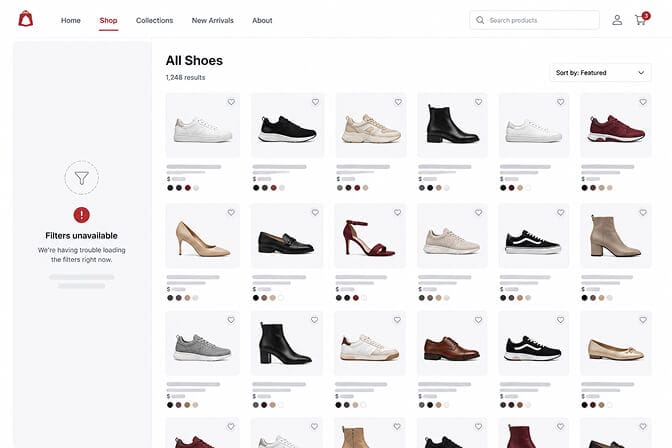
Search results over 100,000 products also drop filters entirely.
25 filters per store, total. Standard and custom combined. And each source can only be used once, so if Price is live, Price is greyed out everywhere else.
A filter displays a maximum of 100 values on your storefront, even though the admin shows you up to 1,000. Grouping is how you get under that ceiling.
The price filter disappears for any customer shopping in a currency other than your store default. If you sell internationally, a chunk of your traffic simply has no price filter.
Tag filters only render in your store's default language. Vendor values too. Multi-market stores should be building on metafields instead.
Re-indexing takes 24 to 48 hours. New metafield values won't appear in filters immediately, which is why so many merchants think their setup failed when it just hasn't caught up.
None of this makes the free tooling bad. It makes it a tool with a known working range. Once your catalogue, your currencies or your languages push past that range, you're patching around limits instead of improving discovery, and every hour spent there is an hour not spent selling.
What we'd actually do this week
Open your zero-results report first. Not your app store tab.
Build synonym groups for the top ten queries on it. Fix the product titles behind the next ten, since title carries the most ranking weight. Then audit your filters against the ceilings above, especially the 5,000-product collection limit if you've grown recently.
Then, and only then, ask whether an app is worth it. You'll be asking with data instead of a hunch, which is a much better conversation to have with yourself.
Because advanced search was never about having more features. It's about the gap between the words on your product pages and the words in your customers' heads. Every one of those forty-one belt bag searches was somebody who wanted to give her money and couldn't find the way.
Close the gap and they stop leaving. That's the entire job.
If you want to see what your customers are actually typing and where they're giving up, Sparq shows you the full search analytics picture from day one, across every Shopify plan. Ten-minute install, free to try, and no developer required.
Frequently Asked Questions
What is Shopify advanced search?
Shopify advanced search refers to search capability beyond basic keyword matching: filters and facets, synonyms, product boosts, typo tolerance, prefix matching and semantic understanding. Some of it is built into storefront search, some sits in the free Search & Discovery app, and some requires a third-party app once you hit Shopify's built-in limits.
How do I add filters to my Shopify store?
Install the free Search & Discovery app, open the Filters tab, and add a filter source. You can choose standard filters like Price, Vendor and Availability, or custom filters built from product options, metafields and metaobjects. Your theme has to support storefront filtering for them to display. You can have a maximum of 25 filters per store.
Does Shopify have AI search built in?
Yes, but conditionally. Semantic understanding is included in native storefront search if your store has fewer than 200,000 products and you're on the Grow, Advanced or Plus plan. It does not apply to predictive search, and it isn't supported on the Japanese locale.
Why aren't my Shopify filters showing up?
The three most common causes are a collection containing more than 5,000 products, a theme that doesn't support storefront filtering, and search indexing lag. New metafield values can take 24 to 48 hours to appear. Filters also disappear on search results returning more than 100,000 products.
Is a Shopify search app worth it for a small store?
Under a few hundred SKUs, the native tooling plus well-written product titles usually does the job. The economics change once you're past that, once you sell in multiple currencies or languages, or once you have collections approaching the 5,000-product filter ceiling. Search visitors convert at a meaningfully higher rate than browsers, so the payback is measured against that lift, not against the subscription price alone.