
Why copying Amazon's filters is killing your conversion rate - and what to do instead
Your customer knows exactly what they want.
A size medium. Navy blue. Under $75. Cotton blend.
They land on your collection page. They see 847 products. They scan the sidebar for filters. They click "Size M." Nothing happens for three seconds. The page reloads. Now they see 312 products.
Still too many.
They click "Blue." Another reload. 89 products. They scroll. They squint. They bounce.
You just lost a sale to a customer who was ready to buy.
This happens thousands of times per day across Shopify stores. And here's the frustrating part: you have filters. You spent time setting them up. They technically work.
But "technically works" isn't the same as "actually converts."
Why Most Ecommerce Filters Fail (Even When They "Work")
Here's what most merchants get wrong: they look at Amazon, see a wall of filter options, and assume more filters equals better experience.
It doesn't.
According to Baymard Institute, 42% of ecommerce sites have filter implementations that cause "significant usability issues" - despite having the filters customers need.
Amazon can get away with 15+ filter categories because they have engineering teams dedicated to search optimization, AI-powered relevance ranking, and millions of products that justify granular filtering.
Your store with 2,000 SKUs? That same approach creates cognitive overload.
The merchants winning at product discovery aren't copying big-box retailers. They're studying why certain faceted search implementations work - then adapting those principles for their catalog size and customer behavior.
Let me show you what that looks like.
What Makes a Faceted Search Example Worth Stealing
Before we break down specific examples, you need a framework for evaluating them.
Every high-converting faceted search shares three qualities:
- Relevance over quantity. Fewer filters that matter beat more filters that don't. If you sell apparel, "neckline type" matters. "Country of manufacture" probably doesn't.
- Progressive disclosure. Show basic filters first. Reveal advanced options only when the customer signals they need them (by scrolling, clicking, or searching within filters).
- Instant feedback. Every filter selection should immediately communicate results - ideally without a full page reload. Customers should never wonder "did that work?"
With that framework, let's look at implementations worth learning from.
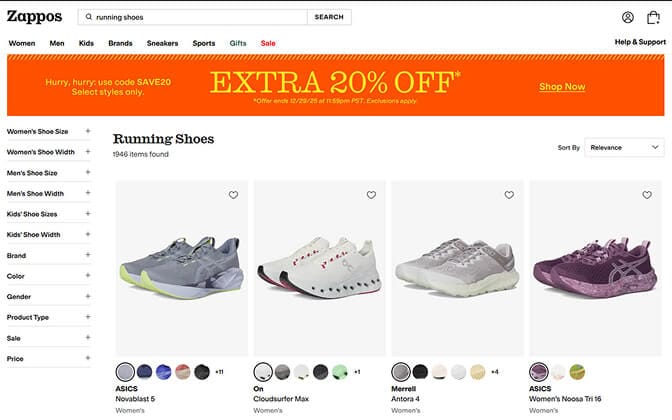
Example #1: Zappos - The Gold Standard for Dynamic Facets
Zappos doesn't show you the same filters on every page. Search for "running shoes" and you'll see filters for cushioning level, arch support, and running surface. Search for "dress shoes" and those disappear - replaced by heel height, occasion, and toe shape.
Why it works: Filters adapt to the product category. No wasted space. No irrelevant options creating decision fatigue.
What to steal: Map your filter options to specific collections. Don't show "sleeve length" when someone's browsing accessories.
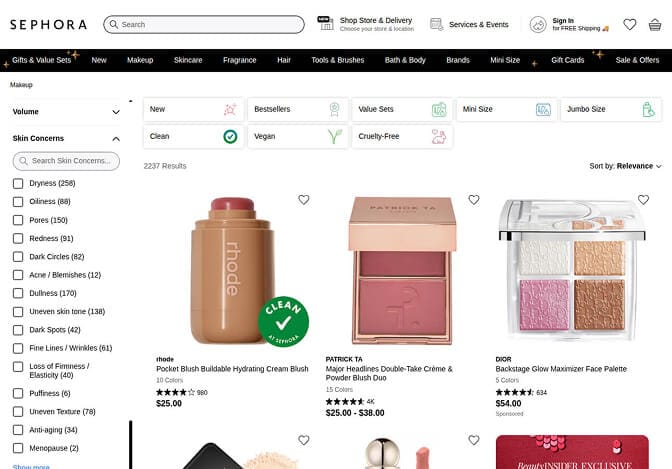
Example #2: Sephora - Solving for the "I Don't Know What I Want" Shopper
Not every customer arrives knowing their exact specifications.
Sephora addresses this with concern-based facets. Instead of just filtering by brand or price, customers can filter by skin concern ("acne," "aging," "dryness"), skin type, or ingredient preferences.
Why it works: It meets customers where they are in their decision journey. Someone who doesn't know which moisturizer they need absolutely knows they have dry skin.
Stores that implement concern-based or benefit-based filters see up to 26% higher engagement on category pages compared to attribute-only filtering.
What to steal: Add one "solution-oriented" filter to your most trafficked collection. For apparel, that might be "occasion." For home goods, "room type." For supplements, "health goal."
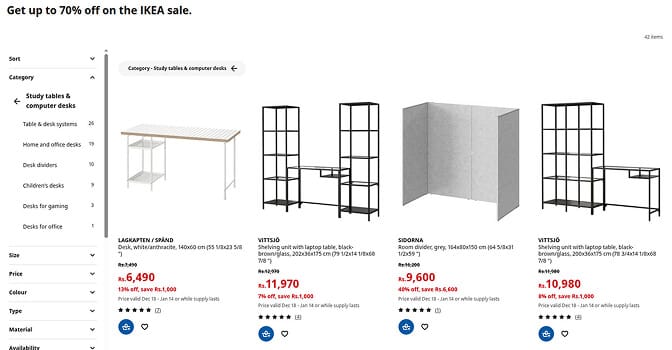
Example #3: IKEA - Brutal Simplicity That Converts
IKEA's faceted search is almost aggressively simple. On most category pages, you'll see just four to five filter options: function, price, size, color, and maybe one category-specific attribute.
That's it.
No overwhelming sidebar. No 47 checkboxes. Just the filters that actually influence purchase decisions for furniture shoppers.
Why it works: IKEA knows their customers. Furniture shopping is already mentally exhausting. Adding filter complexity doesn't help - it paralyzes.
What to steal: Audit your filter usage data. If fewer than 5% of visitors use a specific filter, consider removing it entirely. Clarity beats comprehensiveness.
Example #4: Gymshark - Mobile-First Filtering Done Right
Here's a stat that should terrify you:
On mobile devices, 67% of shoppers who attempt to use filters abandon after encountering friction.
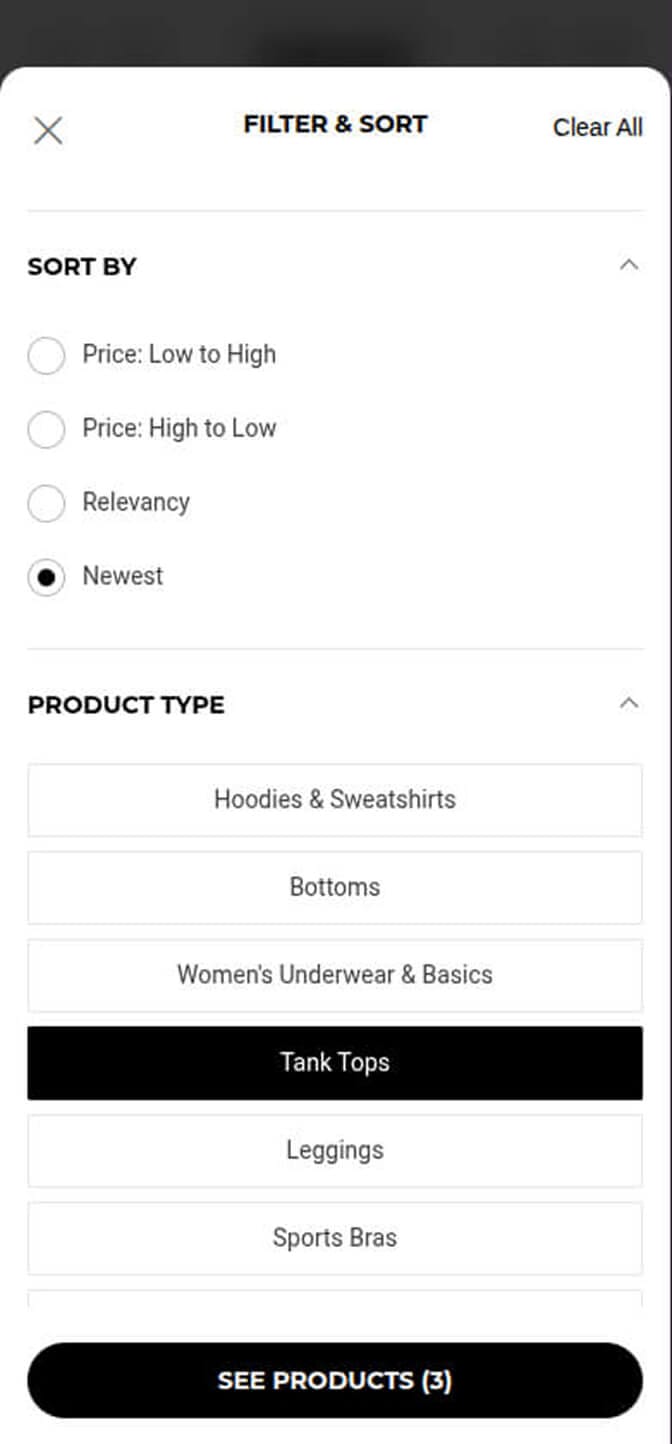
Gymshark solves this with a full-screen filter modal that appears on tap. Filters are displayed as large, thumb-friendly buttons rather than tiny checkboxes. Selections are clearly visible, and a sticky "View Results" button shows the updated product count in real-time.
Why it works: They designed for how people actually use phones - not how filter systems looked in 2012.
What to steal: Test your filters on your own phone. Can you select options without zooming? Does the filter state persist when you return from a product page? If not, you're hemorrhaging mobile conversions.
Example #5: Wayfair - Multi-Select With Visual Confirmation
Furniture shoppers rarely have just one requirement. They need a sofa that reclines, fits two people, and has remote control operation.
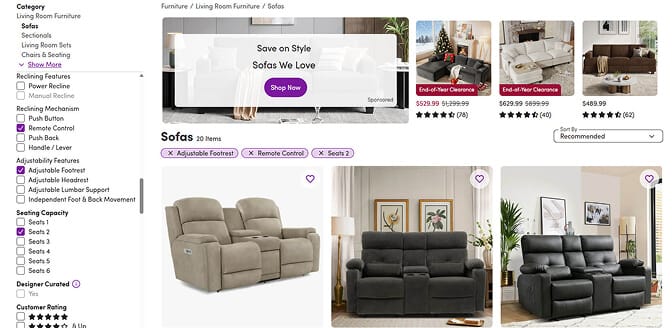
Wayfair's faceted search handles this beautifully with true multi-select across different facet groups. Select "Remote Control" under Reclining Mechanism, "Adjustable Footrest" under Adjustability Features, and "Seats 2" under Seating Capacity - all at once.
The key detail: every active filter appears as a removable tag directly above the results. Customers can see exactly what's filtering their view and remove any single filter with one click - without losing the others.
Why it works: Complex purchases require complex filtering. Wayfair lets customers build layered filter combinations while maintaining complete visibility into what's active. No mystery. No hunting through the sidebar to remember what's selected.
What to steal: Display applied filters as removable chips/tags above your product grid. It gives customers confidence and control — especially on mobile where the filter sidebar isn't always visible.
Example #6: Wayfair - Contextual Filter Ordering
Wayfair doesn't arrange filters alphabetically or by some arbitrary internal logic. They arrange them by customer priority.
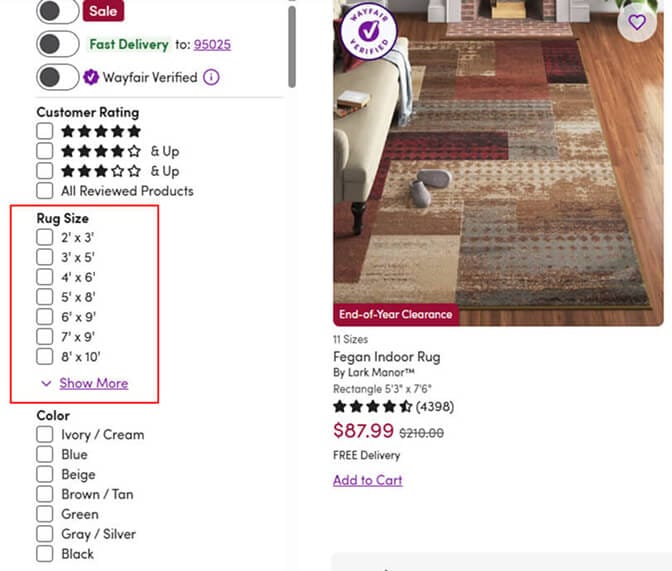
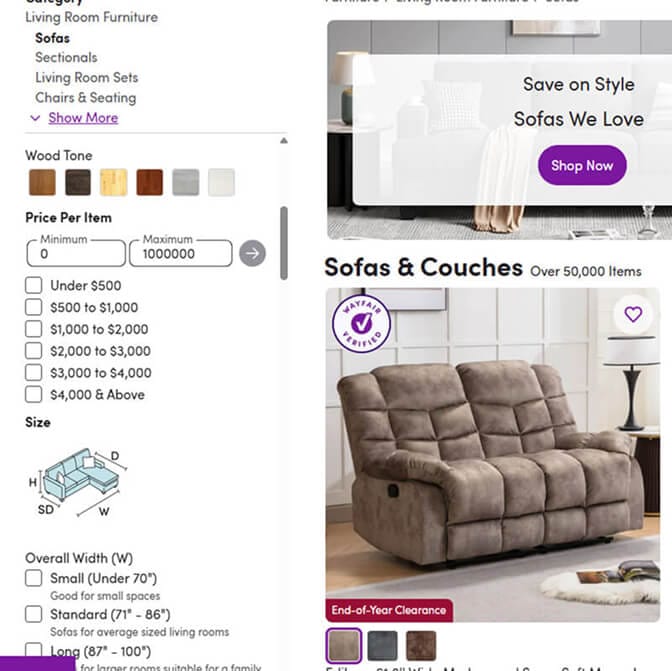
On their sofa category, "price" appears first (big-ticket purchase, budget matters). On area rugs, "size" leads (nothing worse than ordering the wrong dimensions). On lighting, "room" appears prominently (customers think in terms of where it's going).
Why it works: They've studied how their customers think and organized filters to match that mental model.
What to steal: Look at your support tickets and customer chats. What questions do people ask most frequently? Those questions should become your top-positioned filters.
The Patterns That Kill Conversions (What NOT to Copy)
Not every example teaches you what to do. Some teach you what to avoid.
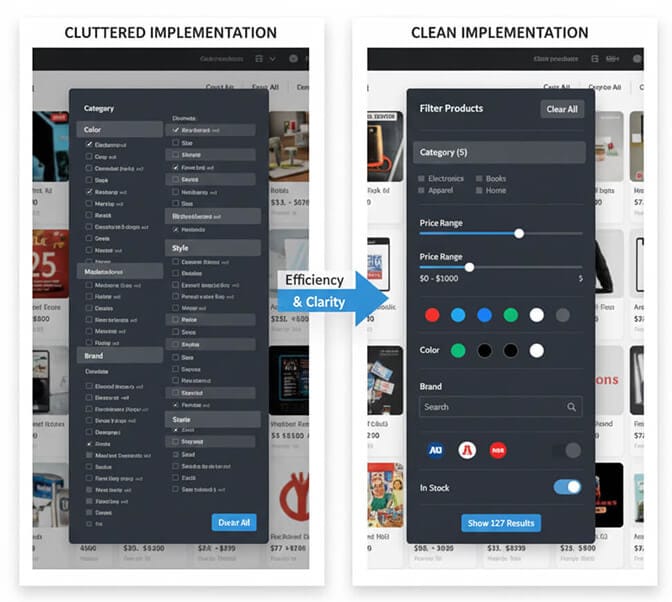
The "Everything Bagel" Sidebar. Some stores show every possible filter on every page. Size, color, price, brand, material, rating, shipping speed, availability, new arrivals, sale items...
When everything is filterable, nothing feels filterable.
The Hidden Apply Button. Some implementations require customers to click a separate "Apply Filters" button after making selections. Every extra click is a dropout opportunity. Filters should apply automatically - or at minimum, make the apply action unmissable.
The "Zero Results" Trap. There's nothing more frustrating than selecting a filter combination that yields zero products - with no warning beforehand. Smart faceted search either disables unavailable combinations or shows greyed-out options with "(0)" next to them.
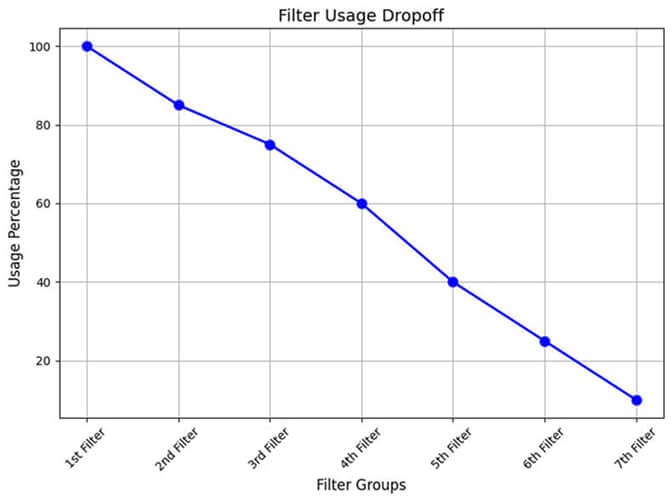
The Scroll-to-Find Filter. If your most important filter requires scrolling past eight other filter groups to reach, you've already lost most visitors. They won't hunt for it.
Example #7: Allbirds - Less Is Literally More
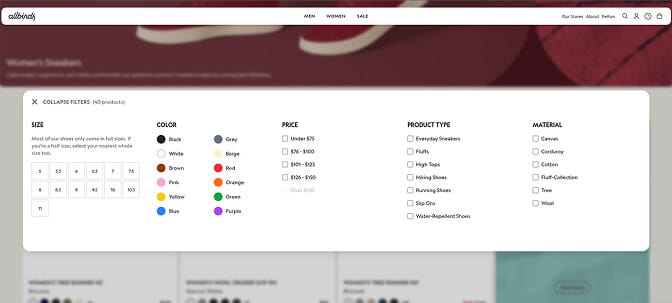
Allbirds has a narrow product catalog by design. And their faceted search reflects that simplicity.
On most category pages, you'll find just two or three filters. Size. Color. Sometimes activity type.
That's not laziness - it's strategy. With a focused catalog, aggressive filtering would fracture their small product selection into unsatisfyingly tiny result sets.
Why it works: They right-sized their filtering to match their catalog depth. Filtering for "material" when you only sell wool and tree fiber products creates unnecessary complexity.
What to steal: Match your filter complexity to your catalog depth. Stores with under 500 SKUs often convert better with minimal filtering and strong search.
Example #8: REI - Filtering for Technical Products
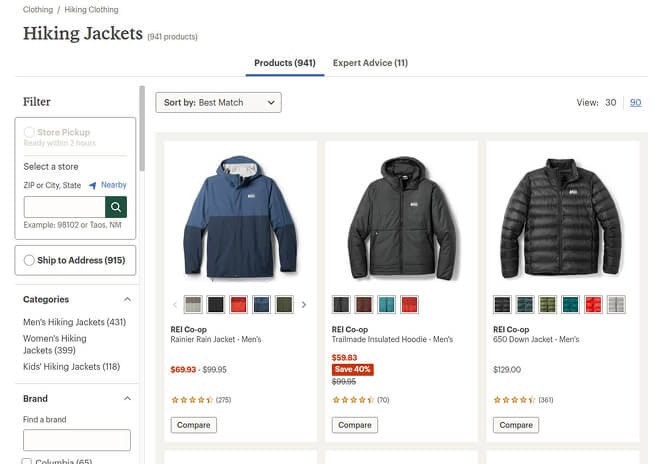
Outdoor gear shoppers need technical specifications. Waterproof rating. Temperature rating. Pack volume in liters.
REI presents these technical filters clearly, with tooltips explaining what each specification means for the uninitiated. "What's a 20D ripstop nylon?" - they tell you.
Why it works: Technical products need technical filters, but education removes the intimidation factor.
What to steal: If you sell products with specifications that aren't universally understood, add inline explanations or tooltips. Don't assume customers know your industry jargon.
Example #9: ASOS - Visual Filtering for Visual Products
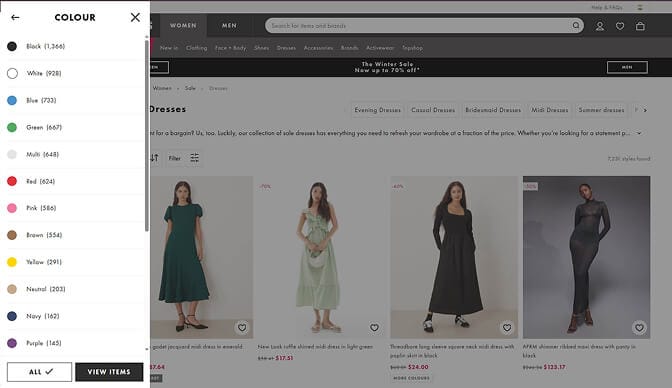
Fashion is visual. ASOS leans into this by using color swatches instead of text labels for color filters. You don't click "Burgundy" - you click a burgundy square.
The same applies to pattern filters, where small pattern previews help customers distinguish between "plaid" and "checkered."
Why it works: When the purchase decision is aesthetic, the filtering experience should be too.
What to steal: Replace text-based color filters with swatches. It's a quick win that removes ambiguity (one person's "navy" is another's "royal blue").
Example #10: Best Buy - Comparison-Enabling Filters
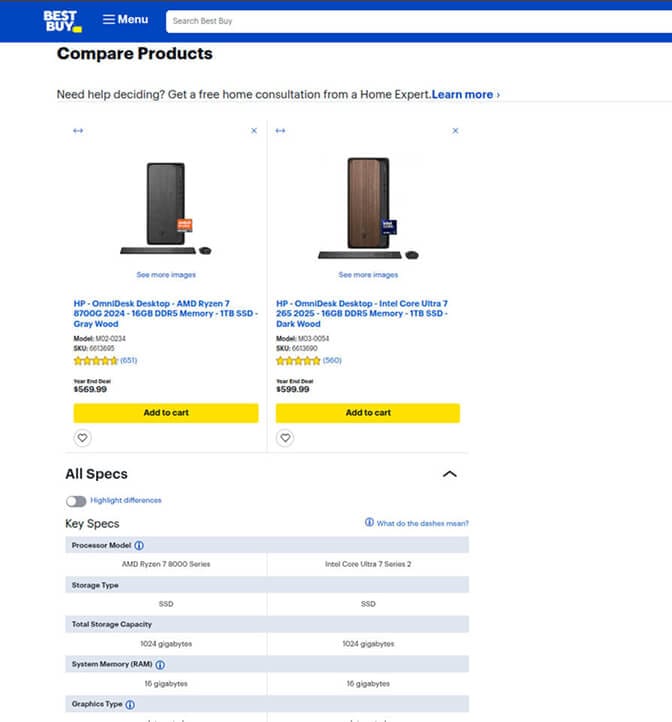
Electronics shoppers don't just want to filter - they want to compare. Best Buy's faceted search integrates with a comparison feature, letting customers select products directly from filtered results and view them side-by-side.
Why it works: It anticipates the next step in the customer journey. Filter → Compare → Purchase.
What to steal: For high-consideration products, think beyond filtering. What does your customer need to do after narrowing results? Can your UX support that?
How to Actually Implement These Lessons
Inspiration is nice. Implementation pays the bills.
Here's the practical path forward:
Step 1: Audit your current filter usage. Most analytics platforms can show you which filters get clicked and which get ignored. Kill the dead weight.
Step 2: Prioritize the top three filters per collection. Based on your data and customer feedback, identify the three most important filters for each major collection. Make these unmissable.
Step 3: Add product counts. If you're not showing how many products match each filter option, you're creating unnecessary uncertainty.
Step 4: Test on mobile. Seriously. Do it right now. Is it usable with your thumb? Does the filter state persist?
Step 5: Consider your technology. Native Shopify filtering works for basic needs, but stores with complex catalogs often need specialized solutions. This is exactly why we built Sparq - to give Shopify merchants AI-powered search and faceted filtering that adapts to their catalog and customer behavior without requiring a development team, thanks to no-code setup.
Ready to Fix Your Store's Search?
The gap between "has filters" and "has filters that convert" is where revenue hides.
The examples above aren't magic. They're the result of merchants who studied their customers, measured their behavior, and refined their approach over time.
You can do the same.
Start with one collection page. Apply one principle from this list. Measure the impact. Then iterate.
If you want to skip the trial-and-error phase, Sparq gives you intelligent faceted search built specifically for Shopify stores - with dynamic filtering, real-time product counts, and mobile-optimized interfaces out of the box.
Either way, stop letting your filters be the reason customers bounce.
They came ready to buy. Your job is to get out of their way.