How to Design an Ecommerce Website That Actually Converts (Not Just Looks Pretty)
The design element 72% of stores ignore is costing you thousands in lost sales every month.
I was staring at the same screen most store owners know too well.
Traffic was up. Facebook ads were finally clicking. Visitors were landing on the homepage, browsing products, adding things to cart.
And then... nothing.
The conversion rate sat there like a stubborn rock: 1.4%.
I'd spent three weeks redesigning the store. New fonts. New colors. Hero images that could make a stock photographer weep. The checkout was "streamlined." The product pages were "clean."
So why wasn't anyone buying?
Here's the part most ecommerce design guides won't tell you: your store's most important design element isn't visible.
It's your search bar.
The Design Element Nobody Talks About
When we think about ecommerce website design, our minds immediately jump to the visual stuff.
Typography. Color palettes. Product photography. That perfectly positioned hero banner.
And those things matter. Studies show visitors form their first impression of your store in roughly 50 milliseconds. That's faster than a blink.
But here's where most design advice falls apart:
Looking good and converting well are two completely different problems.
The stores crushing it right now understand something fundamental. Your design isn't just about aesthetics-it's about helping customers find what they want as fast as humanly possible.
And nothing does that better than search.
Consider this: Amazon's standard conversion rate sits at approximately 2% for general browsing. When visitors use the search function, that number jumps to 12%.Algolia That's a 6x increase from one design element.
Site search users convert at rates up to 50% higher than average visitors.Opensend They're not browsing. They're buying.
Yet here's the painful irony: 72% of sites completely fail site search expectations.Algolia
Which means if you nail this, you're already ahead of almost three-quarters of your competition.
Start With the Skeleton, Not the Skin
Before you obsess over color schemes, let's talk structure.
The best ecommerce homepage design follows a simple principle: reduce cognitive load.
Too much variation can cause cognitive overload, hamper your site's readability, and ruin the overall user experience. Medium
Your homepage has one job: get people to products.
That means:
- Clear navigation with categories that make sense to your customers, not your inventory system
- A visible search bar in the top right or center-where people expect it
- One primary call-to-action above the fold, not seven
I've seen stores with beautiful photography buried under popup offers, email captures, announcement bars, chat widgets, and Instagram feeds all fighting for attention.
Stop it.
Every element you add is one more decision your customer has to make. And every decision is friction. Friction kills conversions.
Mobile-First Isn't Optional Anymore
Here's a stat that should shape every design decision you make:
Mobile dominates traffic at 73%. Speed Commerce
Three out of four visitors are looking at your store on a phone. If your ecommerce web design isn't built for thumbs first, you're designing for a minority.
This means:
Buttons need to be tap-friendly. If someone has to zoom to hit "Add to Cart," you've lost them. Your search bar needs to be prominent on mobile. Make search visible on every page in familiar locations.Medium On mobile, that means above the fold, easy to reach with one thumb. Checkout must be ruthless. Simplify the checkout process for mobile users by minimizing form fields, removing unnecessary steps, and offering guest checkout options.Storyblok
Most Shopify themes are "responsive" by default. But responsive doesn't mean optimized.
Pull up your store on your phone right now. Try to find a specific product. Try to buy it. Time yourself.
If it takes more than 30 seconds or you feel any frustration, your mobile design needs work.
Product Photography: Where Budget Actually Matters
Let's be honest about something: your product images are doing most of the selling.
67% of online shoppers agree that the images of any product are more important than customer reviews or product descriptions.Cloudways
This isn't surprising. Online shoppers can't touch your products. They can't try them on. They can't feel the weight or texture.
Your photography has to bridge that gap.
What works:
- Clean, white backgrounds for primary product shots
- Multiple angles (front, back, side, detail shots)
- Lifestyle images showing the product in context
- Zoom functionality that actually reveals detail
What doesn't work:
- Stock photos that look like every other store
- Low-resolution images that pixelate when clicked
- Inconsistent lighting across your catalog
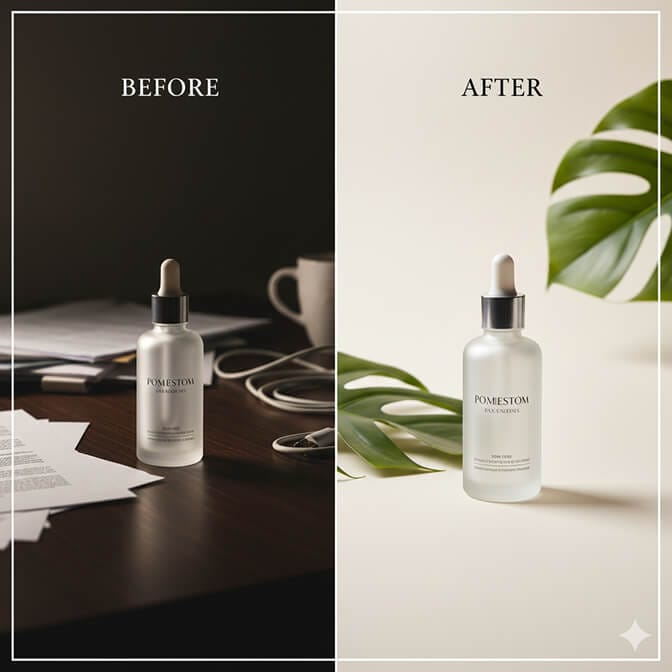
If you're bootstrapping, here's a trick: a $50 lightbox from Amazon and your iPhone can produce better results than most "professional" product photography from five years ago.
Consistency matters more than perfection. If every product looks like it belongs to the same brand, you're doing better than 80% of stores.
The Part Where Most Stores Bleed Money
Stay with me here.
We've covered the visual basics. Navigation, mobile, photography.
Now let's talk about the element that separates stores doing $10K months from stores doing $100K months.
Your search experience.
Up to 30% of e-commerce visitors use internal site search, and site searchers are 2-3x more likely to convert.Algolia
Think about that. A third of your visitors are telling you exactly what they want to buy. They're typing it into a box.
And if your search returns garbage results-or worse, "no results found"-they leave.
I've audited dozens of Shopify stores where "blue dress" returned zero results because the product was tagged "navy" instead of "blue."
That's not a customer problem. That's a design failure.
What good ecommerce site search looks like:
- Typo tolerance: Someone types "snekers" and still finds sneakers
- Synonym handling: "Couch" finds "sofa" finds "loveseat"
- Natural language understanding: "Red shoes under $50" actually works
- Instant results: No waiting, no page reloads
- Smart filters: Attributes that matter for your products, not generic defaults
Shopify's default search is... basic. It does keyword matching and not much else. No AI, no synonym handling, no analytics to show you what customers are searching for.
If you're running a store with more than 100 SKUs, you're probably leaving money on the table.
That's exactly why we built Sparq.ai's AI-powered search. It understands what your customers actually mean-not just what they type. Ten-minute setup, no developer needed, and you can finally see what your customers are searching for (and not finding).
Trust Elements That Actually Work
Beautiful design means nothing if visitors don't trust you.
Unless you are a well-established brand, most customers won't know what your brand is about, or even have heard of it.Cloudways
Here's how to earn that trust visually:
Security badges: Make sure you have a valid SSL certificate on your website.Cloudways Display payment provider logos (Shopify Payments, PayPal, Apple Pay) prominently during checkout.
Social proof: Customer reviews, ratings, and user-generated photos. Displaying customer reviews and testimonials helps validate product quality and authenticity.Webstacks
Real contact information: A physical address, phone number, or at least a responsive live chat. Stores that hide behind a contact form feel sketchy.
Returns policy visibility: Make it easy to find, easy to read. If your returns policy requires a law degree to understand, you've got a conversion problem.
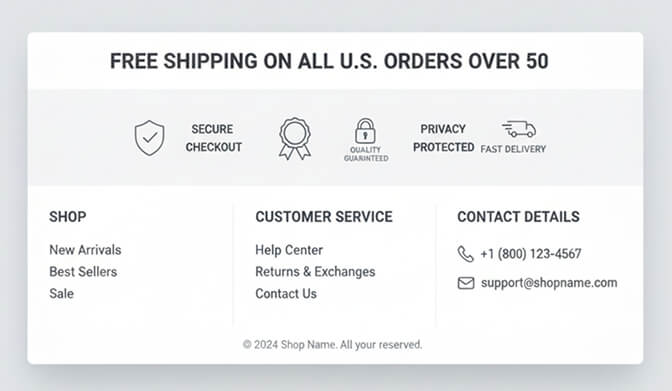
These aren't exciting design elements. They're not the stuff that wins awards.
But they're the stuff that wins sales.
Speed Is Design
I could write an entire article just on page speed, but here's the core truth:
A simple 1-second delay can result in a 7% reduction in your conversion rate.Cloudways
Your beautiful design means nothing if it takes four seconds to load. Visitors are gone before they see it.
Quick wins:
- Compress images (tools like TinyPNG or Shopify's built-in compression)
- Limit the apps you install-each one adds scripts
- Use a fast, lightweight theme (Dawn is a solid free option)
- Enable lazy loading for images below the fold
Run your store through Google PageSpeed Insights. If you're scoring below 50 on mobile, prioritize speed before any other design changes.
Putting It All Together
Here's the hierarchy of what actually matters in ecommerce website design:
- Speed - If it's slow, nothing else matters
- Search & Navigation - Can people find what they want?
- Mobile Experience - Is it actually usable on a phone?
- Trust Signals - Do visitors believe you're legitimate?
- Product Photography - Can they see what they're buying?
- Visual Polish - Colors, fonts, the "pretty" stuff
Most design guides have this order completely backwards. They start with aesthetics and treat everything else as an afterthought.
Don't make that mistake.
What I Wish I Knew at 100 Orders a Day
Looking back at that 1.4% conversion rate, here's what actually moved the needle:
Not the redesign. Not the new fonts. Not the hero banner.
It was fixing search.
When customers could actually find what they were looking for-even when they misspelled it, even when they used different words than my product tags-everything changed.
Cart additions went up. Time on site increased. Customer support tickets went down.
And conversions? They climbed to 2.8% over six weeks.
That might not sound dramatic. But on 50,000 monthly visitors, it meant an extra $35,000 in revenue. Every month.
Your store's design is more than how it looks. It's how it works.
The merchants winning right now understand that.
Ready to see what your customers are actually searching for? Install Sparq.ai free free and check your search analytics. Most store owners are shocked by what they find-the products people want but can't find, the synonyms they're using, the gaps in your catalog.
It takes about 10 minutes to set up. No developer needed.
And it might be the most important design decision you make this year.
Frequently Asked Questions
1. What is ecommerce website design?
Ecommerce website design is the process of creating an online store that effectively displays products, guides visitors through the shopping experience, and converts browsers into buyers. It encompasses visual elements like layout and typography, functional elements like navigation and search, and technical elements like page speed and mobile responsiveness.
2. How does site search compare to navigation for ecommerce conversions?
Site search dramatically outperforms standard navigation for conversions. Visitors who use search convert at 2-3x higher rates than those who browse through categories. Amazon sees conversion rates jump from 2% to 12% when visitors search versus browse. For stores with large catalogs (100+ products), optimizing search can have a bigger impact than any other design change.
3. How long does it take to design an ecommerce website?
A basic Shopify store can be launched in a weekend using a pre-built theme. A custom design typically takes 4-8 weeks when working with a designer or agency. However, the most successful stores treat design as ongoing-continuously testing and optimizing based on customer behavior rather than treating it as a one-time project.
4. Does ecommerce website design affect SEO?
Absolutely. Site speed, mobile responsiveness, and clear navigation structure all impact your search rankings. Google uses mobile-first indexing, meaning it evaluates the mobile version of your site first. Additionally, good UX design reduces bounce rates and increases time on site-both signals that can influence rankings.
5. Is Shopify's default search good enough for my store?
For stores with fewer than 50 products and simple product naming, Shopify's default search may suffice. However, it lacks AI capabilities, synonym handling, typo tolerance, and analytics. If you're running a store with 100+ SKUs or products that customers might search for using different terms (like "couch" vs. "sofa"), you'll likely see significant revenue improvements by upgrading to an AI-powered search solution like Sparq.ai.