
Ecommerce Site Search: Why Your Most Valuable Shoppers Are Leaving Empty-Handed
The 15% of visitors using your search bar generate 45% of your revenue. Here's how to stop failing them.
There's a number that should keep you up at night.
Fifteen percent. That's the portion of your visitors who use your site's search bar. A tiny slice.
Now here's the punchline: those same shoppers generate nearly half of your total revenue.
Let that sink in. The smallest behavioral segment on your site is responsible for 45% of everything you sell. These aren't browsers. They're not window shoppers scrolling through Instagram before dinner. They came with intent. They typed something into that little box because they know what they want.
And according to Baymard Institute's 2024 benchmark study, 72% of ecommerce sites completely fail their site search expectations.
You're probably one of them.
The Site Search Paradox Nobody Talks About
Here's what makes this painful: shoppers who use your internal search convert at 2-3x the rate of those who don't.
Think about that for a second. Your site search users aren't just more valuable-they're exponentially more valuable. A visitor who browses your homepage might convert at 1.5%. That same visitor, if they use your search bar, suddenly converts at 4-5%.
Site searchers convert at rates up to 50% higher than average visitors-yet most stores treat search as an afterthought.
The math is brutal. If your store does $1 million annually and your search experience is mediocre, you're probably hemorrhaging $150,000-$300,000 in recoverable revenue. Every. Single. Year.
But here's what most merchants miss...
Why Default Search Engines Fail Your Customers
Shopify's default search works. It's functional. It indexes your product titles, descriptions, variants, and tags.
It also has no typo tolerance. No fuzzy matching. No understanding that "sneakers" and "trainers" are the same thing. No way to personalize results based on what a shopper has browsed before. Someone types "bluetooth headphnes" (note the typo) into your search bar. What happens?
Zero results.
That customer-the one who came ready to buy-just left to search on Amazon instead.
"But that's their fault for misspelling," you might think.
Here's the reality: your customers type on phones while walking, while distracted, while multitasking. Typos aren't edge cases. They're the norm. And every "0 results" page is revenue walking out the door.
The default experience breaks in other ways too:
No visual merchandising. Your search results page dumps products in a list with no hierarchy, no promoted items, no visual cues about what's popular or what's on sale. Tools with AI merchandising solve this by automatically ranking and promoting the right products.
No synonyms. A customer searching "couch" won't find your "sofa" collection. Someone looking for "workout gear" misses your "athletic apparel" category.
No intelligence. The search doesn't learn. It doesn't adapt. It doesn't get smarter based on what your customers actually buy.

The Hidden Cost of "Good Enough" Search
Let me paint a picture.
You're running a Shopify store selling home goods. You've got 2,000 SKUs across furniture, décor, kitchenware, and bedding. Solid catalog. Good products.
A customer lands on your site searching for a "cream quilt cover." They know exactly what they want.
Your default search returns... nothing relevant. Maybe some cream-colored throw pillows. Maybe a white duvet that's not quite right. The customer scrolls, doesn't find it, and bounces.
Meanwhile, you absolutely have that exact product-it's just listed as "ivory bedding cover" in your catalog.
The product existed. The customer wanted it. The transaction should have happened. Your search engine killed the sale.
Multiply this across hundreds of daily searches. Thousands of monthly queries. Each one a micro-moment where intent meets friction-and friction wins.
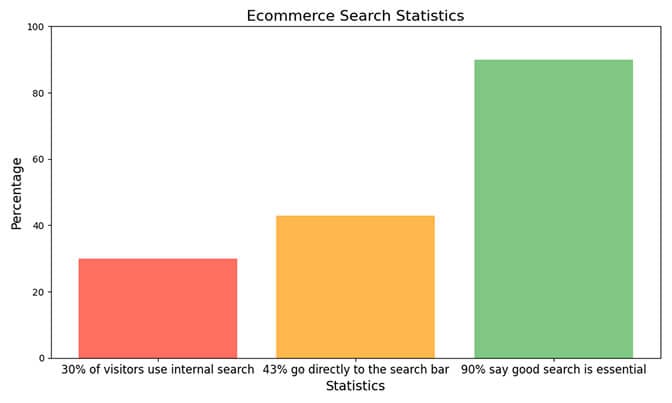
The numbers are staggering:
- 30% of all ecommerce visitors use internal site search when one is available
- 43% of consumers go directly to the search bar when they land on a store
- 90% of shoppers say good search functionality is "essential" for ecommerce
These aren't nice-to-haves. This is your checkout line. And right now, most of you have the equivalent of a flickering "register closed" sign hanging over it.
What High-Converting Search Actually Looks Like
So what separates stores that nail this from stores that don't?
Let's break down the mechanics.
1. Typo Tolerance and Fuzzy Matching
ColourPop (the cosmetics brand) built a search that doesn't crawl misspelled words literally. Type "lipstik" and you still get lipstick. Type "foundashun" and you still get foundation results.
This isn't fancy AI. It's basic hygiene. And most stores don't have it.
2. Synonym Recognition
Smart search understands that "jumper" and "sweater" and "pullover" are the same product category. That "running shoes" and "trainers" and "athletic footwear" should return overlapping results.
LaCkore Couture, a jewelry brand, restructured their entire product tagging strategy around this. The result? A 15% increase in search-driven conversions-just from better tagging.
3. Natural Language Processing
When someone types "red dress under $100," a good search engine doesn't look for products literally named "red dress under $100." It breaks down the intent: color (red) + product type (dress) + price filter ($100 maximum).
GAP's ecommerce site handles queries like "the men's khaki pants" by automatically stripping out stop words ("the," "men's") and matching intent, not exact strings.
4. Visual Search Results
Gymshark shows product previews instantly as you type. Images load in milliseconds. The shopper sees what they're searching for before they even hit enter.
Speed matters. A 1-second delay causes a 7% reduction in conversions.
5. Autocomplete That Actually Helps
Done right, autocomplete doesn't just complete words-it guides behavior. It can boost sales by up to 24% by suggesting popular products, correcting typos in real-time, and showing relevant categories.
The Filter Problem Most Merchants Ignore
Here's the thing about search: it doesn't exist in isolation.
A shopper searches "black dress." You return 147 results. Now what?
Without intelligent filtering, they're left scrolling through pages of products, manually scanning for their size, their price range, their preferred style. That's not shopping. That's work.
Filters aren't just navigation-they're conversion infrastructure.
The best stores treat filters as continuation of the search experience:
- Size filters that adjust dynamically based on what's actually in stock
- Price range sliders that let shoppers self-select their budget
- Color swatches (not text dropdowns) that make selection intuitive
- "Sort by" options that include relevance, popularity, and newest-not just price
Saltrock, the surfwear brand, lets customers filter by size, color, gender, collection, and price. Each filter is a clickable dropdown that doesn't clutter the page.
The key: filters should narrow, not overwhelm.
Mobile Search: Where Most Stores Completely Fail
More than 60% of ecommerce traffic now comes from mobile devices. And mobile search is a different beast.
On a phone screen, every pixel matters. Thumbs are imprecise. Typing is error-prone. Attention spans are shorter.
The stores that win mobile search understand this:
- Larger, more prominent search bars that are easy to tap
- Aggressive autocomplete that reduces typing
- Filter buttons that don't compete with product images for space
- Touch-friendly refinement options (swiping to filter, not tiny checkboxes)
This is where I see the biggest gap between stores that "think" their search works and stores that actually convert.
Load your store on your phone. Search for a product. Is it easy? Is it fast? Does it feel like Amazon-or does it feel like a bad website from 2010?
Be honest.
What To Do Monday Morning
You've got options. None of them require a development team.
Start with the basics:
- Audit your zero-results queries. Shopify's Search & Discovery app (free) shows you what people search for and what returns no results. This is your roadmap.
- Build a synonym list. "Sneakers" = "trainers." "Sofa" = "couch." "Pants" = "trousers." Add these through Search & Discovery or a third-party app.
- Tag your products strategically. Include color variants, size terminology variations, use-case descriptors. If someone might search "gift for dad," tag relevant products accordingly.
- Test on mobile. Actually search your own store on a phone. Time it. Count the taps. Feel the friction.
Then, consider leveling up:
If you're running a store with 500+ SKUs, native search won't cut it. This is why we built Sparq- to give Shopify merchants the kind of AI-powered, NLP-driven search that actually understands customer intent.
But even if you choose a different solution, choose something. The default experience is leaving money on the table.
Third-party search apps like Sparq, Searchanise, Klevu, and Boost all offer typo tolerance, synonyms, visual merchandising, and analytics that Shopify's native search simply doesn't provide.
The Bottom Line
Your site search bar isn't a feature. It's a revenue center.
The 15% of visitors who use it generate 45% of your revenue. They convert at 2-3x the rate of browsers. They're your highest-intent, most valuable traffic segment.
And 72% of stores fail them.
Don't be one of those stores.
Start with an audit. Build your synonym list. Fix your product tags. Then invest in search technology that actually works.
Because every "0 results" page is a customer you'll never see again.
Ready to Fix Your Store's Search?
If your Shopify store has more than a few hundred products, you're probably losing conversions to broken search. Sparq gives you AI-powered site search with typo tolerance, synonym recognition, and filters that actually work-without needing a developer.
See what your customers are actually searching for, what's returning zero results, and how much revenue you're leaving behind.