
The invisible system costing you 23% of potential revenue, and what to do about it.
Last Tuesday at 2:14 PM, a customer searched "navy linen blazer" on your store.
Your search returned zero results.
She left. Bought from your competitor. And you'll never know it happened.
This isn't a bug. It's the default behavior of most Shopify stores. And if you've ever wondered why customers aren't finding products you know exist in your catalog, you're about to understand why.
Here's the uncomfortable truth: your store's search function isn't broken. It was never really built in the first place.
Let me explain.
The Search Bar Nobody Actually Designed
When you set up your Shopify store, you got a search bar for free. It looked professional. It worked... technically. Customers typed words, hit enter, and saw results.
But here's what was actually happening under the hood: nothing sophisticated at all.
Shopify's native search is basically a pattern-matching machine. It looks for exact keywords in your product titles and descriptions. That's it. No understanding of context. No recognition of synonyms. No awareness that "navy" and "dark blue" might mean the same thing.
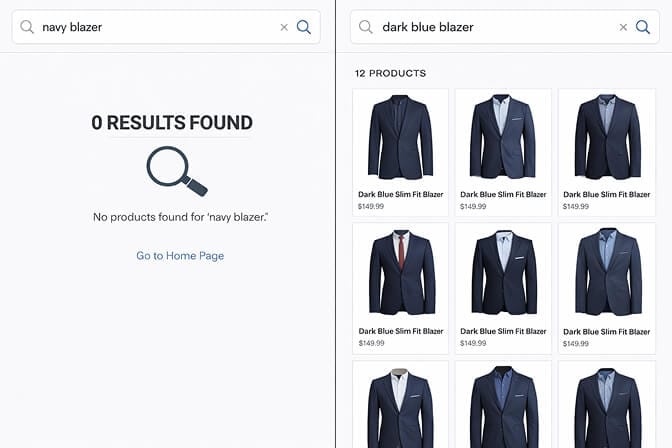
This isn't a criticism of Shopify - they've built an incredible platform. But search is a different beast entirely. It requires infrastructure that most merchants never think about.
And that infrastructure? That's what we call search architecture.
What "Search Architecture" Actually Means (Without the Jargon)
Stay with me here.
When engineers talk about "search architecture," they're describing three things:
1. How your products are indexed
Think of indexing like the back-of-the-book index in a textbook. When a customer searches, the system needs to know where to look. Poor indexing means your search is scanning every single product, every single time - slow, incomplete, and dumb.
2. How queries are understood
When someone types "comfy sneakers under $100," your search needs to parse that into three signals: style preference, product category, and price constraint. Most default search engines? They just look for products with "comfy sneakers under $100" in the title. Literally.
3. How results are ranked
Even when search finds relevant products, the order matters. Should you show the most popular item first? The highest margin? The most-reviewed? Without intentional ranking logic, you're leaving money on the table.
Here's where most stores bleed money.
The $47,000 Mistake I See Every Week
I talk to Shopify merchants constantly. And the same pattern repeats:
Store does $300K/year in revenue. About 30% of visitors use the search bar (that's typical - some studies put it at 43%). Of those searchers, 15% see a "no results" page.
Let's do some quick math.
If 30% of your visitors search, and 15% of those get zero results, that's roughly 4.5% of your total traffic hitting a dead end. These aren't casual browsers - they're high-intent shoppers who typed exactly what they wanted.
Visitors who use site search convert at 2-3x the rate of non-searchers. Losing them isn't a small problem. It's a compounding one.
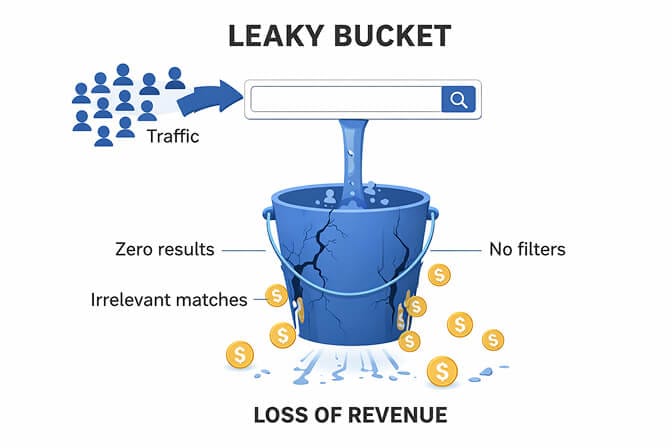
At $300K revenue, that 4.5% traffic loss - assuming even conservative conversion rates - could mean $35,000-$47,000 in missed annual revenue.
And that's just from zero-result searches. It doesn't account for irrelevant results, slow load times, or the frustration that makes customers bounce before even completing a search.
Why Shopify's Default Search Falls Short
I want to be clear: this isn't Shopify's fault.
Shopify Search & Discovery (their native app) has improved significantly. It now supports synonyms, custom filters, and basic product recommendations. If you're running a store with under 200 SKUs, it might be sufficient.
But here's where it struggles:
No natural language processing. If a customer types "gift for my mom who likes gardening," the search doesn't understand intent. It looks for those exact words.
Limited synonym handling. You have to manually add every synonym. "Sneakers" and "tennis shoes" won't match unless you tell the system they're related. Same with "couch" and "sofa." And "pants" vs "trousers." The list is endless.
Basic relevancy logic. The ranking algorithm is simple - it can't learn from customer behavior or prioritize products based on conversion history.
No analytics depth. You can see what customers searched for, but not what they didn't find. The gap between demand and discoverability stays invisible.
For stores scaling past 500 SKUs - or operating in competitive niches where product discovery matters - these limitations become revenue killers.
The Three Layers of Proper Search Architecture
Here's what modern e-commerce search should actually look like:
Layer 1: Intelligent Indexing
Your product catalog isn't just titles and descriptions. It's attributes: colors, sizes, materials, use cases, occasions, compatibility, and dozens of other signals.
Good search architecture indexes all of this - and makes it queryable.
When a customer searches "waterproof hiking boots size 11," the system should parse that into:
- Category: boots
- Attribute: waterproof
- Use case: hiking
- Size: 11
And return matches that hit all four criteria, ranked by relevance.
Layer 2: Query Understanding
This is where AI-powered search earns its name.
Modern search systems use natural language processing to understand what customers mean - not just what they type. That includes:
- Typo tolerance: "sneakrs" → sneakers
- Synonym expansion: "sofa" → couch, settee, loveseat
- Intent recognition: "summer wedding guest dress" → filters for formal, seasonal, and occasion
Without query understanding, your search is just a dumb keyword matcher. And customers will leave for a competitor whose search actually gets them.
Layer 3: Relevance Ranking
Finding products is step one. Showing them in the right order is step two.
Ranking factors should include:
- Conversion history: Products that sell well should rank higher
- Inventory levels: Don't promote items that are almost out of stock
- Margin optimization: For certain queries, you might want to prioritize higher-margin products
- Personalization: Returning customers might prefer brands or styles they've browsed before
Most default search treats all results equally. That's like a bookstore stacking books randomly on shelves.
The Part That Costs You Money
Here's the psychological trigger most merchants miss:
When a customer searches and sees irrelevant results - even if the right product exists three pages deep - they don't keep scrolling. They leave.
Studies show that 68% of shoppers won't return to a site after a bad search experience. Not "might not return." Won't.
Your search bar is either a conversion tool or an exit door. There's no middle ground.
And the really frustrating part? You're probably not even tracking it.
Most merchants obsess over homepage design, product photography, and checkout optimization. All important. But search? It's the invisible infrastructure that powers 30-40% of your conversions - and gets almost zero attention.
What I Wish I Knew When We Built Sparq
When we started building Sparq.ai, we talked to hundreds of Shopify merchants. The same story kept coming up:
"I know my search sucks, but I don't know how to fix it without hiring a developer."
That was the gap.
Enterprise search solutions like Algolia exist, but they're complex. They require technical implementation. They're priced for companies doing $10M+, not merchants grinding toward their first million.
Shopify's native search is accessible, but limited. It works for simple catalogs, but breaks down as complexity grows.
What didn't exist? AI-powered search that:
- Installs in 10 minutes
- Understands natural language queries out of the box
- Shows you what customers are searching for (and not finding)
- Doesn't require developer resources to customize
If you're tired of customers searching and leaving empty-handed, Sparq.ai fixes that - and you can try it free to see your actual search analytics before committing.
Building Better Search Without Rebuilding Your Store
You don't need to overhaul your entire site. Here's what actually moves the needle:
Step 1: Audit Your Zero-Result Searches
Most search apps - including Shopify's native Search & Discovery - have analytics showing top searches with no results. Look at this report weekly.
Those zero-result terms are demand signals. Either you need to add those products, or you need to create synonyms that map those searches to existing inventory.
Step 2: Add Synonyms Systematically
Start with the obvious ones: color variations, regional spelling differences, category synonyms.
Then get specific to your niche. Selling furniture? "Couch," "sofa," "sectional," and "loveseat" might all need to connect. Selling apparel? "Shirt," "top," "blouse," and "tee" are different words for overlapping intent.
Step 3: Implement Smart Filters
Filters aren't just convenience - they're conversion tools.
Let customers narrow by size, color, price, brand, material, and any other attribute that matters in your category. Every click on a filter is a customer telling you exactly what they want.
If you're using Sparq's AI search filters, they adapt automatically based on your inventory - no manual setup required.
Step 4: Watch, Learn, Iterate
Search optimization isn't a one-time project. It's an ongoing practice.
Track your search-to-conversion rate. Monitor exit rates on search result pages. Pay attention to which queries convert and which don't.
The merchants who win at search are the ones who treat it like a living system, not a set-and-forget feature.
The Bottom Line
Your search bar isn't just a feature. It's infrastructure.
And like any infrastructure, it's either working for you or silently breaking down.
The customers typing queries into your search box are telling you exactly what they want to buy. The only question is whether your store is listening.
Most aren't. And that's the opportunity.
Want to see what your customers are actually searching for - and what they're not finding? Install Sparq.ai and check your search analytics. It takes about 10 minutes, and the insights are genuinely eye-opening.
Because the best time to fix your search architecture was before you launched. The second-best time? Right now.
Frequently Asked Questions
1. What is e-commerce site search architecture?
E-commerce site search architecture refers to how your online store's search function is structured - including how products are indexed, how customer queries are interpreted, and how results are ranked and displayed. Good architecture ensures customers find relevant products quickly; poor architecture leads to zero-result pages and lost sales.
2. How does AI search compare to Shopify's native search?
Shopify's native Search & Discovery app handles basic keyword matching and manual synonyms, but lacks natural language processing and advanced relevancy ranking. AI-powered search solutions understand customer intent, tolerate typos, automatically expand synonyms, and learn from conversion data to show the most relevant products first.
3. How long does it take to improve e-commerce search performance?
With a dedicated search app like Sparq.ai, you can see improvements immediately after installation - typically within 10-15 minutes. However, ongoing optimization (adding synonyms, analyzing search data, adjusting ranking rules) is a continuous process that compounds over time.
4. Does better site search actually increase conversion rates?
Yes - significantly. Research shows that visitors who use site search convert 2-3 times more often than non-searchers, and they account for up to 45% of total e-commerce revenue. Improving search relevance directly impacts conversion rates and average order value.
5. Will adding a new search app slow down my Shopify store?
Modern search apps like Sparq.ai are built with performance in mind and typically don't impact page load speeds. In fact, faster search results (compared to default search) can actually improve perceived performance. Always check the app's impact on your store speed using tools like Google PageSpeed Insights after installation.







